


Tableau connector
API Key analyticsbusiness_intelligencedata_visualizationproductivityConnect to Tableau Cloud or Tableau Server to browse workbooks, views, and data sources, export visualizations, and query underlying data.
Tableau connector
-
Install the SDK
Section titled “Install the SDK”Terminal window npm install @scalekit-sdk/nodeTerminal window pip install scalekit -
Set your credentials
Section titled “Set your credentials”Add your Scalekit credentials to your
.envfile. Find values in app.scalekit.com > Developers > API Credentials..env SCALEKIT_ENVIRONMENT_URL=<your-environment-url>SCALEKIT_CLIENT_ID=<your-client-id>SCALEKIT_CLIENT_SECRET=<your-client-secret> -
Set up the connector
Section titled “Set up the connector”Register your Tableau credentials with Scalekit so it can authenticate requests on your behalf. You do this once per environment.
Dashboard setup steps
Connect your Tableau Cloud or Tableau Server site to Scalekit so your agent can browse workbooks, query views, export dashboards, and manage users.
Scalekit handles session token management automatically. You store your Personal Access Token (PAT) credentials once, and Scalekit signs in and refreshes the session token before it expires — your code never calls the sign-in endpoint directly.
-
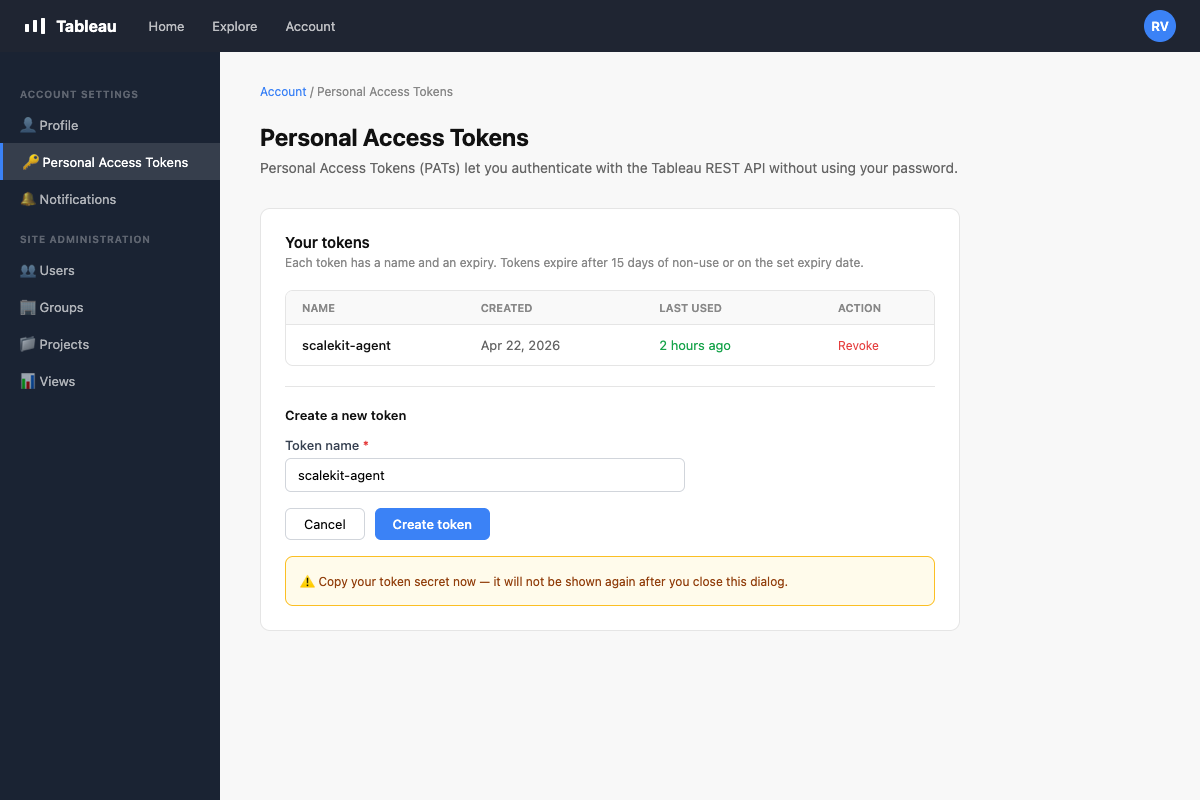
Create a Personal Access Token in Tableau
A Personal Access Token (PAT) is used by Scalekit to sign in on your behalf and keep the session alive automatically.
- Sign in to your Tableau site.
- Click your avatar in the top-right corner → My Account Settings.
- Scroll to the Personal Access Tokens section.
- Click + Create new token, give it a name (e.g.,
scalekit-agent), and click Create. - Copy both the Token Name and Token Secret — the secret is shown only once.
-
Create a connection in Scalekit
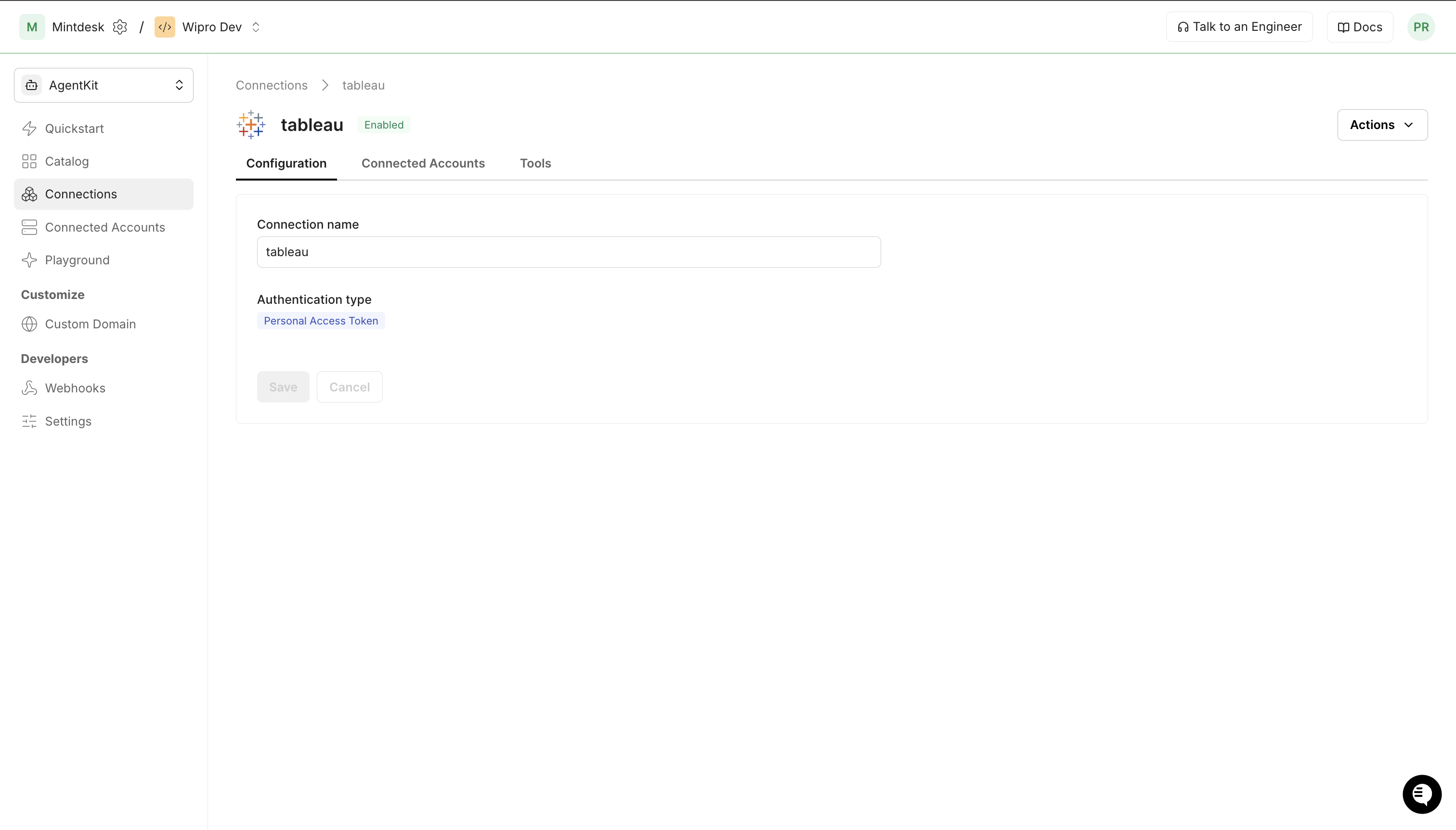
- In Scalekit dashboard, go to Agent Auth → Create Connection.
- Search for Tableau and click Create.
- Note the Connection name — use this as
connection_namein your code (e.g.,tableau). - Click Save.
-
Add a connected account
A connected account links a user in your system to their Tableau PAT credentials. Scalekit uses these to sign in and refresh the session automatically.
Via dashboard (for testing)
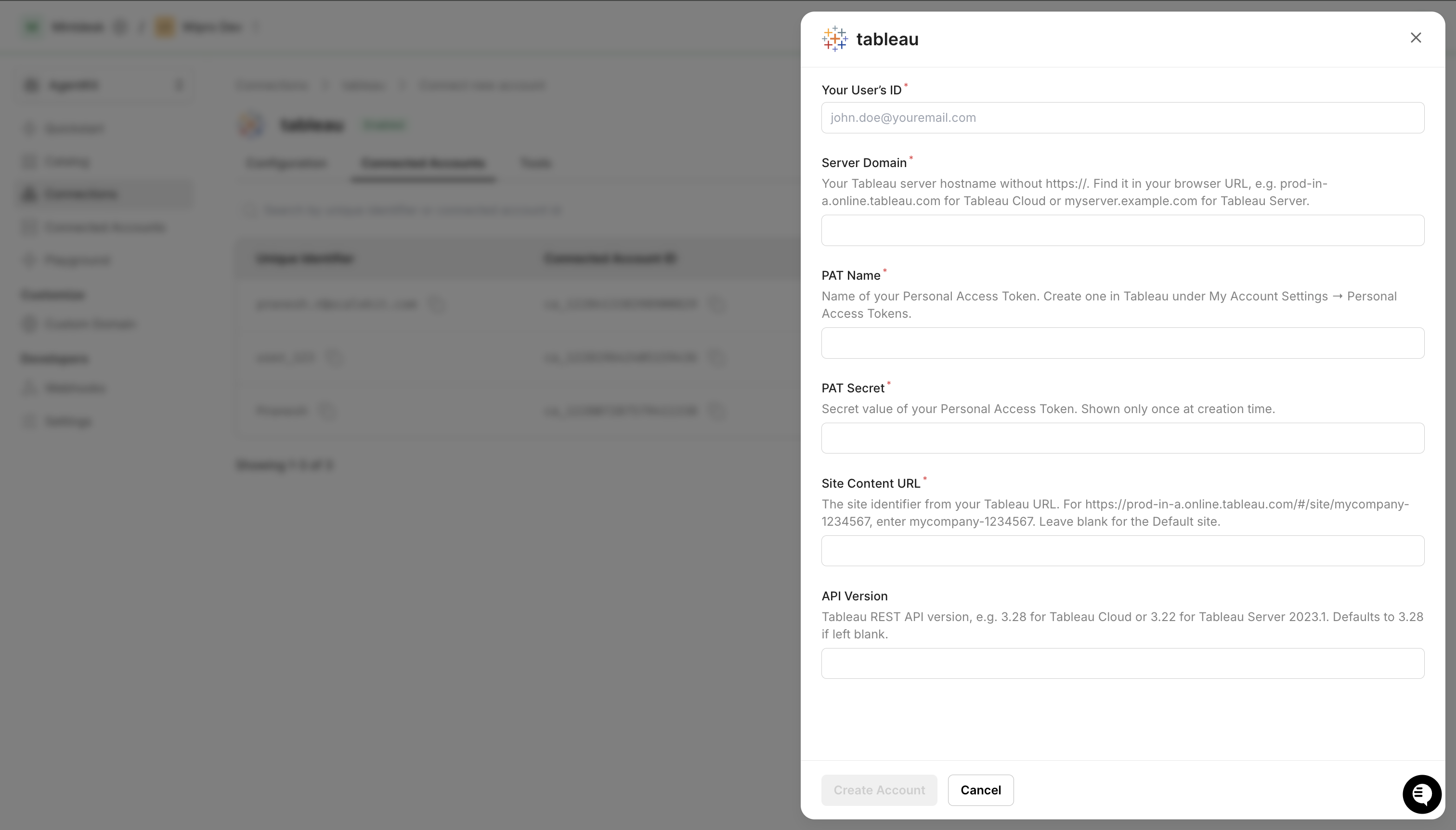
- Open the connection → Connected Accounts tab → Add account.
- Fill in:
- Your User’s ID — any identifier for this user (e.g.,
user_123) - Server Domain — your Tableau hostname without
https://(e.g.,prod-in-a.online.tableau.com) - PAT Name — the token name from step 1
- PAT Secret — the token secret from step 1
- Site Content URL — the site identifier from your Tableau URL (leave blank for the Default site)
- Your User’s ID — any identifier for this user (e.g.,
- Click Save.
Via API (for production)
await scalekit.actions.upsertConnectedAccount({connectionName: 'tableau',identifier: 'user_123',credentials: {domain: 'prod-in-a.online.tableau.com',pat_name: 'scalekit-agent',pat_secret: process.env.TABLEAU_PAT_SECRET,site_content_url: 'mycompany-1234567', // omit for Default site},});scalekit_client.actions.upsert_connected_account(connection_name="tableau",identifier="user_123",credentials={"domain": "prod-in-a.online.tableau.com","pat_name": "scalekit-agent","pat_secret": os.getenv("TABLEAU_PAT_SECRET"),"site_content_url": "mycompany-1234567", # omit for Default site},)
-
-
Make your first call
Section titled “Make your first call”quickstart.ts import { ScalekitClient } from '@scalekit-sdk/node'import 'dotenv/config'const scalekit = new ScalekitClient(process.env.SCALEKIT_ENV_URL,process.env.SCALEKIT_CLIENT_ID,process.env.SCALEKIT_CLIENT_SECRET,)const actions = scalekit.actionsconst connector = 'tableau'const identifier = 'user_123'// Make your first callconst result = await actions.executeTool({connector,identifier,toolName: 'tableau_datasources_list',toolInput: {},})console.log(result)quickstart.py import osfrom scalekit.client import ScalekitClientfrom dotenv import load_dotenvload_dotenv()scalekit_client = ScalekitClient(env_url=os.getenv("SCALEKIT_ENV_URL"),client_id=os.getenv("SCALEKIT_CLIENT_ID"),client_secret=os.getenv("SCALEKIT_CLIENT_SECRET"),)actions = scalekit_client.actionsconnection_name = "tableau"identifier = "user_123"# Make your first callresult = actions.execute_tool(tool_input={},tool_name="tableau_datasources_list",connection_name=connection_name,identifier=identifier,)print(result)
What you can do
Section titled “What you can do”Connect this agent connector to let your agent:
- List workbooks, workbook connections, views — Retrieve a filtered, sorted list of workbooks on a specified Tableau site
- Search workbook — Search for workbooks on a Tableau site by name
- Get workbook, view, user — Retrieve detailed information about a specific Tableau workbook by its ID, including metadata, project, owner, tags, and optional usage statistics
- Delete workbook, project, datasource — Delete a workbook from a Tableau site
- Site user remove from, user add to — Remove a user from a Tableau site
- Query view — Run a structured query against a published Tableau data source using the VizQL Data Service API
Common workflows
Section titled “Common workflows”The site ID (site LUID) is resolved automatically from the connected account after sign-in. You do not pass site_id to tool calls. For proxy API calls that require a site ID in the URL path, call tableau_session_get once to retrieve it.
Proxy API call
Use the Scalekit proxy to call any Tableau REST API endpoint directly. Binary downloads (PNG, PDF, Excel, .twbx, .tdsx) must use the proxy — use tableau_session_get to retrieve the site ID for the URL path:
// Get site ID once (needed for proxy URL construction)const session = await actions.executeTool({ toolName: 'tableau_session_get', connector: 'tableau', identifier: 'user_123', toolInput: {},});const siteId = session.session.site.id;
// Export a view as PNGconst imageBytes = await actions.request({ connectionName: 'tableau', identifier: 'user_123', path: `/api/3.28/sites/${siteId}/views/${viewId}/image`, method: 'GET', queryParams: { resolution: 'high' },});
// Export a view as PDFconst pdfBytes = await actions.request({ connectionName: 'tableau', identifier: 'user_123', path: `/api/3.28/sites/${siteId}/views/${viewId}/pdf`, method: 'GET', queryParams: { type: 'a4', orientation: 'landscape' },});
// Download a workbook (.twbx)const workbookBytes = await actions.request({ connectionName: 'tableau', identifier: 'user_123', path: `/api/3.28/sites/${siteId}/workbooks/${workbookId}/content`, method: 'GET',});
// Download a data source (.tdsx)const datasourceBytes = await actions.request({ connectionName: 'tableau', identifier: 'user_123', path: `/api/3.28/sites/${siteId}/datasources/${datasourceId}/content`, method: 'GET',});# Get site ID once (needed for proxy URL construction)session = actions.execute_tool( tool_name="tableau_session_get", connection_name='tableau', identifier='user_123', tool_input={},)site_id = session.data["session"]["site"]["id"]
# Export a view as PNGimage_response = actions.request( connection_name='tableau', identifier='user_123', path=f"/api/3.28/sites/{site_id}/views/{view_id}/image", method="GET", query_params={"resolution": "high"},)with open("dashboard.png", "wb") as f: f.write(image_response.content)
# Export a view as PDFpdf_response = actions.request( connection_name='tableau', identifier='user_123', path=f"/api/3.28/sites/{site_id}/views/{view_id}/pdf", method="GET", query_params={"type": "a4", "orientation": "landscape"},)with open("dashboard.pdf", "wb") as f: f.write(pdf_response.content)
# Download a workbook (.twbx)workbook_response = actions.request( connection_name='tableau', identifier='user_123', path=f"/api/3.28/sites/{site_id}/workbooks/{workbook_id}/content", method="GET",)with open("workbook.twbx", "wb") as f: f.write(workbook_response.content)
# Download a data source (.tdsx)datasource_response = actions.request( connection_name='tableau', identifier='user_123', path=f"/api/3.28/sites/{site_id}/datasources/{datasource_id}/content", method="GET",)with open("datasource.tdsx", "wb") as f: f.write(datasource_response.content)Browse workbooks and views
// List all workbooks on the siteconst workbooks = await actions.executeTool({ toolName: 'tableau_workbooks_list', connector: 'tableau', identifier: 'user_123', toolInput: {},});// workbooks.workbooks.workbook[] — each has id, name, contentUrl, project
// Search for a workbook by nameconst found = await actions.executeTool({ toolName: 'tableau_workbook_search', connector: 'tableau', identifier: 'user_123', toolInput: { name: 'SalesReport' },});
// List all views within a workbookconst workbookId = workbooks.workbooks.workbook[0].id;const views = await actions.executeTool({ toolName: 'tableau_workbook_views_list', connector: 'tableau', identifier: 'user_123', toolInput: { workbook_id: workbookId },});// views.views.view[] — each has id, name, contentUrl# List all workbooks on the siteworkbooks = actions.execute_tool( tool_name="tableau_workbooks_list", connection_name='tableau', identifier='user_123', tool_input={},)# workbooks["workbooks"]["workbook"] — each has id, name, contentUrl, project
# Search for a workbook by namefound = actions.execute_tool( tool_name="tableau_workbook_search", connection_name='tableau', identifier='user_123', tool_input={"name": "SalesReport"},)
# List all views within a workbookworkbook_id = workbooks["workbooks"]["workbook"][0]["id"]views = actions.execute_tool( tool_name="tableau_workbook_views_list", connection_name='tableau', identifier='user_123', tool_input={"workbook_id": workbook_id},)# views["views"]["view"] — each has id, name, contentUrlSign out
Call tableau_auth_signout to invalidate the session token when the agent session ends:
await actions.executeTool({ toolName: 'tableau_auth_signout', connector: 'tableau', identifier: 'user_123', toolInput: {},});// The stored session token is now invalid — Scalekit will refresh on next callactions.execute_tool( tool_name="tableau_auth_signout", connection_name='tableau', identifier='user_123', tool_input={},)# The stored session token is now invalid — Scalekit will refresh on next callGetting resource IDs
Section titled “Getting resource IDs”Most Tableau tools require one or more resource LUIDs. The site ID is resolved automatically by Scalekit after sign-in — you do not pass it to tool calls. Always fetch other IDs from the API — never guess or hard-code them.
| Resource | Tool to get ID | Field in response |
|---|---|---|
| Workbook ID | tableau_workbooks_list or tableau_workbook_search | workbooks.workbook[].id |
| View ID | tableau_views_list or tableau_workbook_views_list | views.view[].id |
| Data Source ID | tableau_datasources_list | datasources.datasource[].id |
| Project ID | tableau_projects_list | projects.project[].id |
| User ID | tableau_users_list | users.user[].id |
| Group ID | tableau_groups_list | groups.group[].id |
| Job ID | tableau_job_get (from background job operations) | job.id |
| Site ID (proxy only) | tableau_session_get | session.site.id |
Recommended start sequence for any agent session:
1. tableau_workbooks_list → discover workbooks2. tableau_workbook_views_list → discover views within a workbook3. tableau_datasources_list → discover data sourcesTool list
Section titled “Tool list”Use the exact tool names from the Tool list below when you call execute_tool. If you’re not sure which name to use, list the tools available for the current user first.
tableau_auth_signout
#
Sign out of Tableau Server or Tableau Cloud, invalidating the current authentication token. 0 params
Sign out of Tableau Server or Tableau Cloud, invalidating the current authentication token.
tableau_datasource_delete
#
Delete a published data source from a Tableau site. This action is permanent and also removes the associated data connection. 1 param
Delete a published data source from a Tableau site. This action is permanent and also removes the associated data connection.
datasource_id string required The LUID of the data source to delete tableau_datasource_get
#
Retrieve detailed information about a specific Tableau data source by its ID, including metadata, connections, project, and owner. 1 param
Retrieve detailed information about a specific Tableau data source by its ID, including metadata, connections, project, and owner.
datasource_id string required The LUID of the data source to retrieve tableau_datasources_list
#
Retrieve a filtered, sorted list of published data sources on a Tableau site. Supports pagination and filtering by name, type, project, and owner. 4 params
Retrieve a filtered, sorted list of published data sources on a Tableau site. Supports pagination and filtering by name, type, project, and owner.
filter string optional Filter expression to narrow results, e.g. name:eq:SalesData page_number integer optional Page number for pagination (1-based) page_size integer optional Number of data sources to return per page (max 1000) sort string optional Sort expression, e.g. name:asc or updatedAt:desc tableau_group_add_user
#
Add an existing Tableau site user to a group. The user must already be a member of the site before being added to a group. 2 params
Add an existing Tableau site user to a group. The user must already be a member of the site before being added to a group.
group_id string required The LUID of the group to add the user to user_id string required The LUID of the user to add to the group tableau_group_create
#
Create a new local group on a Tableau site. Groups simplify permission management by allowing you to assign permissions to multiple users simultaneously. 2 params
Create a new local group on a Tableau site. Groups simplify permission management by allowing you to assign permissions to multiple users simultaneously.
name string required Name of the group to create minimum_site_role string optional Minimum site role for users added to this group tableau_group_remove_user
#
Remove a user from a Tableau site group. The user remains a member of the site but loses any permissions inherited from this group. 2 params
Remove a user from a Tableau site group. The user remains a member of the site but loses any permissions inherited from this group.
group_id string required The LUID of the group to remove the user from user_id string required The LUID of the user to remove from the group tableau_groups_list
#
Retrieve a filtered, sorted list of groups on a Tableau site. Groups are used to manage permissions for multiple users at once. 4 params
Retrieve a filtered, sorted list of groups on a Tableau site. Groups are used to manage permissions for multiple users at once.
filter string optional Filter expression to narrow results, e.g. name:eq:Sales page_number integer optional Page number for pagination (1-based) page_size integer optional Number of groups to return per page (max 1000) sort string optional Sort expression, e.g. name:asc tableau_job_cancel
#
Cancel an asynchronous Tableau job that is currently queued or in progress, such as an extract refresh or flow run. 1 param
Cancel an asynchronous Tableau job that is currently queued or in progress, such as an extract refresh or flow run.
job_id string required The LUID of the job to cancel tableau_job_get
#
Retrieve the status and details of an asynchronous Tableau job, such as an extract refresh, workbook publish, or flow run. Use this to monitor long-running operations. 1 param
Retrieve the status and details of an asynchronous Tableau job, such as an extract refresh, workbook publish, or flow run. Use this to monitor long-running operations.
job_id string required The LUID of the job to retrieve tableau_jobs_list
#
Retrieve a filtered, sorted list of asynchronous jobs on a Tableau site. Jobs include extract refreshes, workbook publishes, data-driven alerts, and flow runs. 4 params
Retrieve a filtered, sorted list of asynchronous jobs on a Tableau site. Jobs include extract refreshes, workbook publishes, data-driven alerts, and flow runs.
filter string optional Filter expression to narrow results, e.g. status:eq:InProgress page_number integer optional Page number for pagination (1-based) page_size integer optional Number of jobs to return per page (max 1000) sort string optional Sort expression, e.g. createdAt:desc tableau_list_views
#
List views (individual sheets and dashboards) within a specific workbook, or all views across an entire Tableau site. Supports filtering by name or owner and pagination. 5 params
List views (individual sheets and dashboards) within a specific workbook, or all views across an entire Tableau site. Supports filtering by name or owner and pagination.
workbook_id string required The LUID of the workbook to list views from. If omitted, lists all views on the site. filter string optional Filter expression using Tableau REST API filter syntax (e.g., name:eq:Sales Dashboard) include_usage_statistics boolean optional Include view usage statistics (total views count) in the response page_number integer optional Page number to retrieve (1-based) page_size integer optional Number of views to return per page (max 1000) tableau_project_create
#
Create a new project on a Tableau site to organize workbooks, data sources, and flows. Optionally specify a parent project to create a nested project hierarchy. 4 params
Create a new project on a Tableau site to organize workbooks, data sources, and flows. Optionally specify a parent project to create a nested project hierarchy.
name string required Name of the project to create content_permissions string optional Content permission mode: ManagedByOwner or LockedToProject description string optional Description of the project parent_project_id string optional LUID of the parent project to create a nested project tableau_project_delete
#
Delete a project from a Tableau site. This action is permanent. Content within the project may be moved to the Default project or deleted depending on server settings. 1 param
Delete a project from a Tableau site. This action is permanent. Content within the project may be moved to the Default project or deleted depending on server settings.
project_id string required The LUID of the project to delete tableau_project_update
#
Update an existing project on a Tableau site. You can rename the project, change its description, content permissions, or move it to a different parent project. 5 params
Update an existing project on a Tableau site. You can rename the project, change its description, content permissions, or move it to a different parent project.
project_id string required The LUID of the project to update content_permissions string optional Content permission mode: ManagedByOwner or LockedToProject description string optional New description for the project name string optional New name for the project parent_project_id string optional LUID of the parent project (set to move this project under a different parent) tableau_projects_list
#
Retrieve a filtered, sorted list of projects on a Tableau site. Projects are used to organize workbooks, views, and data sources. 4 params
Retrieve a filtered, sorted list of projects on a Tableau site. Projects are used to organize workbooks, views, and data sources.
filter string optional Filter expression to narrow results, e.g. name:eq:Marketing page_number integer optional Page number for pagination (1-based) page_size integer optional Number of projects to return per page (max 1000) sort string optional Sort expression, e.g. name:asc tableau_query_view
#
Run a structured query against a published Tableau data source using the VizQL Data Service API. Supports selecting fields, applying filters, sorting, and limiting rows. Returns JSON data. Available on Tableau Cloud and Tableau Server 2023.1+. 5 params
Run a structured query against a published Tableau data source using the VizQL Data Service API. Supports selecting fields, applying filters, sorting, and limiting rows. Returns JSON data. Available on Tableau Cloud and Tableau Server 2023.1+.
datasource_luid string required The LUID of the published data source to query fields string required JSON array of field objects to select, each with a fieldCaption property filters string optional JSON array of filter conditions to apply to the query max_rows integer optional Maximum number of rows to return from the query sort string optional JSON array of sort criteria applied to query results tableau_session_get
#
Returns information about the current authenticated session, including the site LUID, site name, and authenticated user details. Call this after tableau_auth_signin to retrieve the site_id needed for the connected account configuration. 0 params
Returns information about the current authenticated session, including the site LUID, site name, and authenticated user details. Call this after tableau_auth_signin to retrieve the site_id needed for the connected account configuration.
tableau_site_get
#
Retrieve information about a specific Tableau site, including its name, content URL, status, storage quota, and user quota settings. 1 param
Retrieve information about a specific Tableau site, including its name, content URL, status, storage quota, and user quota settings.
include_usage_statistics boolean optional If true, include view count and storage usage statistics tableau_user_add_to_site
#
Add a user to a Tableau site with a specified site role. If the user does not exist in the server, a new user account will be created. 3 params
Add a user to a Tableau site with a specified site role. If the user does not exist in the server, a new user account will be created.
name string required Username of the user to add (e.g. john.doe or john.doe@example.com) site_role string required The role to assign to the user on the site auth_setting string optional Authentication type for the user, e.g. SAML or ServerDefault tableau_user_get
#
Retrieve information about a specific user on a Tableau site, including their name, email, site role, and authentication settings. 1 param
Retrieve information about a specific user on a Tableau site, including their name, email, site role, and authentication settings.
user_id string required The LUID of the user to retrieve tableau_user_remove_from_site
#
Remove a user from a Tableau site. The user's content (workbooks, data sources) is reassigned to the site administrator. 1 param
Remove a user from a Tableau site. The user's content (workbooks, data sources) is reassigned to the site administrator.
user_id string required The LUID of the user to remove from the site tableau_users_list
#
Retrieve a filtered, sorted list of users added to a Tableau site. Supports pagination and filtering by name, site role, and other attributes. 4 params
Retrieve a filtered, sorted list of users added to a Tableau site. Supports pagination and filtering by name, site role, and other attributes.
filter string optional Filter expression to narrow results, e.g. name:eq:john.doe page_number integer optional Page number for pagination (1-based) page_size integer optional Number of users to return per page (max 1000) sort string optional Sort expression, e.g. name:asc tableau_view_get
#
Retrieve detailed information about a specific Tableau view by its ID, including name, content URL, owner, workbook, project, and optional usage statistics. 2 params
Retrieve detailed information about a specific Tableau view by its ID, including name, content URL, owner, workbook, project, and optional usage statistics.
view_id string required The LUID of the view to retrieve include_usage_statistics boolean optional If true, include view count and high-water-mark usage statistics tableau_views_list
#
Retrieve a filtered, sorted list of all views on a Tableau site. Supports pagination, filtering by name or owner, and sorting. 5 params
Retrieve a filtered, sorted list of all views on a Tableau site. Supports pagination, filtering by name or owner, and sorting.
filter string optional Filter expression to narrow results, e.g. name:eq:SalesView include_usage_statistics boolean optional If true, include view count and high-water-mark usage statistics page_number integer optional Page number for pagination (1-based) page_size integer optional Number of views to return per page (max 1000) sort string optional Sort expression, e.g. name:asc or viewCount:desc tableau_workbook_connections_list
#
Returns the data connections for a published workbook, including connection type, server address, port, username, and whether embedded credentials are used. 1 param
Returns the data connections for a published workbook, including connection type, server address, port, username, and whether embedded credentials are used.
workbook_id string required The LUID of the workbook whose connections to list tableau_workbook_delete
#
Delete a workbook from a Tableau site. This action is permanent and also removes all views and associated data connections. 1 param
Delete a workbook from a Tableau site. This action is permanent and also removes all views and associated data connections.
workbook_id string required The LUID of the workbook to delete tableau_workbook_get
#
Retrieve detailed information about a specific Tableau workbook by its ID, including metadata, project, owner, tags, and optional usage statistics. 2 params
Retrieve detailed information about a specific Tableau workbook by its ID, including metadata, project, owner, tags, and optional usage statistics.
workbook_id string required The LUID of the workbook to retrieve include_usage_statistics boolean optional If true, include view and high-water-mark usage statistics in the response tableau_workbook_search
#
Search for workbooks on a Tableau site by name. Returns workbooks whose name matches the search term. 3 params
Search for workbooks on a Tableau site by name. Returns workbooks whose name matches the search term.
name string required The workbook name to search for (exact match) page_number integer optional Page number for pagination (1-based) page_size integer optional Number of workbooks to return per page (max 1000) tableau_workbooks_list
#
Retrieve a filtered, sorted list of workbooks on a specified Tableau site. Supports pagination and filtering by name, owner, project, and more. 4 params
Retrieve a filtered, sorted list of workbooks on a specified Tableau site. Supports pagination and filtering by name, owner, project, and more.
filter string optional Filter expression to narrow results, e.g. name:eq:SalesReport page_number integer optional Page number for pagination (1-based) page_size integer optional Number of workbooks to return per page (max 1000) sort string optional Sort expression, e.g. name:asc or updatedAt:desc