


Mailchimp connector
OAuth 2.0 marketingemailautomationConnect your agent to Mailchimp to manage subscribers, campaigns, lists, and email reports using OAuth 2.0.
Mailchimp connector
-
Install the SDK
Section titled “Install the SDK”Terminal window npm install @scalekit-sdk/nodeTerminal window pip install scalekit -
Set your credentials
Section titled “Set your credentials”Add your Scalekit credentials to your
.envfile. Find values in app.scalekit.com > Developers > API Credentials..env SCALEKIT_ENVIRONMENT_URL=<your-environment-url>SCALEKIT_CLIENT_ID=<your-client-id>SCALEKIT_CLIENT_SECRET=<your-client-secret> -
Set up the connector
Section titled “Set up the connector”Register your Mailchimp credentials with Scalekit so it handles the token lifecycle. You do this once per environment.
Dashboard setup steps
Register your Mailchimp account with Scalekit so Scalekit handles the OAuth flow and token refresh automatically. The connection name you create is used to identify and invoke the connection in your code.
-
Set up auth redirects
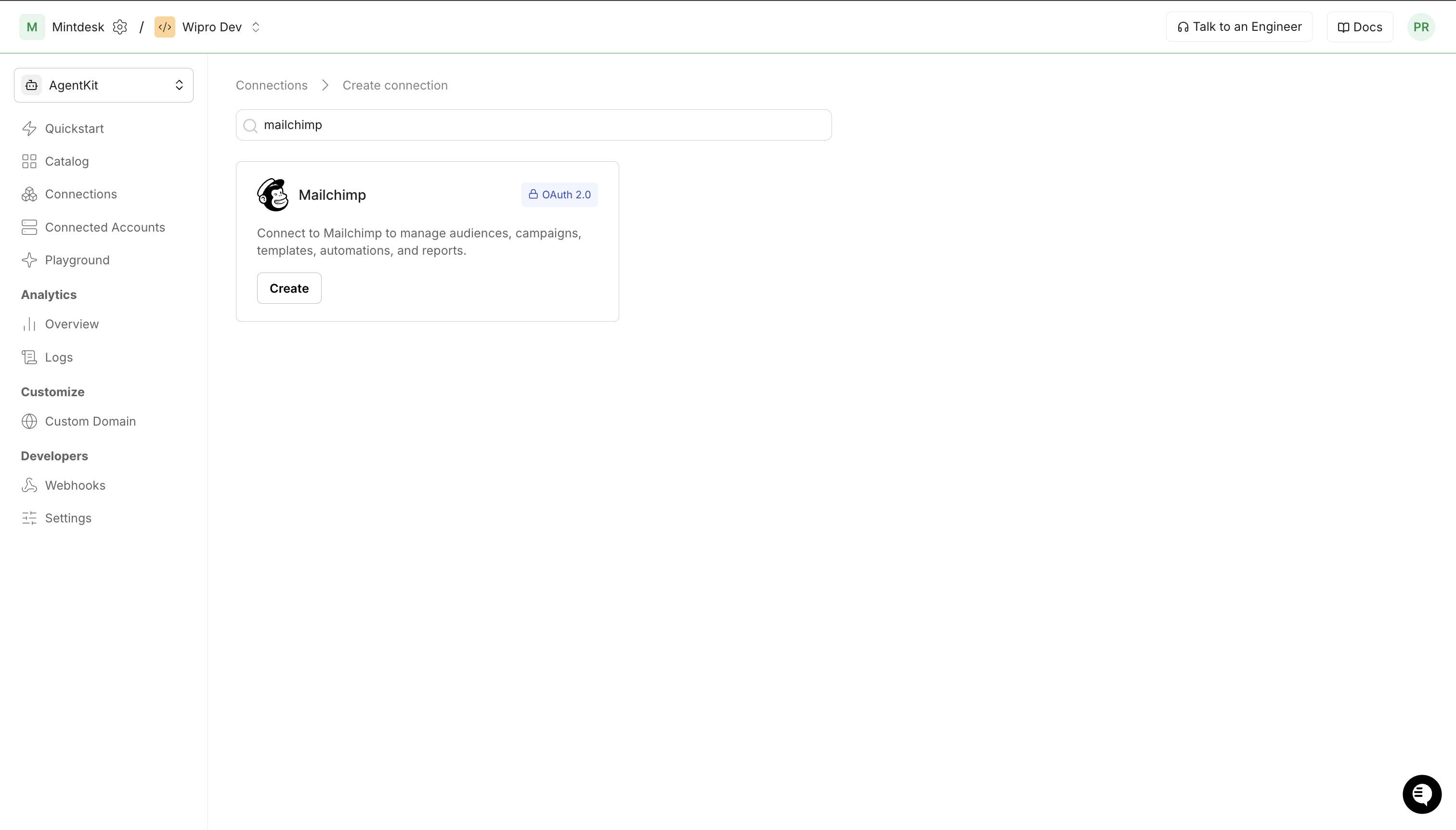
- In Scalekit dashboard, go to AgentKit > Connections > Create Connection. Find Mailchimp and click Create. Copy the redirect URI — it looks like
https://<SCALEKIT_ENV_URL>/sso/v1/oauth/<CONNECTION_ID>/callback.
- Log in to your Mailchimp account and go to Account & Billing > Extras > API keys > OAuth apps.
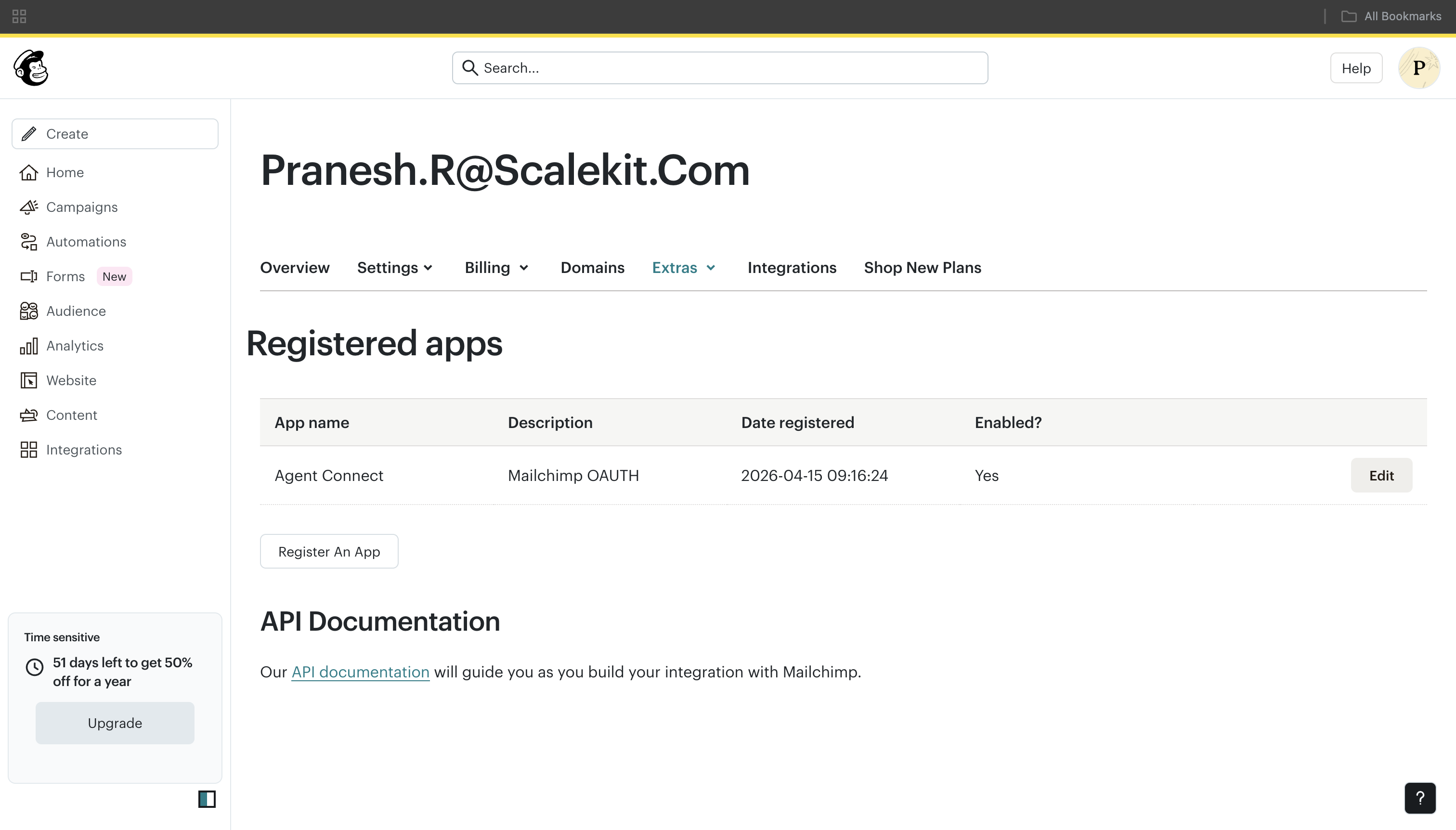
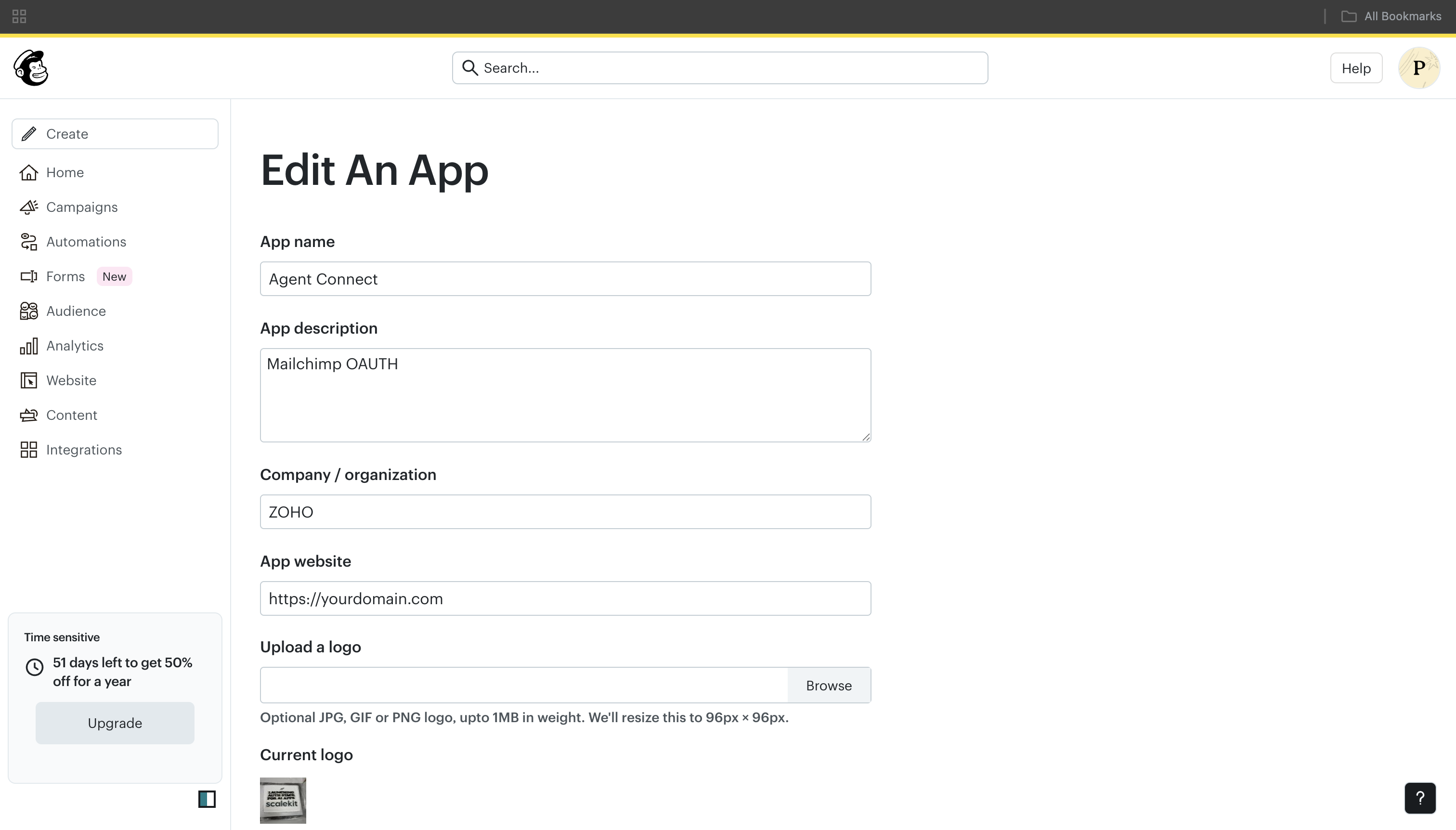
- Click Register An App, fill in the app details, and paste the redirect URI from Scalekit into the redirect URI field.
- In Scalekit dashboard, go to AgentKit > Connections > Create Connection. Find Mailchimp and click Create. Copy the redirect URI — it looks like
-
Get client credentials
- In your Mailchimp OAuth app, copy the Client ID and Client Secret.
-
Add credentials in Scalekit
- In Scalekit dashboard, open the Mailchimp connection you created and enter:
- Client ID
- Client Secret
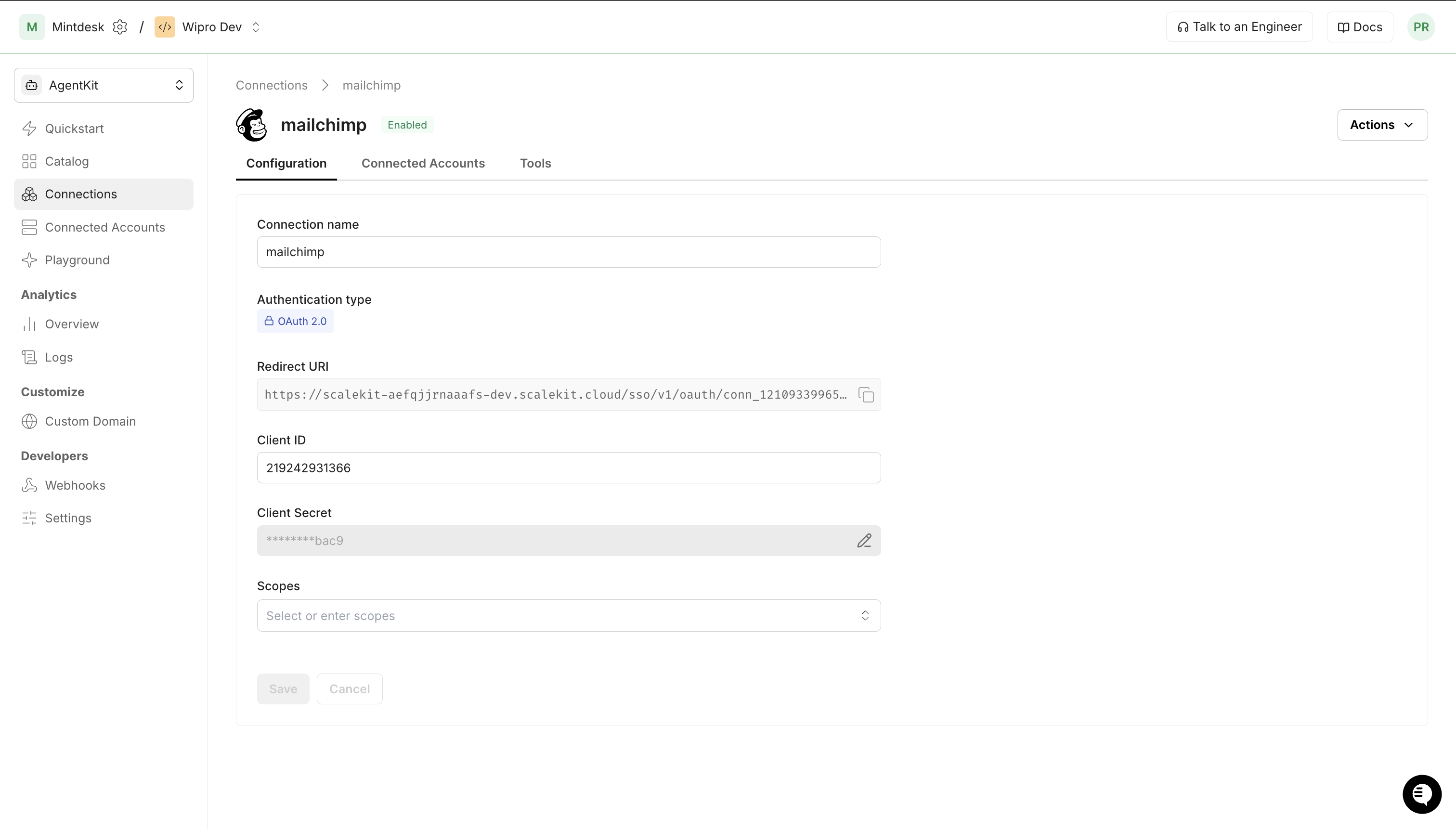
- Click Save.
- In Scalekit dashboard, open the Mailchimp connection you created and enter:
-
Connect a user account
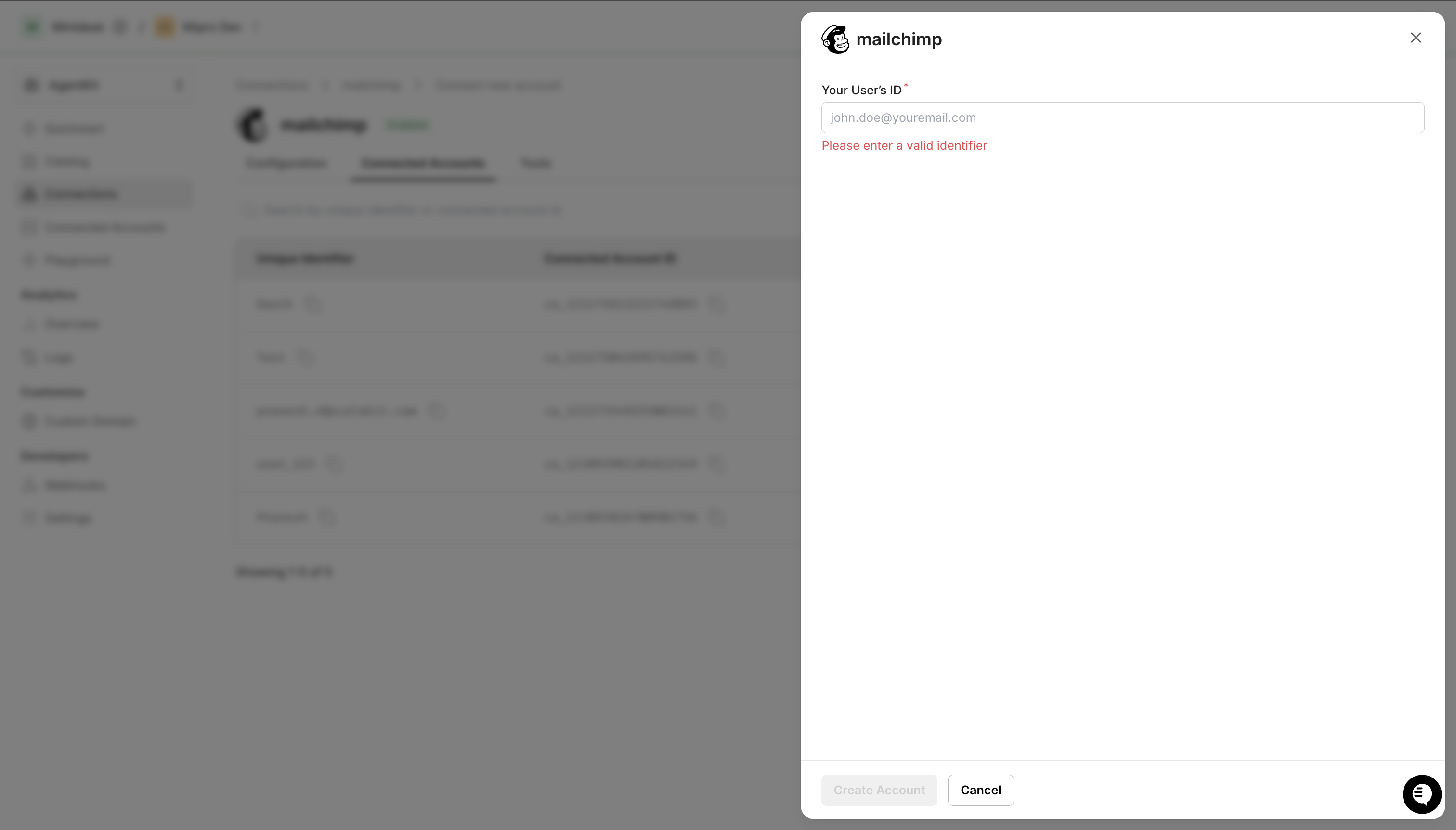
- Click the Connected Accounts tab, then Add Account.
- Enter your user’s ID and click Create Account — you’ll be redirected to Mailchimp to authorize access.
-
-
Authorize and make your first call
Section titled “Authorize and make your first call”quickstart.ts import { ScalekitClient } from '@scalekit-sdk/node'import 'dotenv/config'const scalekit = new ScalekitClient(process.env.SCALEKIT_ENV_URL,process.env.SCALEKIT_CLIENT_ID,process.env.SCALEKIT_CLIENT_SECRET,)const actions = scalekit.actionsconst connector = 'mailchimp'const identifier = 'user_123'// Generate an authorization link for the userconst { link } = await actions.getAuthorizationLink({ connectionName: connector, identifier })console.log('Authorize Mailchimp:', link)process.stdout.write('Press Enter after authorizing...')await new Promise(r => process.stdin.once('data', r))// Make your first callconst result = await actions.executeTool({connector,identifier,toolName: 'mailchimp_ping',toolInput: {},})console.log(result)quickstart.py import osfrom scalekit.client import ScalekitClientfrom dotenv import load_dotenvload_dotenv()scalekit_client = ScalekitClient(env_url=os.getenv("SCALEKIT_ENV_URL"),client_id=os.getenv("SCALEKIT_CLIENT_ID"),client_secret=os.getenv("SCALEKIT_CLIENT_SECRET"),)actions = scalekit_client.actionsconnection_name = "mailchimp"identifier = "user_123"# Generate an authorization link for the userlink_response = actions.get_authorization_link(connection_name=connection_name,identifier=identifier,)print("Authorize Mailchimp:", link_response.link)input("Press Enter after authorizing...")# Make your first callresult = actions.execute_tool(tool_input={},tool_name="mailchimp_ping",connection_name=connection_name,identifier=identifier,)print(result)
What you can do
Section titled “What you can do”Connect this agent connector to let your agent:
- Manage audiences — create, update, and delete audiences; list all audiences and their settings
- Manage members — add, update, upsert, archive, and permanently delete subscribers; get membership and tag details
- Manage segments — create saved and static segments; list, update, and delete segments; list segment members
- Manage campaigns — create, update, and delete campaigns; set HTML content; send, schedule, and unschedule campaigns; send test emails
- Manage templates — create, update, delete, and list custom HTML email templates
- Access reports — retrieve campaign send reports including opens, clicks, email activity, and unsubscribes
- Manage automations — list, get, start, and pause classic automation workflows
- Track batch operations — check the status of asynchronous batch jobs
Common workflows
Section titled “Common workflows”Proxy API call
const result = await actions.request({ connectionName: 'mailchimp', identifier: 'user_123', path: '/ping', method: 'GET',});console.log(result);result = actions.request( connection_name='mailchimp', identifier='user_123', path="/ping", method="GET")print(result)Add a subscriber
const member = await actions.executeTool({ connector: 'mailchimp', identifier: 'user_123', toolName: 'mailchimp_list_member_add', toolInput: { list_id: 'abc123def', email_address: 'jane.smith@example.com', status: 'subscribed', first_name: 'Jane', last_name: 'Smith', },});console.log('Added member:', member.id);member = actions.execute_tool( connection_name='mailchimp', identifier='user_123', tool_name="mailchimp_list_member_add", tool_input={ "list_id": "abc123def", "email_address": "jane.smith@example.com", "status": "subscribed", "first_name": "Jane", "last_name": "Smith", },)print("Added member:", member["id"])Create and send a campaign
const campaign = await actions.executeTool({ connector: 'mailchimp', identifier: 'user_123', toolName: 'mailchimp_campaign_create', toolInput: { type: 'regular', list_id: 'abc123def', subject_line: 'Your April newsletter', from_name: 'Acme Corp', reply_to: 'hello@acme.com', },});
await actions.executeTool({ connector: 'mailchimp', identifier: 'user_123', toolName: 'mailchimp_campaign_content_set', toolInput: { campaign_id: campaign.id, html: '<h1>Hello!</h1><p>Here is your monthly update.</p>', },});
await actions.executeTool({ connector: 'mailchimp', identifier: 'user_123', toolName: 'mailchimp_campaign_send', toolInput: { campaign_id: campaign.id },});console.log('Campaign sent:', campaign.id);campaign = actions.execute_tool( connection_name='mailchimp', identifier='user_123', tool_name="mailchimp_campaign_create", tool_input={ "type": "regular", "list_id": "abc123def", "subject_line": "Your April newsletter", "from_name": "Acme Corp", "reply_to": "hello@acme.com", },)
actions.execute_tool( connection_name='mailchimp', identifier='user_123', tool_name="mailchimp_campaign_content_set", tool_input={ "campaign_id": campaign["id"], "html": "<h1>Hello!</h1><p>Here is your monthly update.</p>", },)
actions.execute_tool( connection_name='mailchimp', identifier='user_123', tool_name="mailchimp_campaign_send", tool_input={"campaign_id": campaign["id"]},)print("Campaign sent:", campaign["id"])Get campaign report
const report = await actions.executeTool({ connector: 'mailchimp', identifier: 'user_123', toolName: 'mailchimp_report_get', toolInput: { campaign_id: 'abc123' },});console.log(`Opens: ${report.opens.open_rate}, Clicks: ${report.clicks.click_rate}`);report = actions.execute_tool( connection_name='mailchimp', identifier='user_123', tool_name="mailchimp_report_get", tool_input={"campaign_id": "abc123"},)print(f"Opens: {report['opens']['open_rate']}, Clicks: {report['clicks']['click_rate']}")Tool list
Section titled “Tool list”Pass the exact tool name from the list below when you call executeTool (Node.js) or execute_tool (Python).
mailchimp_ping
#
Health check — returns a simple "Everything's Chimpy!" response if your API key is valid. 0 params
Health check — returns a simple "Everything's Chimpy!" response if your API key is valid.
mailchimp_account_info
#
Retrieve details about the authenticated Mailchimp account, including plan, contact info, and industry. 0 params
Retrieve details about the authenticated Mailchimp account, including plan, contact info, and industry.
mailchimp_lists_list
#
List all Mailchimp audiences (lists) in the account with pagination and filtering options. 5 params
List all Mailchimp audiences (lists) in the account with pagination and filtering options.
count number optional Number of audiences to return (default 10, max 1000). offset number optional Pagination offset. sort_field string optional Sort audiences by field: `date_created` or `campaign_last_sent`. sort_dir string optional Sort direction: `ASC` or `DESC`. before_date_created string optional Filter audiences created before this ISO 8601 datetime. mailchimp_list_get
#
Retrieve details about a specific Mailchimp audience by its list ID. 2 params
Retrieve details about a specific Mailchimp audience by its list ID.
list_id string required The unique ID of the audience. Get it from `mailchimp_lists_list`. fields string optional Comma-separated list of fields to include in the response. mailchimp_list_create
#
Create a new Mailchimp audience. Requires a contact address and campaign defaults. Note: free plans allow only one audience. 13 params
Create a new Mailchimp audience. Requires a contact address and campaign defaults. Note: free plans allow only one audience.
name string required The name of the audience. permission_reminder string required A reminder for subscribers about why they were added (e.g. "You subscribed to our newsletter."). from_name string required Default sender display name for campaigns. from_email string required Default sender email address (must be verified). email_type_option boolean required Set to `true` to let subscribers choose HTML or plain text email format. contact_company string required Company name for the audience contact address. contact_address string required Street address for the audience contact address. contact_city string required City for the audience contact address. contact_state string required State or province for the audience contact address. contact_zip string required ZIP or postal code for the audience contact address. contact_country string required Two-letter ISO country code for the audience contact address (e.g. `US`). subject string optional Default campaign subject line. language string optional Default language for the audience (ISO 639-1 code, e.g. `en`). mailchimp_list_update
#
Update settings for a Mailchimp audience such as name, permission reminder, or sender details. 5 params
Update settings for a Mailchimp audience such as name, permission reminder, or sender details.
list_id string required The unique ID of the audience. Get it from `mailchimp_lists_list`. name string optional Updated audience name. permission_reminder string optional Updated permission reminder text. from_name string optional Updated default sender display name. from_email string optional Updated default sender email address. mailchimp_list_delete
#
Permanently delete a Mailchimp audience and all its member data. This action is irreversible. 1 param
Permanently delete a Mailchimp audience and all its member data. This action is irreversible.
list_id string required The unique ID of the audience to delete. mailchimp_list_members_list
#
List all members of a Mailchimp audience with filtering by status, segment, and pagination. 7 params
List all members of a Mailchimp audience with filtering by status, segment, and pagination.
list_id string required The unique ID of the audience. Get it from `mailchimp_lists_list`. status string optional Filter by subscription status: `subscribed`, `unsubscribed`, `cleaned`, `pending`, or `transactional`. count number optional Number of members to return (default 10, max 1000). offset number optional Pagination offset. email_address string optional Filter to a specific email address. since_last_changed string optional Filter members changed after this ISO 8601 datetime. segment_id string optional Filter members in a specific segment. mailchimp_list_member_get
#
Retrieve information about a specific audience member by their MD5-hashed email address. 3 params
Retrieve information about a specific audience member by their MD5-hashed email address.
list_id string required The unique ID of the audience. subscriber_hash string required The MD5 hash of the member's email address (lowercase). Get it from `mailchimp_list_members_list`. fields string optional Comma-separated list of fields to include. mailchimp_list_member_add
#
Add a new member to a Mailchimp audience. 6 params
Add a new member to a Mailchimp audience.
list_id string required The unique ID of the audience. email_address string required The member's email address. status string required Subscription status: `subscribed`, `unsubscribed`, `cleaned`, or `pending`. first_name string optional Member's first name. last_name string optional Member's last name. tags string optional JSON array of tags to apply (e.g. `["vip","beta"]`). mailchimp_list_member_update
#
Update an existing audience member's details such as email, status, or name. 6 params
Update an existing audience member's details such as email, status, or name.
list_id string required The unique ID of the audience. subscriber_hash string required MD5 hash of the member's email address (lowercase). status string optional Updated subscription status: `subscribed`, `unsubscribed`, `cleaned`, or `pending`. email_address string optional Updated email address. first_name string optional Updated first name. last_name string optional Updated last name. mailchimp_list_member_upsert
#
Add or update a member in an audience. Creates the member if they don't exist; updates them if they do. 7 params
Add or update a member in an audience. Creates the member if they don't exist; updates them if they do.
list_id string required The unique ID of the audience. subscriber_hash string required MD5 hash of the member's email address (lowercase). email_address string required The member's email address. status_if_new string required Status to set if this is a new subscriber: `subscribed`, `unsubscribed`, `cleaned`, or `pending`. status string optional Updated subscription status for existing members. first_name string optional First name. last_name string optional Last name. mailchimp_list_member_archive
#
Archive a member from a Mailchimp audience (sets status to unsubscribed without permanently deleting). 2 params
Archive a member from a Mailchimp audience (sets status to unsubscribed without permanently deleting).
list_id string required The unique ID of the audience. subscriber_hash string required MD5 hash of the member's email address (lowercase). mailchimp_list_member_delete_permanent
#
Permanently delete a member from a Mailchimp audience. This cannot be undone. 2 params
Permanently delete a member from a Mailchimp audience. This cannot be undone.
list_id string required The unique ID of the audience. subscriber_hash string required MD5 hash of the member's email address (lowercase). mailchimp_list_member_tags_get
#
Retrieve all tags applied to a specific audience member. 2 params
Retrieve all tags applied to a specific audience member.
list_id string required The unique ID of the audience. subscriber_hash string required MD5 hash of the member's email address (lowercase). mailchimp_list_member_tags_update
#
Add or remove tags on a specific audience member. 3 params
Add or remove tags on a specific audience member.
list_id string required The unique ID of the audience. subscriber_hash string required MD5 hash of the member's email address (lowercase). tags string required JSON array of tag objects, each with `name` and `status` (`active` or `inactive`). Example: `[{"name":"vip","status":"active"}]`. mailchimp_segments_list
#
List all segments in a Mailchimp audience. 5 params
List all segments in a Mailchimp audience.
list_id string required The unique ID of the audience. Get it from `mailchimp_lists_list`. type string optional Filter by segment type: `saved`, `static`, or `fuzzy`. count number optional Number of segments to return. offset number optional Pagination offset. fields string optional Comma-separated list of fields to include. mailchimp_segment_get
#
Retrieve details about a specific audience segment. 2 params
Retrieve details about a specific audience segment.
list_id string required The unique ID of the audience. segment_id string required The unique ID of the segment. Get it from `mailchimp_segments_list`. mailchimp_segment_create
#
Create a new segment in a Mailchimp audience. Provide either `options` for a saved/conditional segment or `static_segment` for a static list of emails. 4 params
Create a new segment in a Mailchimp audience. Provide either `options` for a saved/conditional segment or `static_segment` for a static list of emails.
list_id string required The unique ID of the audience. name string required Name for the segment. static_segment string optional JSON array of email addresses for a static segment (e.g. `["a@example.com","b@example.com"]`). options object optional Conditions object for a saved/conditional segment. mailchimp_segment_update
#
Update an existing audience segment's name or member conditions. 4 params
Update an existing audience segment's name or member conditions.
list_id string required The unique ID of the audience. segment_id string required The unique ID of the segment. name string optional Updated segment name. static_segment string optional Updated JSON array of email addresses for a static segment. mailchimp_segment_delete
#
Delete a segment from a Mailchimp audience. 2 params
Delete a segment from a Mailchimp audience.
list_id string required The unique ID of the audience. segment_id string required The unique ID of the segment to delete. mailchimp_segment_members_list
#
List all members of a specific audience segment. 4 params
List all members of a specific audience segment.
list_id string required The unique ID of the audience. segment_id string required The unique ID of the segment. count number optional Number of members to return. offset number optional Pagination offset. mailchimp_campaigns_list
#
List all campaigns in the Mailchimp account with filtering by type, status, and date. 8 params
List all campaigns in the Mailchimp account with filtering by type, status, and date.
type string optional Filter by campaign type: `regular`, `plaintext`, `absplit`, `rss`, or `variate`. status string optional Filter by status: `save`, `paused`, `schedule`, `sending`, or `sent`. count number optional Number of campaigns to return. offset number optional Pagination offset. list_id string optional Filter campaigns by audience ID. before_send_time string optional Filter campaigns scheduled before this ISO 8601 datetime. since_send_time string optional Filter campaigns scheduled after this ISO 8601 datetime. sort_field string optional Sort by field: `create_time` or `send_time`. mailchimp_campaign_get
#
Retrieve details about a specific campaign by its ID. 2 params
Retrieve details about a specific campaign by its ID.
campaign_id string required The unique ID of the campaign. Get it from `mailchimp_campaigns_list`. fields string optional Comma-separated list of fields to include. mailchimp_campaign_create
#
Create a new Mailchimp campaign. Use `mailchimp_campaign_content_set` to add HTML content before sending. 8 params
Create a new Mailchimp campaign. Use `mailchimp_campaign_content_set` to add HTML content before sending.
type string required Campaign type: `regular`, `plaintext`, `absplit`, `rss`, or `variate`. list_id string required The audience ID to send this campaign to. subject_line string optional Subject line for the campaign. preview_text string optional Preview text shown in inbox previews. title string optional Internal campaign title (not shown to subscribers). from_name string optional Sender display name. reply_to string optional Reply-to email address. segment_id string optional Send only to members of this segment ID. mailchimp_campaign_update
#
Update settings for an existing campaign such as subject line, sender name, or audience. 7 params
Update settings for an existing campaign such as subject line, sender name, or audience.
campaign_id string required The unique ID of the campaign. subject_line string optional Updated subject line. preview_text string optional Updated preview text. title string optional Updated campaign title. from_name string optional Updated sender display name. reply_to string optional Updated reply-to email address. list_id string optional Updated audience ID. mailchimp_campaign_delete
#
Delete a campaign. Only campaigns with status `save` or `paused` can be deleted. 1 param
Delete a campaign. Only campaigns with status `save` or `paused` can be deleted.
campaign_id string required The unique ID of the campaign to delete. mailchimp_campaign_content_get
#
Retrieve the HTML and plain-text content of a campaign. 2 params
Retrieve the HTML and plain-text content of a campaign.
campaign_id string required The unique ID of the campaign. fields string optional Comma-separated list of fields to include. mailchimp_campaign_content_set
#
Set the HTML content for a campaign. Call this before sending. 4 params
Set the HTML content for a campaign. Call this before sending.
campaign_id string required The unique ID of the campaign. html string optional Raw HTML for the campaign body. plain_text string optional Plain text version of the campaign. template_id string optional ID of a saved template to use as the campaign content. mailchimp_campaign_send
#
Send a campaign immediately. The campaign must have a subject line, content, and a valid recipient list. 1 param
Send a campaign immediately. The campaign must have a subject line, content, and a valid recipient list.
campaign_id string required The unique ID of the campaign to send. mailchimp_campaign_schedule
#
Schedule a campaign to send at a specific time. Requires a paid Mailchimp plan. 2 params
Schedule a campaign to send at a specific time. Requires a paid Mailchimp plan.
campaign_id string required The unique ID of the campaign. schedule_time string required The UTC datetime to send the campaign in ISO 8601 format (e.g. `2024-12-01T10:00:00Z`). mailchimp_campaign_unschedule
#
Cancel a scheduled campaign and return it to draft status. 1 param
Cancel a scheduled campaign and return it to draft status.
campaign_id string required The unique ID of the scheduled campaign. mailchimp_campaign_test
#
Send a test email for a campaign to one or more addresses. 3 params
Send a test email for a campaign to one or more addresses.
campaign_id string required The unique ID of the campaign. test_emails string required JSON-encoded array of email addresses to send the test to (e.g. `["you@example.com"]`). send_type string optional Email format to send: `html` (default) or `plaintext`. mailchimp_templates_list
#
List all email templates in the Mailchimp account. 6 params
List all email templates in the Mailchimp account.
type string optional Filter by template type: `user`, `gallery`, or `base`. category string optional Filter by template category. count number optional Number of templates to return. offset number optional Pagination offset. sort_field string optional Sort by `date_created` or `name`. sort_dir string optional Sort direction: `ASC` or `DESC`. mailchimp_template_get
#
Retrieve details about a specific email template by its ID. 2 params
Retrieve details about a specific email template by its ID.
template_id string required The unique ID of the template. Get it from `mailchimp_templates_list`. fields string optional Comma-separated list of fields to include. mailchimp_template_create
#
Create a new custom HTML email template. 3 params
Create a new custom HTML email template.
name string required Name for the template. html string required HTML content of the template. folder_id string optional ID of the folder to place the template in. mailchimp_template_update
#
Update an existing email template's name or HTML content. 3 params
Update an existing email template's name or HTML content.
template_id string required The unique ID of the template. name string optional Updated template name. html string optional Updated HTML content. mailchimp_template_delete
#
Delete a custom email template. 1 param
Delete a custom email template.
template_id string required The unique ID of the template to delete. mailchimp_reports_list
#
List campaign reports for the account with filtering by type and date. 4 params
List campaign reports for the account with filtering by type and date.
type string optional Filter by campaign type: `regular`, `plaintext`, `absplit`, `rss`, or `variate`. count number optional Number of reports to return. offset number optional Pagination offset. since_send_time string optional Filter reports for campaigns sent after this ISO 8601 datetime. mailchimp_report_get
#
Retrieve the summary report for a specific sent campaign. 2 params
Retrieve the summary report for a specific sent campaign.
campaign_id string required The unique ID of the campaign. Get it from `mailchimp_campaigns_list`. fields string optional Comma-separated list of fields to include. mailchimp_report_click_details
#
Retrieve click activity details for a sent campaign, showing which links were clicked. 3 params
Retrieve click activity details for a sent campaign, showing which links were clicked.
campaign_id string required The unique ID of the campaign. count number optional Number of results to return. offset number optional Pagination offset. mailchimp_report_open_details
#
Retrieve open activity details for a sent campaign, showing who opened the email. 3 params
Retrieve open activity details for a sent campaign, showing who opened the email.
campaign_id string required The unique ID of the campaign. count number optional Number of results to return. offset number optional Pagination offset. mailchimp_report_email_activity
#
Retrieve per-subscriber email activity (opens, clicks, bounces) for a sent campaign. 4 params
Retrieve per-subscriber email activity (opens, clicks, bounces) for a sent campaign.
campaign_id string required The unique ID of the campaign. count number optional Number of results to return. offset number optional Pagination offset. since string optional Filter activity since this ISO 8601 datetime. mailchimp_report_unsubscribes
#
Retrieve the list of members who unsubscribed from a sent campaign. 3 params
Retrieve the list of members who unsubscribed from a sent campaign.
campaign_id string required The unique ID of the campaign. count number optional Number of results to return. offset number optional Pagination offset. mailchimp_automations_list
#
List all classic automation workflows in the Mailchimp account. 4 params
List all classic automation workflows in the Mailchimp account.
count number optional Number of automations to return. offset number optional Pagination offset. status string optional Filter by status: `save`, `paused`, or `sending`. before_create_time string optional Filter automations created before this ISO 8601 datetime. mailchimp_automation_get
#
Retrieve details about a specific classic automation workflow. 1 param
Retrieve details about a specific classic automation workflow.
workflow_id string required The unique ID of the automation workflow. Get it from `mailchimp_automations_list`. mailchimp_automation_start
#
Start all emails in a paused or saved automation workflow. 1 param
Start all emails in a paused or saved automation workflow.
workflow_id string required The unique ID of the automation workflow. mailchimp_automation_pause
#
Pause all emails in an active automation workflow. 1 param
Pause all emails in an active automation workflow.
workflow_id string required The unique ID of the automation workflow. mailchimp_batch_status_get
#
Check the status of a batch operation by its batch ID. 1 param
Check the status of a batch operation by its batch ID.
batch_id string required The unique ID of the batch operation.