


Google Calendar connector
OAuth 2.0 communicationGoogle Calendar is Google's cloud-based calendar service that allows you to manage your events, appointments, and schedules from any computer or device...
Google Calendar connector
-
Install the SDK
Section titled “Install the SDK”Terminal window npm install @scalekit-sdk/nodeTerminal window pip install scalekit -
Set your credentials
Section titled “Set your credentials”Add your Scalekit credentials to your
.envfile. Find values in app.scalekit.com > Developers > API Credentials..env SCALEKIT_ENVIRONMENT_URL=<your-environment-url>SCALEKIT_CLIENT_ID=<your-client-id>SCALEKIT_CLIENT_SECRET=<your-client-secret> -
Set up the connector
Section titled “Set up the connector”Register your Google Calendar credentials with Scalekit so it handles the token lifecycle. You do this once per environment.
Dashboard setup steps
Register your Scalekit environment with the Google Calendar connector so Scalekit handles the authentication flow and token lifecycle for you. The connection name you create will be used to identify and invoke the connection programmatically. Then complete the configuration in your application as follows:
-
Set up auth redirects
-
In Scalekit dashboard, go to AgentKit > Connections > Create Connection. Find Google Calendar and click Create. Click Use your own credentials and copy the redirect URI. It looks like
https://<SCALEKIT_ENVIRONMENT_URL>/sso/v1/oauth/<CONNECTION_ID>/callback.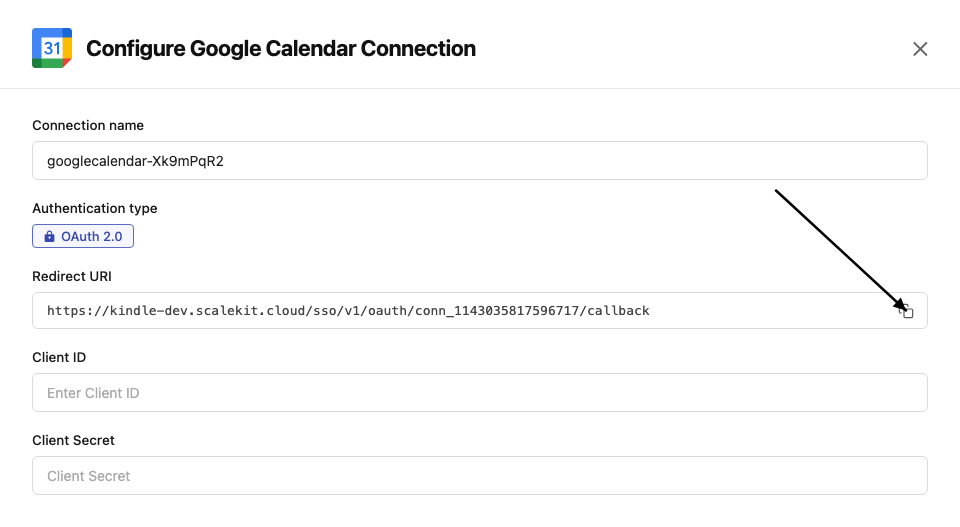
-
Navigate to Google Cloud Console → APIs & Services → Credentials. Select + Create Credentials, then OAuth client ID. Choose Web application from the Application type menu.
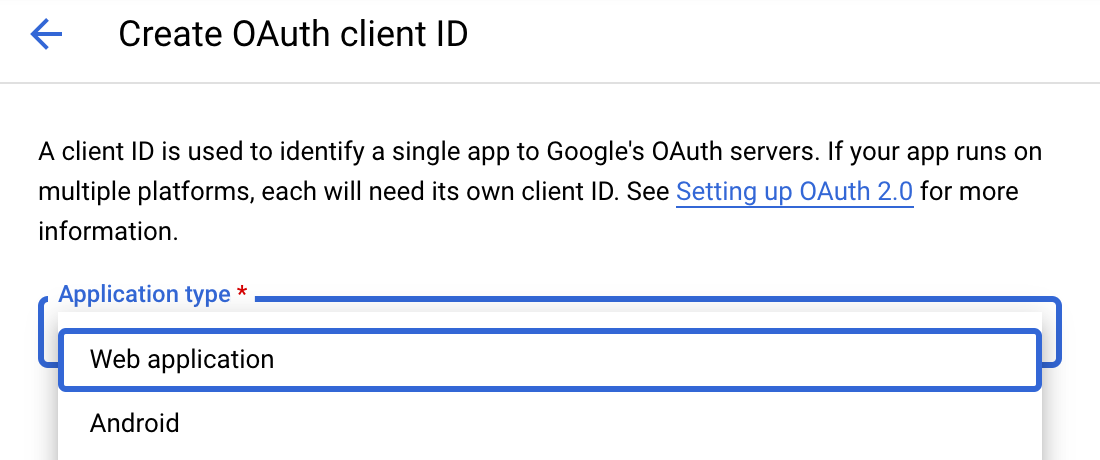
-
Under Authorized redirect URIs, click + Add URI, paste the redirect URI, and click Create.
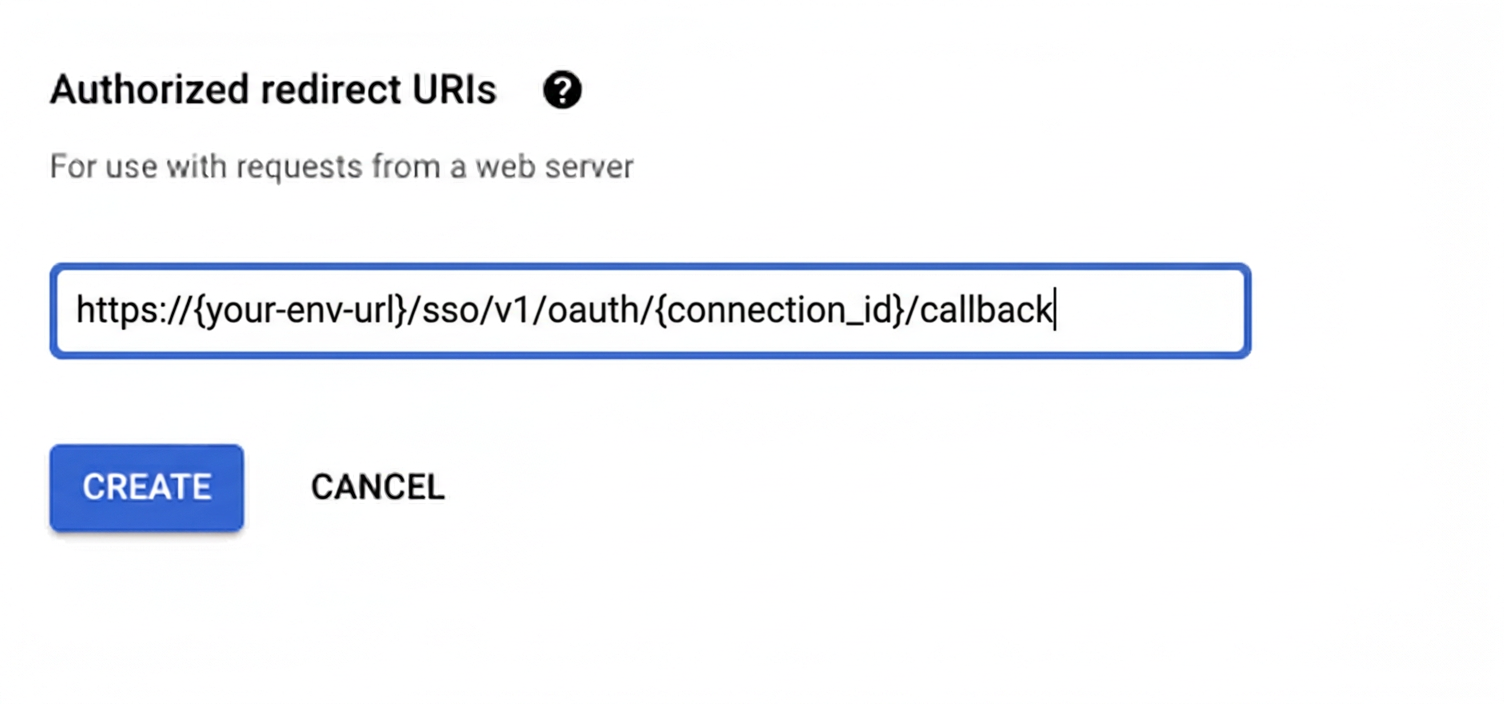
-
-
Enable the Google Calendar API
- In Google Cloud Console, go to APIs & Services → Library. Search for “Google Calendar API” and click Enable.
-
Get client credentials
- Google provides your Client ID and Client Secret after you create the OAuth client ID in step 1.
-
Add credentials in Scalekit
-
In Scalekit dashboard, go to AgentKit > Connections and open the connection you created.
-
Copy the Connection name shown on that connection and use that exact value in your code as
connection_nameorconnectionName. It may be something likemeeting-prep-agent-googlecalendar, notgooglecalendar. -
Enter your credentials:
- Client ID (from above)
- Client Secret (from above)
- Permissions (scopes — see Google API Scopes reference)
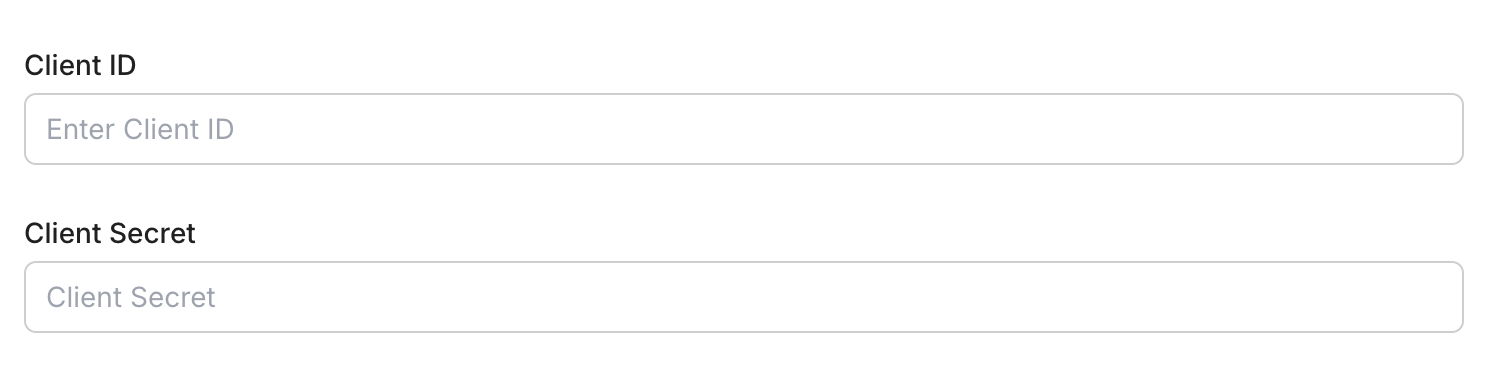
-
Click Save.
-
-
-
Authorize and make your first call
Section titled “Authorize and make your first call”quickstart.ts import { ScalekitClient } from '@scalekit-sdk/node'import 'dotenv/config'const scalekit = new ScalekitClient(process.env.SCALEKIT_ENV_URL,process.env.SCALEKIT_CLIENT_ID,process.env.SCALEKIT_CLIENT_SECRET,)const actions = scalekit.actionsconst connector = 'googlecalendar'const identifier = 'user_123'// Generate an authorization link for the userconst { link } = await actions.getAuthorizationLink({ connectionName: connector, identifier })console.log('Authorize Google Calendar:', link)process.stdout.write('Press Enter after authorizing...')await new Promise(r => process.stdin.once('data', r))// Make your first callconst result = await actions.executeTool({connector,identifier,toolName: 'googlecalendar_list_calendars',toolInput: {},})console.log(result)quickstart.py import osfrom scalekit.client import ScalekitClientfrom dotenv import load_dotenvload_dotenv()scalekit_client = ScalekitClient(env_url=os.getenv("SCALEKIT_ENV_URL"),client_id=os.getenv("SCALEKIT_CLIENT_ID"),client_secret=os.getenv("SCALEKIT_CLIENT_SECRET"),)actions = scalekit_client.actionsconnection_name = "googlecalendar"identifier = "user_123"# Generate an authorization link for the userlink_response = actions.get_authorization_link(connection_name=connection_name,identifier=identifier,)print("Authorize Google Calendar:", link_response.link)input("Press Enter after authorizing...")# Make your first callresult = actions.execute_tool(tool_input={},tool_name="googlecalendar_list_calendars",connection_name=connection_name,identifier=identifier,)print(result)
What you can do
Section titled “What you can do”Connect this agent connector to let your agent:
- Update event — Update an existing event in a connected Google Calendar account
- List events, calendars — List events from a connected Google Calendar account with filtering options
- Get event by id — Retrieve a specific calendar event by its ID using optional filtering and list parameters
- Delete event — Delete an event from a connected Google Calendar account
- Create event — Create a new event in a connected Google Calendar account
Common workflows
Section titled “Common workflows”Execute a tool
const accountResponse = await actions.getOrCreateConnectedAccount({ connectionName: 'googlecalendar', identifier: 'user_123',});const connectedAccountId = accountResponse.connectedAccount?.id;
if (!connectedAccountId) { throw new Error('Authorize the Google Calendar connection before listing events.');}
const response = await actions.executeTool({ connector: 'googlecalendar', identifier: 'user_123', toolName: 'googlecalendar_list_events', toolInput: { calendar_id: 'primary', max_results: 10, },});
const events = Array.isArray(response.data?.events) ? response.data.events : [];const nextPageToken = typeof response.data?.next_page_token === 'string' ? response.data.next_page_token : '';
console.log('Events returned:', events.length);console.log('Next page token:', nextPageToken);account_response = actions.get_or_create_connected_account( connection_name='googlecalendar', identifier='user_123',)connected_account = account_response.connected_account
if not connected_account.id: raise RuntimeError("Authorize the Google Calendar connection before listing events.")
response = actions.execute_tool( connection_name='googlecalendar', identifier='user_123', tool_name="googlecalendar_list_events", tool_input={ "calendar_id": "primary", "max_results": 10, },)
data = response.data or {}events = data.get("events", [])next_page_token = data.get("next_page_token", "")
print("Events returned:", len(events))print("Next page token:", next_page_token)Proxy API call
const result = await actions.request({ connectionName: 'googlecalendar', identifier: 'user_123', path: '/calendar/v3/users/me/calendarList', method: 'GET',});console.log(result);result = actions.request( connection_name='googlecalendar', identifier='user_123', path="/calendar/v3/users/me/calendarList", method="GET")print(result)Tool list
Section titled “Tool list”Use the exact tool names from the Tool list below when you call execute_tool. If you’re not sure which name to use, list the tools available for the current user first.
googlecalendar_create_event
#
Create a new event in a connected Google Calendar account. Supports meeting links, recurrence, attendees, and more. 20 params
Create a new event in a connected Google Calendar account. Supports meeting links, recurrence, attendees, and more.
start_datetime string required Event start time in RFC3339 format summary string required Event title/summary attendees_emails array optional Attendee email addresses calendar_id string optional Calendar ID to create the event in create_meeting_room boolean optional Generate a Google Meet link for this event description string optional Optional event description event_duration_hour integer optional Duration of event in hours event_duration_minutes integer optional Duration of event in minutes event_type string optional Event type for display purposes guests_can_invite_others boolean optional Allow guests to invite others guests_can_modify boolean optional Allow guests to modify the event guests_can_see_other_guests boolean optional Allow guests to see each other location string optional Location of the event recurrence array optional Recurrence rules (iCalendar RRULE format) schema_version string optional Optional schema version to use for tool execution send_updates boolean optional Send update notifications to attendees timezone string optional Timezone for the event (IANA time zone identifier) tool_version string optional Optional tool version to use for execution transparency string optional Calendar transparency (free/busy) visibility string optional Visibility of the event googlecalendar_delete_event
#
Delete an event from a connected Google Calendar account. Requires the calendar ID and event ID. 4 params
Delete an event from a connected Google Calendar account. Requires the calendar ID and event ID.
event_id string required The ID of the calendar event to delete calendar_id string optional The ID of the calendar from which the event should be deleted schema_version string optional Optional schema version to use for tool execution tool_version string optional Optional tool version to use for execution googlecalendar_get_event_by_id
#
Retrieve a specific calendar event by its ID using optional filtering and list parameters. 11 params
Retrieve a specific calendar event by its ID using optional filtering and list parameters.
event_id string required The unique identifier of the calendar event to fetch calendar_id string optional The calendar ID to search in event_types array optional Filter by Google event types query string optional Free text search query schema_version string optional Optional schema version to use for tool execution show_deleted boolean optional Include deleted events in results single_events boolean optional Expand recurring events into instances time_max string optional Upper bound for event start time (RFC3339) time_min string optional Lower bound for event start time (RFC3339) tool_version string optional Optional tool version to use for execution updated_min string optional Filter events updated after this time (RFC3339) googlecalendar_list_calendars
#
List all accessible Google Calendar calendars for the authenticated user. Supports filters and pagination. 8 params
List all accessible Google Calendar calendars for the authenticated user. Supports filters and pagination.
max_results integer optional Maximum number of calendars to fetch min_access_role string optional Minimum access role to include in results page_token string optional Token to retrieve the next page of results schema_version string optional Optional schema version to use for tool execution show_deleted boolean optional Include deleted calendars in the list show_hidden boolean optional Include calendars that are hidden from the calendar list sync_token string optional Token to get updates since the last sync tool_version string optional Optional tool version to use for execution googlecalendar_list_events
#
List events from a connected Google Calendar account with filtering options. Requires a valid Google Calendar OAuth2 connection. 10 params
List events from a connected Google Calendar account with filtering options. Requires a valid Google Calendar OAuth2 connection.
calendar_id string optional Calendar ID to list events from max_results integer optional Maximum number of events to fetch order_by string optional Order of events in the result page_token string optional Page token for pagination query string optional Free text search query schema_version string optional Optional schema version to use for tool execution single_events boolean optional Expand recurring events into single events time_max string optional Upper bound for event start time (RFC3339 timestamp) time_min string optional Lower bound for event start time (RFC3339 timestamp) tool_version string optional Optional tool version to use for execution googlecalendar_update_event
#
Update an existing event in a connected Google Calendar account. Only provided fields will be updated. Supports updating time, attendees, location, meeting links, and more. 22 params
Update an existing event in a connected Google Calendar account. Only provided fields will be updated. Supports updating time, attendees, location, meeting links, and more.
calendar_id string required Calendar ID containing the event event_id string required The ID of the calendar event to update attendees_emails array optional Attendee email addresses create_meeting_room boolean optional Generate a Google Meet link for this event description string optional Optional event description end_datetime string optional Event end time in RFC3339 format event_duration_hour integer optional Duration of event in hours event_duration_minutes integer optional Duration of event in minutes event_type string optional Event type for display purposes guests_can_invite_others boolean optional Allow guests to invite others guests_can_modify boolean optional Allow guests to modify the event guests_can_see_other_guests boolean optional Allow guests to see each other location string optional Location of the event recurrence array optional Recurrence rules (iCalendar RRULE format) schema_version string optional Optional schema version to use for tool execution send_updates boolean optional Send update notifications to attendees start_datetime string optional Event start time in RFC3339 format summary string optional Event title/summary timezone string optional Timezone for the event (IANA time zone identifier) tool_version string optional Optional tool version to use for execution transparency string optional Calendar transparency (free/busy) visibility string optional Visibility of the event