


Asana connector
OAuth 2.0 project_managementConnect to Asana. Manage tasks, projects, teams, and workflow automation
Asana connector
-
Install the SDK
Section titled “Install the SDK”Terminal window npm install @scalekit-sdk/nodeTerminal window pip install scalekit -
Set your credentials
Section titled “Set your credentials”Add your Scalekit credentials to your
.envfile. Find values in app.scalekit.com > Developers > API Credentials..env SCALEKIT_ENVIRONMENT_URL=<your-environment-url>SCALEKIT_CLIENT_ID=<your-client-id>SCALEKIT_CLIENT_SECRET=<your-client-secret> -
Set up the connector
Section titled “Set up the connector”Register your Asana credentials with Scalekit so it handles the token lifecycle. You do this once per environment.
Dashboard setup steps
Register your Scalekit environment with the Asana connector so Scalekit handles the authentication flow and token lifecycle for you. The connection name you create will be used to identify and invoke the connection programmatically. Then complete the configuration in your application as follows:
-
Set up auth redirects
-
In Scalekit dashboard, go to AgentKit > Connections > Create Connection. Find Asana and click Create. Copy the redirect URI. It looks like
https://<SCALEKIT_ENVIRONMENT_URL>/sso/v1/oauth/<CONNECTION_ID>/callback.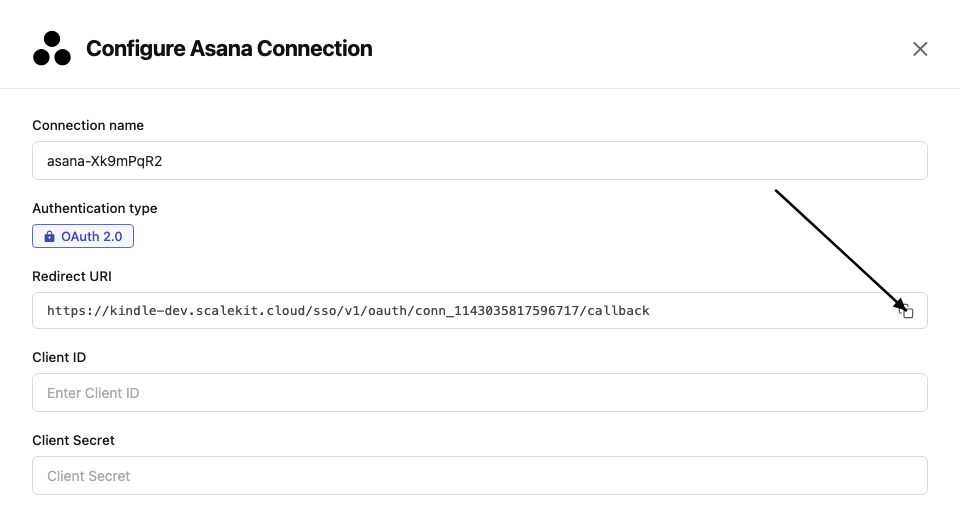
-
Go to Asana Developer Console and click Create new app. Enter an app name.
-
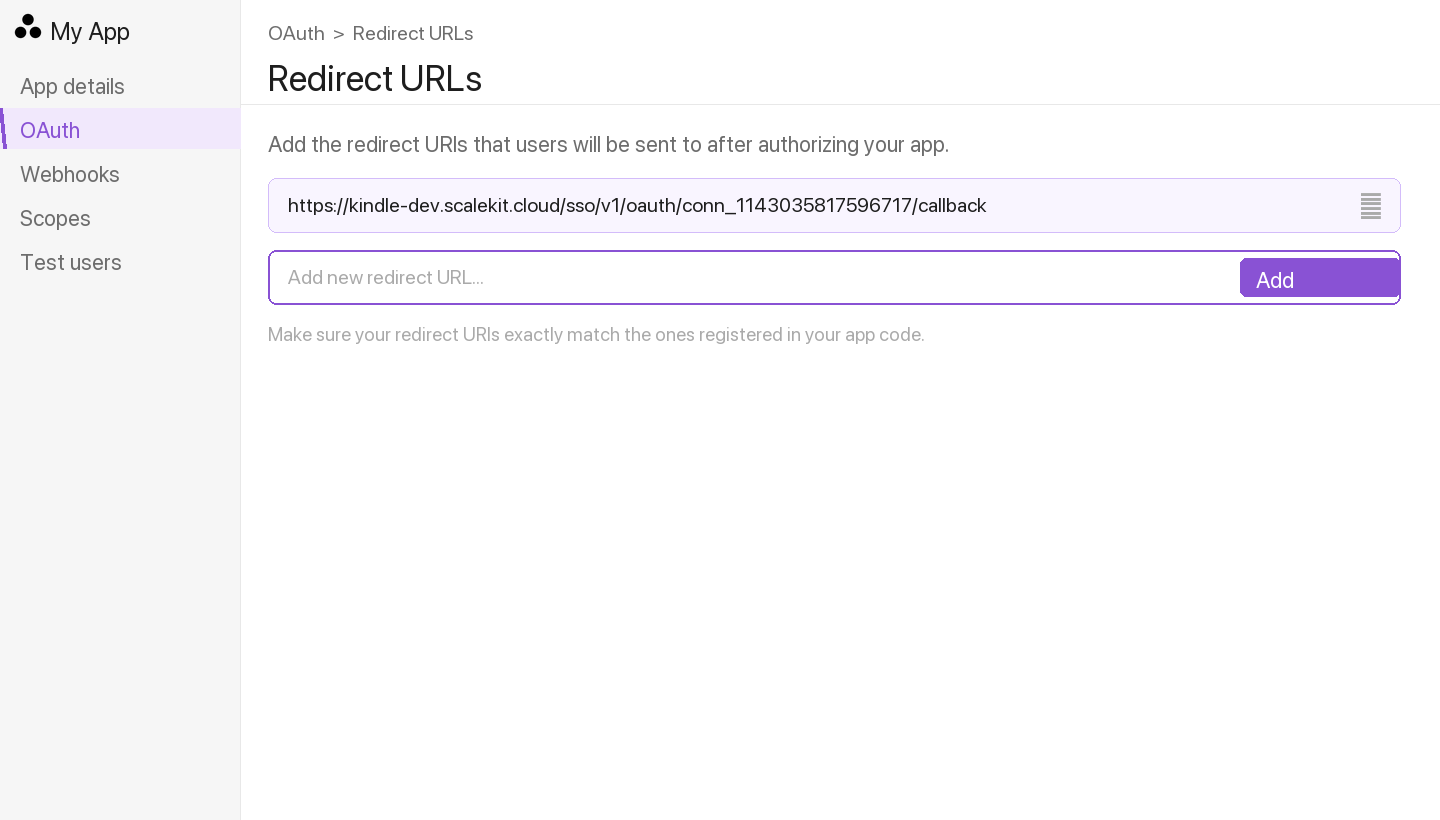
In the left menu, go to OAuth. Under Redirect URLs, click Add redirect URL, paste the redirect URI from Scalekit, and click Add.
-
-
Enable multi-workspace install Optional
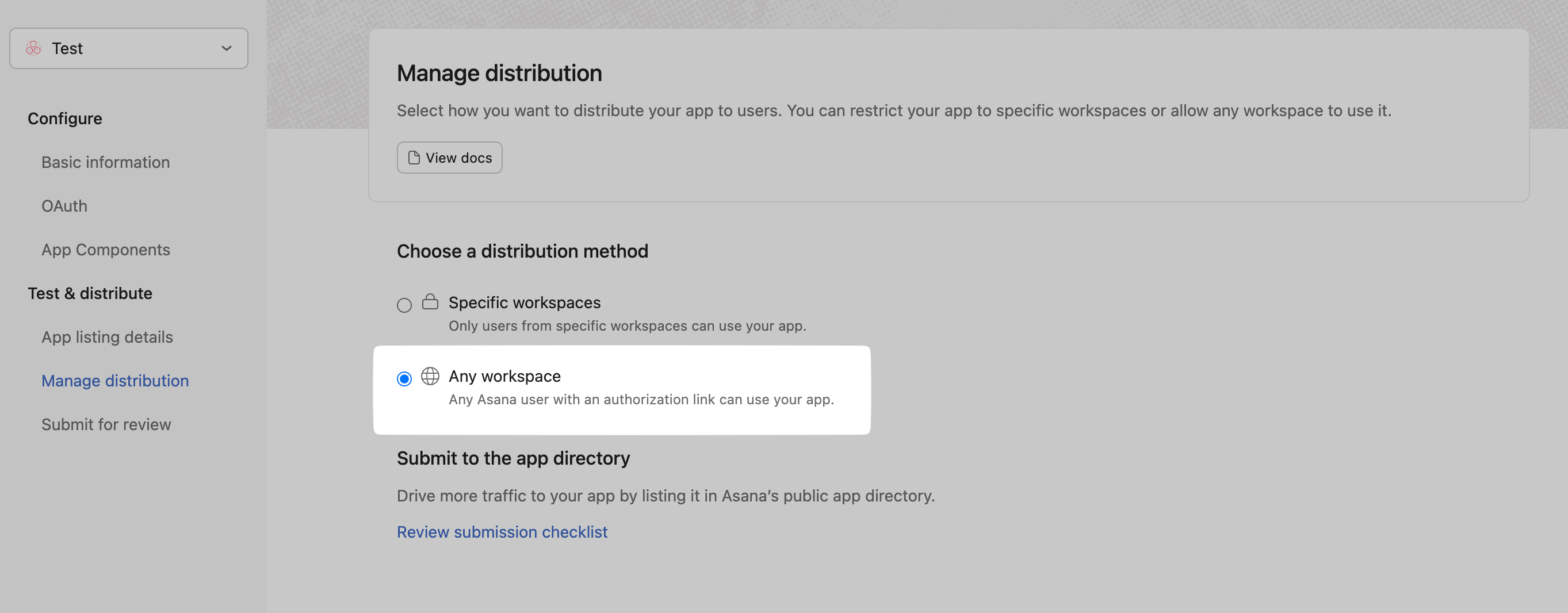
Enable this if you want users outside your Asana workspace to install the app.
-
In your app settings, go to OAuth → App permissions.
-
Under App install permissions, enable Allow users outside your workspace to install this app.
-
-
Get client credentials
- In Asana Developer Console, select your app.
- Under OAuth, copy your Client ID and Client Secret.
-
Add credentials in Scalekit
-
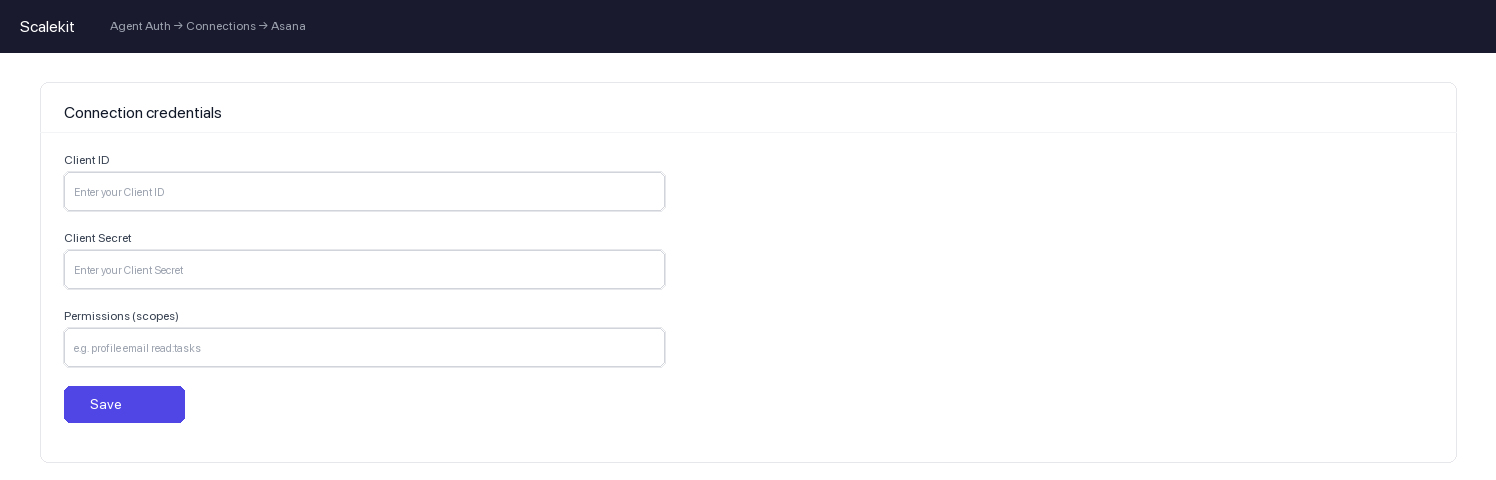
In Scalekit dashboard, go to AgentKit > Connections and open the connection you created.
-
Enter your credentials:
- Client ID (from above)
- Client Secret (from above)
- Permissions (scopes — see Asana OAuth scopes reference)
-
Click Save.
-
-
-
Authorize and make your first call
Section titled “Authorize and make your first call”quickstart.ts import { ScalekitClient } from '@scalekit-sdk/node'import 'dotenv/config'const scalekit = new ScalekitClient(process.env.SCALEKIT_ENV_URL,process.env.SCALEKIT_CLIENT_ID,process.env.SCALEKIT_CLIENT_SECRET,)const actions = scalekit.actionsconst connector = 'asana'const identifier = 'user_123'// Generate an authorization link for the userconst { link } = await actions.getAuthorizationLink({ connectionName: connector, identifier })console.log('Authorize Asana:', link)process.stdout.write('Press Enter after authorizing...')await new Promise(r => process.stdin.once('data', r))// Make your first callconst result = await actions.executeTool({connector,identifier,toolName: 'asana_me_get',toolInput: {},})console.log(result)quickstart.py import osfrom scalekit.client import ScalekitClientfrom dotenv import load_dotenvload_dotenv()scalekit_client = ScalekitClient(env_url=os.getenv("SCALEKIT_ENV_URL"),client_id=os.getenv("SCALEKIT_CLIENT_ID"),client_secret=os.getenv("SCALEKIT_CLIENT_SECRET"),)actions = scalekit_client.actionsconnection_name = "asana"identifier = "user_123"# Generate an authorization link for the userlink_response = actions.get_authorization_link(connection_name=connection_name,identifier=identifier,)print("Authorize Asana:", link_response.link)input("Press Enter after authorizing...")# Make your first callresult = actions.execute_tool(tool_input={},tool_name="asana_me_get",connection_name=connection_name,identifier=identifier,)print(result)
What you can do
Section titled “What you can do”Connect this agent connector to let your agent:
- List workspaces, workspace teams, webhooks — List all workspaces the authenticated user has access to
- Get workspace, user, team — Get details of a specific workspace by its GID
- User team remove, team add — Remove a user from a team
- Update task, tag, section — Update an existing task’s properties
- Parent task set — Set or change the parent task of a task
- Tag task remove, task add — Remove a tag from a task
Common workflows
Section titled “Common workflows”Proxy API call
const result = await actions.request({ connectionName: 'asana', identifier: 'user_123', path: '/api/1.0/users/me', method: 'GET',});console.log(result);result = actions.request( connection_name='asana', identifier='user_123', path="/api/1.0/users/me", method="GET",)print(result)Tool list
Section titled “Tool list”Use the exact tool names from the Tool list below when you call execute_tool. If you’re not sure which name to use, list the tools available for the current user first.
asana_attachment_delete
#
Delete an attachment permanently. 1 param
Delete an attachment permanently.
attachment_gid string required GID of the attachment to delete asana_attachment_get
#
Get details of a specific attachment by its GID. 2 params
Get details of a specific attachment by its GID.
attachment_gid string required GID of the attachment to retrieve opt_fields string optional Comma-separated list of optional fields to include in response asana_me_get
#
Get the profile of the authenticated user. 1 param
Get the profile of the authenticated user.
opt_fields string optional Comma-separated list of optional fields to include in response asana_project_create
#
Create a new project in a workspace. 10 params
Create a new project in a workspace.
name string required Name of the project workspace string required GID of the workspace to create the project in color string optional Color of the project default_view string optional Default view for the project due_on string optional Due date for the project (YYYY-MM-DD) notes string optional Free-form text description for the project opt_fields string optional Comma-separated list of optional fields to include in response privacy_setting string optional Privacy setting for the project start_on string optional Start date for the project (YYYY-MM-DD) team string optional GID of the team to share the project with asana_project_delete
#
Delete a project permanently. 1 param
Delete a project permanently.
project_gid string required GID of the project to delete asana_project_duplicate
#
Create a duplicate of an existing project. 4 params
Create a duplicate of an existing project.
name string required Name for the duplicated project project_gid string required GID of the project to duplicate opt_fields string optional Comma-separated list of optional fields to include in response team string optional GID of the team for the duplicated project asana_project_get
#
Get details of a specific project by its GID. 2 params
Get details of a specific project by its GID.
project_gid string required GID of the project to retrieve opt_fields string optional Comma-separated list of optional fields to include in response asana_project_tasks_list
#
List all tasks in a specific project. 2 params
List all tasks in a specific project.
project_gid string required GID of the project to list tasks from opt_fields string optional Comma-separated list of optional fields to include in response asana_project_update
#
Update an existing project's properties. 10 params
Update an existing project's properties.
project_gid string required GID of the project to update archived boolean optional Whether the project is archived color string optional Color of the project default_view string optional Default view for the project due_on string optional Due date for the project (YYYY-MM-DD) name string optional New name for the project notes string optional Free-form text description for the project opt_fields string optional Comma-separated list of optional fields to include in response privacy_setting string optional Privacy setting for the project start_on string optional Start date for the project (YYYY-MM-DD) asana_projects_list
#
List projects in a workspace or team. 3 params
List projects in a workspace or team.
opt_fields string optional Comma-separated list of optional fields to include in response team string optional GID of a team to filter projects by workspace string optional GID of the workspace to list projects from asana_section_add_task
#
Move a task into a specific section within a project. 4 params
Move a task into a specific section within a project.
section_gid string required GID of the section to add the task to task string required GID of the task to move into this section insert_after string optional Insert the task after this task GID within the section insert_before string optional Insert the task before this task GID within the section asana_section_create
#
Create a new section in a project. 3 params
Create a new section in a project.
name string required Name of the section project_gid string required GID of the project to create a section in opt_fields string optional Comma-separated list of optional fields to include in response asana_section_delete
#
Delete a section from a project. 1 param
Delete a section from a project.
section_gid string required GID of the section to delete asana_section_get
#
Get details of a specific section by its GID. 2 params
Get details of a specific section by its GID.
section_gid string required GID of the section to retrieve opt_fields string optional Comma-separated list of optional fields to include in response asana_section_update
#
Update the name of a section. 3 params
Update the name of a section.
name string required New name for the section section_gid string required GID of the section to update opt_fields string optional Comma-separated list of optional fields to include in response asana_sections_list
#
List all sections in a project. 2 params
List all sections in a project.
project_gid string required GID of the project to list sections from opt_fields string optional Comma-separated list of optional fields to include in response asana_story_create
#
Add a comment or story to a task. 3 params
Add a comment or story to a task.
task_gid string required GID of the task to add the comment to text string required Text of the comment to add to the task opt_fields string optional Comma-separated list of optional fields to include in response asana_story_get
#
Get details of a specific story by its GID. 2 params
Get details of a specific story by its GID.
story_gid string required GID of the story to retrieve opt_fields string optional Comma-separated list of optional fields to include in response asana_subtask_create
#
Create a subtask under an existing task. 6 params
Create a subtask under an existing task.
name string required Name of the subtask task_gid string required GID of the parent task assignee string optional GID of the user to assign, or 'me' due_on string optional Due date for the subtask (YYYY-MM-DD) notes string optional Free-form description for the subtask opt_fields string optional Comma-separated list of optional fields to include in response asana_tag_create
#
Create a new tag in a workspace. 4 params
Create a new tag in a workspace.
name string required Name of the tag workspace string required GID of the workspace to create the tag in color string optional Color for the tag opt_fields string optional Comma-separated list of optional fields to include in response asana_tag_delete
#
Delete a tag permanently. 1 param
Delete a tag permanently.
tag_gid string required GID of the tag to delete asana_tag_get
#
Get details of a specific tag by its GID. 2 params
Get details of a specific tag by its GID.
tag_gid string required GID of the tag to retrieve opt_fields string optional Comma-separated list of optional fields to include in response asana_tag_update
#
Update a tag's name or color. 4 params
Update a tag's name or color.
tag_gid string required GID of the tag to update color string optional New color for the tag name string optional New name for the tag opt_fields string optional Comma-separated list of optional fields to include in response asana_tags_list
#
List tags in a workspace. 2 params
List tags in a workspace.
opt_fields string optional Comma-separated list of optional fields to include in response workspace string optional GID of the workspace to list tags from asana_task_add_followers
#
Add followers to a task. 3 params
Add followers to a task.
followers string required Comma-separated GIDs of users to add as followers task_gid string required GID of the task opt_fields string optional Comma-separated list of optional fields to include in response asana_task_add_project
#
Add a task to a project. 5 params
Add a task to a project.
project string required GID of the project to add the task to task_gid string required GID of the task to add to a project insert_after string optional Insert the task after this task in the project insert_before string optional Insert the task before this task in the project section string optional GID of a section in the project to place the task asana_task_add_tag
#
Add a tag to a task. 2 params
Add a tag to a task.
tag string required GID of the tag to add to the task task_gid string required GID of the task asana_task_create
#
Create a new task in Asana. 9 params
Create a new task in Asana.
name string required Name of the task assignee string optional GID of the user to assign, or 'me' due_on string optional Due date for the task (YYYY-MM-DD) followers string optional Comma-separated GIDs of users to follow the task notes string optional Free-form text description of the task opt_fields string optional Comma-separated list of optional fields to include in response projects string optional Comma-separated GIDs of projects to add the task to start_on string optional Start date for the task (YYYY-MM-DD) workspace string optional GID of the workspace to create the task in (required if no project) asana_task_delete
#
Delete a task permanently. 1 param
Delete a task permanently.
task_gid string required GID of the task to delete asana_task_duplicate
#
Create a duplicate of an existing task. 4 params
Create a duplicate of an existing task.
name string required Name for the duplicated task task_gid string required GID of the task to duplicate include string optional Comma-separated list of fields to copy (assignee, attachments, dates, dependencies, notes, projects, subtasks, tags) opt_fields string optional Comma-separated list of optional fields to include in response asana_task_get
#
Get details of a specific task by its GID. 2 params
Get details of a specific task by its GID.
task_gid string required GID of the task to retrieve opt_fields string optional Comma-separated list of optional fields to include in response asana_task_remove_followers
#
Remove followers from a task. 3 params
Remove followers from a task.
followers string required Comma-separated GIDs of users to remove as followers task_gid string required GID of the task opt_fields string optional Comma-separated list of optional fields to include in response asana_task_remove_project
#
Remove a task from a project. 2 params
Remove a task from a project.
project string required GID of the project to remove the task from task_gid string required GID of the task to remove from a project asana_task_remove_tag
#
Remove a tag from a task. 2 params
Remove a tag from a task.
tag string required GID of the tag to remove from the task task_gid string required GID of the task asana_task_set_parent
#
Set or change the parent task of a task. 5 params
Set or change the parent task of a task.
parent string required GID of the new parent task. Use null to make it a top-level task. task_gid string required GID of the task to set parent for insert_after string optional A subtask GID to insert this task after in the parent insert_before string optional A subtask GID to insert this task before in the parent opt_fields string optional Comma-separated list of optional fields to include in response asana_task_stories_list
#
List stories (comments and activity) on a task. 2 params
List stories (comments and activity) on a task.
task_gid string required GID of the task to list stories from opt_fields string optional Comma-separated list of optional fields to include in response asana_task_subtasks_list
#
List all subtasks of a task. 2 params
List all subtasks of a task.
task_gid string required GID of the parent task opt_fields string optional Comma-separated list of optional fields to include in response asana_task_update
#
Update an existing task's properties. 8 params
Update an existing task's properties.
task_gid string required GID of the task to update assignee string optional GID of the user to assign, or 'me', or null to unassign completed boolean optional Mark the task as complete or incomplete due_on string optional Due date for the task (YYYY-MM-DD) name string optional New name for the task notes string optional Updated description for the task opt_fields string optional Comma-separated list of optional fields to include in response start_on string optional Start date for the task (YYYY-MM-DD) asana_tasks_list
#
List tasks filtered by project, section, assignee, or workspace. 6 params
List tasks filtered by project, section, assignee, or workspace.
assignee string optional GID or 'me' to filter tasks by assignee completed_since string optional Only return tasks completed after this date-time (ISO 8601) opt_fields string optional Comma-separated list of optional fields to include in response project string optional GID of a project to filter tasks by section string optional GID of a section to filter tasks by workspace string optional GID of the workspace (required if assignee is set without project) asana_team_add_user
#
Add a user to a team. 3 params
Add a user to a team.
team_gid string required GID of the team user string required GID of the user to add to the team opt_fields string optional Comma-separated list of optional fields to include in response asana_team_get
#
Get details of a specific team by its GID. 2 params
Get details of a specific team by its GID.
team_gid string required GID of the team to retrieve opt_fields string optional Comma-separated list of optional fields to include in response asana_team_remove_user
#
Remove a user from a team. 2 params
Remove a user from a team.
team_gid string required GID of the team user string required GID of the user to remove from the team asana_user_get
#
Get the profile of a specific user by GID. 2 params
Get the profile of a specific user by GID.
user_gid string required GID of the user. Use 'me' for the authenticated user. opt_fields string optional Comma-separated list of optional fields to include in response asana_users_list
#
List users in a workspace. 2 params
List users in a workspace.
workspace_gid string required GID of the workspace to list users from opt_fields string optional Comma-separated list of optional fields to include in response asana_webhooks_list
#
List all webhooks for a workspace. 3 params
List all webhooks for a workspace.
workspace string required GID of the workspace to list webhooks for opt_fields string optional Comma-separated list of optional fields to include in response resource string optional GID of a resource to filter webhooks by asana_workspace_get
#
Get details of a specific workspace by its GID. 2 params
Get details of a specific workspace by its GID.
workspace_gid string required GID of the workspace to retrieve opt_fields string optional Comma-separated list of optional fields to include in response asana_workspace_teams_list
#
List all teams in a workspace. 2 params
List all teams in a workspace.
workspace_gid string required GID of the workspace opt_fields string optional Comma-separated list of optional fields to include in response asana_workspaces_list
#
List all workspaces the authenticated user has access to. 1 param
List all workspaces the authenticated user has access to.
opt_fields string optional Comma-separated list of optional fields to include in response