


HubSpot connector
OAuth 2.0 crmsalesConnect to HubSpot CRM. Manage contacts, deals, companies, and marketing automation
HubSpot connector
-
Install the SDK
Section titled “Install the SDK”Terminal window npm install @scalekit-sdk/nodeTerminal window pip install scalekit -
Set your credentials
Section titled “Set your credentials”Add your Scalekit credentials to your
.envfile. Find values in app.scalekit.com > Developers > API Credentials..env SCALEKIT_ENVIRONMENT_URL=<your-environment-url>SCALEKIT_CLIENT_ID=<your-client-id>SCALEKIT_CLIENT_SECRET=<your-client-secret> -
Set up the connector
Section titled “Set up the connector”Register your HubSpot credentials with Scalekit so it handles the token lifecycle. You do this once per environment.
Dashboard setup steps
Register your Scalekit environment with the HubSpot connector so Scalekit handles the authentication flow and token lifecycle for you. The connection name you create will be used to identify and invoke the connection programmatically. Then complete the configuration in your application as follows:
-
Set up auth redirects
-
In Scalekit dashboard, go to AgentKit > Connections > Create Connection. Find HubSpot and click Create. Copy the redirect URI. It looks like
https://<SCALEKIT_ENVIRONMENT_URL>/sso/v1/oauth/<CONNECTION_ID>/callback.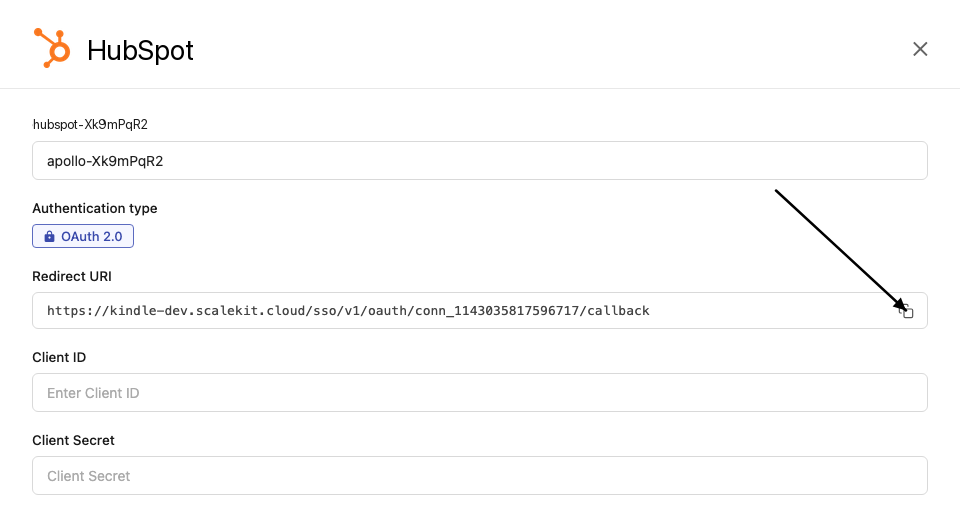
-
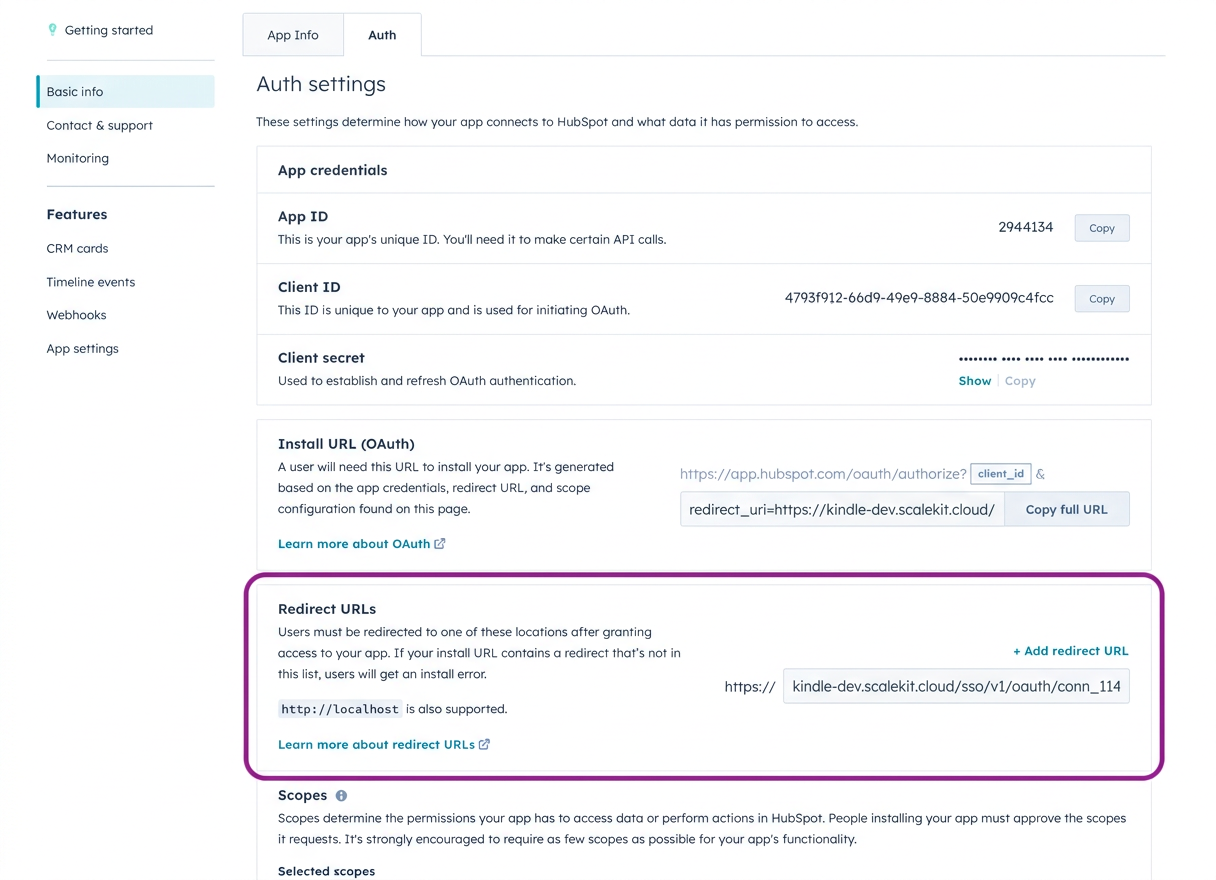
Log in to your HubSpot developer dashboard, click Manage apps, click Create app, and select Public app. Do not select Private app; Private Apps use static API tokens and do not support OAuth redirect flows, so they do not show the Redirect URL field Scalekit needs. If you already have a HubSpot Public App, open that app instead.
-
Go to Auth > Auth settings > Redirect URL, paste the redirect URI from Scalekit, and click Save.
-
Under Auth > Auth settings > Scopes, select the required scopes for your application. The scopes you select here must match exactly what you configure in Scalekit. For a read-only CRM enrichment flow that looks up contacts, companies, and deals, use:
crm.objects.contacts.readcrm.objects.companies.readcrm.objects.deals.read
-
-
Get client credentials
-
In your HubSpot app, go to Auth > Auth settings.
-
Copy your Client ID and Client Secret.
-
-
Add credentials in Scalekit
-
In Scalekit dashboard, go to AgentKit > Connections and open the connection you created.
-
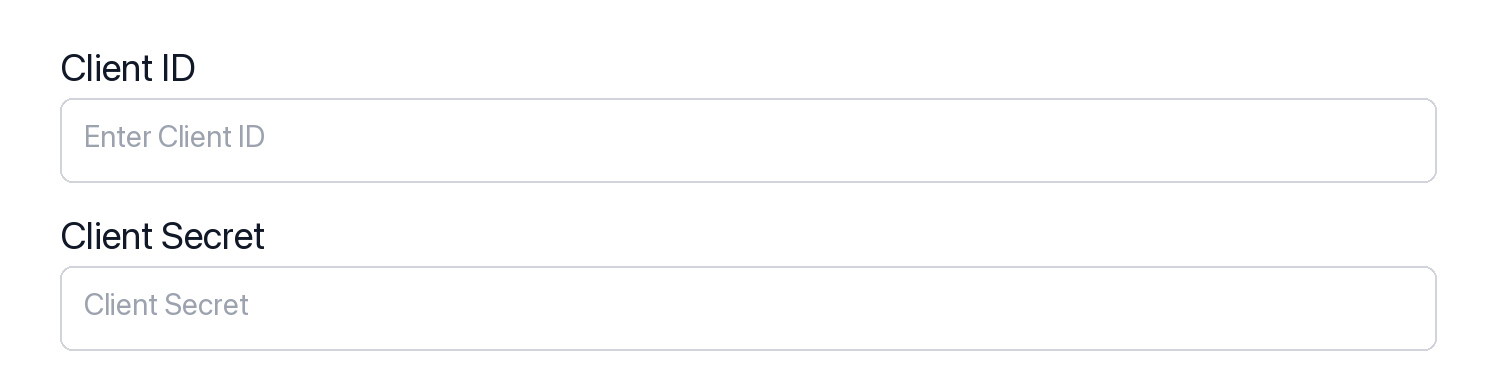
Enter your credentials:
- Client ID (from your HubSpot app)
- Client Secret (from your HubSpot app)
- Permissions (OAuth scope strings such as
crm.objects.contacts.read, entered exactly as configured in the HubSpot app)
-
Click Save.
-
-
-
Authorize and make your first call
Section titled “Authorize and make your first call”quickstart.ts import { ScalekitClient } from '@scalekit-sdk/node'import 'dotenv/config'const scalekit = new ScalekitClient(process.env.SCALEKIT_ENV_URL,process.env.SCALEKIT_CLIENT_ID,process.env.SCALEKIT_CLIENT_SECRET,)const actions = scalekit.actionsconst connector = 'hubspot'const identifier = 'user_123'// Generate an authorization link for the userconst { link } = await actions.getAuthorizationLink({ connectionName: connector, identifier })console.log('Authorize HubSpot:', link)process.stdout.write('Press Enter after authorizing...')await new Promise(r => process.stdin.once('data', r))// Make your first call — list CRM ownersconst result = await actions.executeTool({connector,identifier,toolName: 'hubspot_owners_list',toolInput: {},})console.log('HubSpot owners:', result)quickstart.py import osfrom scalekit.client import ScalekitClientfrom dotenv import load_dotenvload_dotenv()scalekit_client = ScalekitClient(env_url=os.getenv("SCALEKIT_ENV_URL"),client_id=os.getenv("SCALEKIT_CLIENT_ID"),client_secret=os.getenv("SCALEKIT_CLIENT_SECRET"),)actions = scalekit_client.actionsconnection_name = "hubspot"identifier = "user_123"# Generate an authorization link for the userlink_response = actions.get_authorization_link(connection_name=connection_name,identifier=identifier,)print("Authorize HubSpot:", link_response.link)input("Press Enter after authorizing...")# Make your first call — list CRM ownersresult = actions.execute_tool(tool_input={},tool_name="hubspot_owners_list",connection_name=connection_name,identifier=identifier,)print("HubSpot owners:", result)
What you can do
Section titled “What you can do”Connect this agent connector to let your agent:
- Read CRM records — retrieve contacts, companies, deals, and tickets
- Create and update records — add contacts, update deal stages, and log company data
- Log engagements — record calls, emails, meetings, and notes against any CRM record
- Search and filter — query CRM objects by property values and associations
Common workflows
Section titled “Common workflows”Proxy API call
const result = await actions.request({ connectionName: 'hubspot', identifier: 'user_123', path: '/crm/v3/owners', method: 'GET',});console.log(result);result = actions.request( connection_name='hubspot', identifier='user_123', path="/crm/v3/owners", method="GET")print(result)Create a contact
const contact = await actions.executeTool({ connector: 'hubspot', identifier: 'user_123', toolName: 'hubspot_contact_create', toolInput: { email: 'jane.smith@acme.com', firstname: 'Jane', lastname: 'Smith', jobtitle: 'VP of Engineering', company: 'Acme Corp', lifecyclestage: 'lead', },});console.log('Created contact ID:', contact.id);contact = actions.execute_tool( connection_name='hubspot', identifier='user_123', tool_name="hubspot_contact_create", tool_input={ "email": "jane.smith@acme.com", "firstname": "Jane", "lastname": "Smith", "jobtitle": "VP of Engineering", "company": "Acme Corp", "lifecyclestage": "lead", },)print("Created contact ID:", contact["id"])Search deals
const deals = await actions.executeTool({ connector: 'hubspot', identifier: 'user_123', toolName: 'hubspot_deals_search', toolInput: { query: 'enterprise', filterGroups: JSON.stringify([{ filters: [{ propertyName: 'dealstage', operator: 'EQ', value: 'qualifiedtobuy' }] }]), properties: 'dealname,amount,dealstage,closedate', limit: 10, },});console.log('Found deals:', deals.results);import json
deals = actions.execute_tool( connection_name='hubspot', identifier='user_123', tool_name="hubspot_deals_search", tool_input={ "query": "enterprise", "filterGroups": json.dumps([{ "filters": [{"propertyName": "dealstage", "operator": "EQ", "value": "qualifiedtobuy"}] }]), "properties": "dealname,amount,dealstage,closedate", "limit": 10, },)print("Found deals:", deals["results"])Log a call
const call = await actions.executeTool({ connector: 'hubspot', identifier: 'user_123', toolName: 'hubspot_call_log', toolInput: { hs_call_title: 'Q4 Renewal Discussion', hs_timestamp: new Date().toISOString(), hs_call_body: 'Discussed renewal terms. Customer is interested in the enterprise plan.', hs_call_direction: 'OUTBOUND', hs_call_duration: 900000, // 15 minutes in ms hs_call_status: 'COMPLETED', },});console.log('Logged call ID:', call.id);from datetime import datetime, timezone
call = actions.execute_tool( connection_name='hubspot', identifier='user_123', tool_name="hubspot_call_log", tool_input={ "hs_call_title": "Q4 Renewal Discussion", "hs_timestamp": datetime.now(timezone.utc).isoformat(), "hs_call_body": "Discussed renewal terms. Customer is interested in the enterprise plan.", "hs_call_direction": "OUTBOUND", "hs_call_duration": 900000, # 15 minutes in ms "hs_call_status": "COMPLETED", },)print("Logged call ID:", call["id"])Create and associate a ticket
// Create the ticketconst ticket = await actions.executeTool({ connector: 'hubspot', identifier: 'user_123', toolName: 'hubspot_ticket_create', toolInput: { subject: 'Cannot export data to CSV', hs_pipeline_stage: '1', // "New" stage content: 'Customer reports that the CSV export button is unresponsive on the Reports page.', hs_ticket_priority: 'HIGH', },});
// Associate with a contactawait actions.executeTool({ connector: 'hubspot', identifier: 'user_123', toolName: 'hubspot_association_create', toolInput: { from_object_type: 'tickets', from_object_id: ticket.id, to_object_type: 'contacts', to_object_id: '12345', },});console.log('Ticket created and associated:', ticket.id);# Create the ticketticket = actions.execute_tool( connection_name='hubspot', identifier='user_123', tool_name="hubspot_ticket_create", tool_input={ "subject": "Cannot export data to CSV", "hs_pipeline_stage": "1", # "New" stage "content": "Customer reports that the CSV export button is unresponsive on the Reports page.", "hs_ticket_priority": "HIGH", },)
# Associate with a contactactions.execute_tool( connection_name='hubspot', identifier='user_123', tool_name="hubspot_association_create", tool_input={ "from_object_type": "tickets", "from_object_id": ticket["id"], "to_object_type": "contacts", "to_object_id": "12345", },)print("Ticket created and associated:", ticket["id"])Tool list
Section titled “Tool list”Use the exact tool names from the Tool list below when you call execute_tool. If you’re not sure which name to use, list the tools available for the current user first.
hubspot_association_create
#
Create a default association between two HubSpot CRM objects. For example, associate a contact with a deal, or a company with a ticket. 4 params
Create a default association between two HubSpot CRM objects. For example, associate a contact with a deal, or a company with a ticket.
from_object_id string required ID of the source object from_object_type string required Type of the source object (e.g. contacts, companies, deals, tickets) to_object_id string required ID of the target object to_object_type string required Type of the target object (e.g. contacts, companies, deals, tickets) hubspot_call_log
#
Log a call engagement in HubSpot CRM. Records details of a phone call including title, duration, notes, status, and direction. 6 params
Log a call engagement in HubSpot CRM. Records details of a phone call including title, duration, notes, status, and direction.
hs_call_title string required Title or subject of the call hs_timestamp string required Date and time when the call took place (ISO 8601 format) hs_call_body string optional Notes or transcript from the call hs_call_direction string optional Direction of the call hs_call_duration number optional Duration of the call in milliseconds hs_call_status string optional Outcome status of the call hubspot_calls_search
#
Search HubSpot call engagements using filters and full-text search. Returns logged calls with their properties. 5 params
Search HubSpot call engagements using filters and full-text search. Returns logged calls with their properties.
after string optional Pagination offset to get results starting from a specific position filterGroups string optional JSON string containing filter groups for advanced filtering limit number optional Number of results to return per page (max 100) properties string optional Comma-separated list of properties to include in the response query string optional Full-text search term across call properties hubspot_campaign_get
#
Retrieve details of a specific HubSpot marketing campaign by campaign ID. 1 param
Retrieve details of a specific HubSpot marketing campaign by campaign ID.
campaign_id string required ID of the campaign to retrieve hubspot_campaigns_list
#
List all HubSpot marketing campaigns with pagination support. 2 params
List all HubSpot marketing campaigns with pagination support.
after string optional Pagination cursor for the next page of results limit number optional Number of campaigns to return per page hubspot_companies_search
#
Search HubSpot companies using full-text search and pagination. Returns matching companies with specified properties. 5 params
Search HubSpot companies using full-text search and pagination. Returns matching companies with specified properties.
after string optional Pagination offset to get results starting from a specific position filterGroups string optional JSON string containing filter groups for advanced filtering limit number optional Number of results to return per page (max 100) properties string optional Comma-separated list of properties to include in the response query string optional Search term for full-text search across company properties hubspot_company_create
#
Create a new company in HubSpot CRM. Requires a company name as the unique identifier. Supports additional properties like domain, industry, phone, location, and revenue information. 10 params
Create a new company in HubSpot CRM. Requires a company name as the unique identifier. Supports additional properties like domain, industry, phone, location, and revenue information.
name string required Company name (required, serves as primary identifier) annualrevenue number optional Annual revenue of the company city string optional Company city location country string optional Company country location description string optional Company description or overview domain string optional Company website domain industry string optional Industry type of the company numberofemployees number optional Number of employees at the company phone string optional Company phone number state string optional Company state or region hubspot_company_get
#
Retrieve details of a specific company from HubSpot by company ID. Returns company properties and associated data. 2 params
Retrieve details of a specific company from HubSpot by company ID. Returns company properties and associated data.
company_id string required ID of the company to retrieve properties string optional Comma-separated list of properties to include in the response hubspot_company_update
#
Update an existing company in HubSpot CRM by company ID. Provide any fields to update. 12 params
Update an existing company in HubSpot CRM by company ID. Provide any fields to update.
company_id string required ID of the company to update annualrevenue string optional Annual revenue of the company city string optional City where the company is located country string optional Country where the company is located description string optional Description of the company domain string optional Company website domain industry string optional Industry the company operates in name string optional Name of the company numberofemployees number optional Number of employees at the company phone string optional Company phone number state string optional State or region where the company is located website string optional Company website URL hubspot_contact_create
#
Create a new contact in HubSpot CRM. Requires an email address as the unique identifier. Supports additional properties like name, company, phone, and lifecycle stage. 9 params
Create a new contact in HubSpot CRM. Requires an email address as the unique identifier. Supports additional properties like name, company, phone, and lifecycle stage.
email string required Primary email address for the contact (required, serves as unique identifier) company string optional Company name where the contact works firstname string optional First name of the contact hs_lead_status string optional Lead status of the contact jobtitle string optional Job title of the contact lastname string optional Last name of the contact lifecyclestage string optional Lifecycle stage of the contact phone string optional Phone number of the contact website string optional Personal or company website URL hubspot_contact_email_events_get
#
Retrieve marketing email events for a specific contact by their email address. Returns open, click, bounce, and unsubscribe events. 3 params
Retrieve marketing email events for a specific contact by their email address. Returns open, click, bounce, and unsubscribe events.
email string required Email address of the contact to retrieve events for eventType string optional Filter by event type (e.g., OPEN, CLICK, BOUNCE, UNSUBSCRIBE) limit number optional Number of events to return per page hubspot_contact_get
#
Retrieve details of a specific contact from HubSpot by contact ID. Returns contact properties and associated data. 2 params
Retrieve details of a specific contact from HubSpot by contact ID. Returns contact properties and associated data.
contact_id string required ID of the contact to retrieve properties string optional Comma-separated list of properties to include in the response hubspot_contact_list_membership_get
#
Retrieve all HubSpot lists that a specific contact belongs to, identified by contact ID. 1 param
Retrieve all HubSpot lists that a specific contact belongs to, identified by contact ID.
contact_id string required ID of the contact to retrieve list memberships for hubspot_contact_update
#
Update an existing contact in HubSpot CRM by contact ID. Provide any fields to update. 10 params
Update an existing contact in HubSpot CRM by contact ID. Provide any fields to update.
contact_id string required ID of the contact to update company string optional Company name where the contact works email string optional Primary email address of the contact firstname string optional First name of the contact hs_lead_status string optional Lead status of the contact jobtitle string optional Job title of the contact lastname string optional Last name of the contact lifecyclestage string optional Lifecycle stage of the contact phone string optional Phone number of the contact website string optional Website URL of the contact hubspot_contacts_batch_create
#
Create multiple contacts in HubSpot CRM in a single API call. Each contact requires an email address. Supports up to 100 contacts per request. 1 param
Create multiple contacts in HubSpot CRM in a single API call. Each contact requires an email address. Supports up to 100 contacts per request.
contacts array required Array of contact objects to create. Each contact requires an email address. hubspot_contacts_list
#
Retrieve a list of contacts from HubSpot with filtering and pagination. Returns contact properties and supports pagination through cursor-based navigation. 4 params
Retrieve a list of contacts from HubSpot with filtering and pagination. Returns contact properties and supports pagination through cursor-based navigation.
after string optional Pagination cursor to get the next set of results archived boolean optional Whether to include archived contacts in the results limit number optional Number of results to return per page (max 100) properties string optional Comma-separated list of properties to include in the response hubspot_contacts_search
#
Search HubSpot contacts using full-text search and pagination. Returns matching contacts with specified properties. 5 params
Search HubSpot contacts using full-text search and pagination. Returns matching contacts with specified properties.
after string optional Pagination offset to get results starting from a specific position filterGroups string optional JSON string containing filter groups for advanced filtering limit number optional Number of results to return per page (max 100) properties string optional Comma-separated list of properties to include in the response query string optional Search term for full-text search across contact properties hubspot_custom_object_record_create
#
Create a new record for a HubSpot custom object type. 2 params
Create a new record for a HubSpot custom object type.
object_type_id string required The object type ID of the custom object (e.g., 2-1234567) properties string required JSON object containing the properties for the new record hubspot_custom_object_record_get
#
Retrieve a specific record of a HubSpot custom object by object type ID and record ID. 3 params
Retrieve a specific record of a HubSpot custom object by object type ID and record ID.
object_type_id string required The object type ID of the custom object (e.g., 2-1234567) record_id string required ID of the record to retrieve properties string optional Comma-separated list of properties to include in the response hubspot_custom_object_record_update
#
Update an existing record of a HubSpot custom object by object type ID and record ID. Use hubspot_schemas_list to discover available object type IDs and their properties. 3 params
Update an existing record of a HubSpot custom object by object type ID and record ID. Use hubspot_schemas_list to discover available object type IDs and their properties.
object_type_id string required The object type ID of the custom object (e.g., 2-1234567) properties object required Key-value pairs of custom object properties to update record_id string required ID of the record to update hubspot_custom_object_records_search
#
Search records of a HubSpot custom object by object type ID. Use hubspot_schemas_list to find the objectTypeId for your custom object. 6 params
Search records of a HubSpot custom object by object type ID. Use hubspot_schemas_list to find the objectTypeId for your custom object.
object_type_id string required The object type ID of the custom object (e.g., 2-1234567) after string optional Pagination offset to get results starting from a specific position filterGroups string optional JSON string containing filter groups for advanced filtering limit number optional Number of results to return per page (max 100) properties string optional Comma-separated list of properties to include in the response query string optional Full-text search term across record properties hubspot_deal_create
#
Create a new deal in HubSpot CRM. Requires dealname and dealstage. Supports additional properties like amount, pipeline, close date, and deal type. 8 params
Create a new deal in HubSpot CRM. Requires dealname and dealstage. Supports additional properties like amount, pipeline, close date, and deal type.
dealname string required Name of the deal (required) dealstage string required Current stage of the deal (required) amount number optional Deal amount/value closedate string optional Expected close date (YYYY-MM-DD format) dealtype string optional Type of deal description string optional Deal description hs_priority string optional Deal priority (high, medium, low) pipeline string optional Deal pipeline hubspot_deal_get
#
Retrieve details of a specific deal from HubSpot by deal ID. Returns deal properties and associated data. 3 params
Retrieve details of a specific deal from HubSpot by deal ID. Returns deal properties and associated data.
deal_id string required ID of the deal to retrieve associations string optional Comma-separated list of object types to retrieve associations for properties string optional Comma-separated list of properties to include in the response hubspot_deal_line_items_get
#
Retrieve all line items associated with a specific HubSpot deal. 1 param
Retrieve all line items associated with a specific HubSpot deal.
deal_id string required ID of the deal to retrieve line items for hubspot_deal_pipelines_list
#
Retrieve all deal pipelines in HubSpot, including pipeline stages. Use this to get valid pipeline IDs and stage IDs for creating or updating deals. 1 param
Retrieve all deal pipelines in HubSpot, including pipeline stages. Use this to get valid pipeline IDs and stage IDs for creating or updating deals.
archived string optional Include archived pipelines in the response hubspot_deal_update
#
Update an existing deal in HubSpot CRM by deal ID. Provide any fields to update. 9 params
Update an existing deal in HubSpot CRM by deal ID. Provide any fields to update.
deal_id string required ID of the deal to update amount number optional Updated deal amount/value closedate string optional Updated expected close date (YYYY-MM-DD format) dealname string optional Updated name of the deal dealstage string optional Updated stage of the deal dealtype string optional Updated type of deal description string optional Updated deal description hs_priority string optional Updated deal priority pipeline string optional Updated deal pipeline hubspot_deals_search
#
Search HubSpot deals using full-text search and pagination. Returns matching deals with specified properties. 5 params
Search HubSpot deals using full-text search and pagination. Returns matching deals with specified properties.
after string optional Pagination offset to get results starting from a specific position filterGroups string optional JSON string containing filter groups for advanced filtering limit number optional Number of results to return per page (max 100) properties string optional Comma-separated list of properties to include in the response query string optional Search term for full-text search across deal properties hubspot_emails_search
#
Search HubSpot email engagements (logged emails) using filters and full-text search. Returns logged email records with their properties. 5 params
Search HubSpot email engagements (logged emails) using filters and full-text search. Returns logged email records with their properties.
after string optional Pagination offset to get results starting from a specific position filterGroups string optional JSON string containing filter groups for advanced filtering limit number optional Number of results to return per page (max 100) properties string optional Comma-separated list of properties to include in the response query string optional Full-text search term across email properties hubspot_engagements_list
#
List engagements (notes, tasks, calls, emails, meetings) from HubSpot CRM. Supports filtering by engagement type and pagination. 3 params
List engagements (notes, tasks, calls, emails, meetings) from HubSpot CRM. Supports filtering by engagement type and pagination.
engagement_type string required Type of engagement to list after string optional Pagination cursor to get the next page of results limit integer optional Number of results to return (max 100) hubspot_form_submissions_get
#
Retrieve all submissions for a specific HubSpot form. Returns submitted field values and submission timestamps. 3 params
Retrieve all submissions for a specific HubSpot form. Returns submitted field values and submission timestamps.
form_id string required ID of the form to retrieve submissions for after string optional Pagination offset token for the next page limit number optional Number of submissions to return per page hubspot_forms_list
#
List all HubSpot marketing forms. Returns form IDs, names, and field definitions. 3 params
List all HubSpot marketing forms. Returns form IDs, names, and field definitions.
after string optional Pagination cursor for the next page of results formTypes string optional Comma-separated list of form types to filter by (e.g., hubspot,captured,flow) limit number optional Number of forms to return per page (max 50) hubspot_line_item_create
#
Create a new line item in HubSpot. Line items represent individual products or services in a deal. 5 params
Create a new line item in HubSpot. Line items represent individual products or services in a deal.
name string required Name of the line item deal_id string optional ID of the deal to associate this line item with hs_product_id string optional ID of the associated product from HubSpot product library price string optional Unit price of the line item quantity string optional Quantity of the line item hubspot_meeting_log
#
Log a meeting engagement in HubSpot CRM. Records details of a meeting including title, start/end time, description, and outcome. 6 params
Log a meeting engagement in HubSpot CRM. Records details of a meeting including title, start/end time, description, and outcome.
hs_meeting_end_time string required End time of the meeting (ISO 8601 format) hs_meeting_start_time string required Start time of the meeting (ISO 8601 format) hs_meeting_title string required Title of the meeting hs_timestamp string required Timestamp for the meeting (ISO 8601 format) hs_meeting_body string optional Description or agenda for the meeting hs_meeting_outcome string optional Outcome of the meeting hubspot_meetings_search
#
Search HubSpot meeting engagements using filters and full-text search. Returns logged meetings with their properties. 5 params
Search HubSpot meeting engagements using filters and full-text search. Returns logged meetings with their properties.
after string optional Pagination offset to get results starting from a specific position filterGroups string optional JSON string containing filter groups for advanced filtering limit number optional Number of results to return per page (max 100) properties string optional Comma-separated list of properties to include in the response query string optional Full-text search term across meeting properties hubspot_note_create
#
Create a note in HubSpot CRM to log interactions, meeting summaries, or important information. Notes can be associated with contacts, companies, or deals. 1 param
Create a note in HubSpot CRM to log interactions, meeting summaries, or important information. Notes can be associated with contacts, companies, or deals.
props object required Note properties. hs_note_body (required) is the note content. hs_timestamp (required) is Unix ms timestamp e.g. 1700000000000. hubspot_note_log
#
Log a note engagement in HubSpot CRM. Creates a text note that can be associated with contacts, companies, or deals. 2 params
Log a note engagement in HubSpot CRM. Creates a text note that can be associated with contacts, companies, or deals.
hs_note_body string required Content of the note hs_timestamp string required Timestamp for the note (ISO 8601 format) hubspot_notes_search
#
Search HubSpot note engagements using filters and full-text search. Returns logged notes with their content and timestamps. 5 params
Search HubSpot note engagements using filters and full-text search. Returns logged notes with their content and timestamps.
after string optional Pagination offset to get results starting from a specific position filterGroups string optional JSON string containing filter groups for advanced filtering limit number optional Number of results to return per page (max 100) properties string optional Comma-separated list of properties to include in the response query string optional Full-text search term across note content hubspot_object_properties_list
#
Retrieve all properties defined for a HubSpot CRM object type (contacts, companies, deals, tickets, etc.). 2 params
Retrieve all properties defined for a HubSpot CRM object type (contacts, companies, deals, tickets, etc.).
object_type string required The CRM object type to list properties for archived string optional Include archived properties in the response hubspot_owners_list
#
List all HubSpot owners (users). Use this to find owner IDs for assigning contacts, deals, tickets, and other CRM records. 3 params
List all HubSpot owners (users). Use this to find owner IDs for assigning contacts, deals, tickets, and other CRM records.
after string optional Pagination cursor for the next page of results email string optional Filter owners by email address limit number optional Number of owners to return per page (max 500) hubspot_product_create
#
Create a new product in the HubSpot product library. 4 params
Create a new product in the HubSpot product library.
name string required Name of the product description string optional Description of the product hs_sku string optional Stock keeping unit (SKU) identifier for the product price string optional Price of the product hubspot_products_list
#
Retrieve a list of products from the HubSpot product library. 3 params
Retrieve a list of products from the HubSpot product library.
after string optional Pagination cursor for the next page of results limit number optional Number of products to return per page (max 100) properties string optional Comma-separated list of product properties to include in response hubspot_quote_create
#
Create a new quote in HubSpot for a deal. 5 params
Create a new quote in HubSpot for a deal.
hs_language string required Language of the quote (ISO 639-1 code, e.g. en, de, fr, es) hs_title string required Title of the quote deal_id string optional ID of the deal to associate this quote with hs_expiration_date string optional Expiration date of the quote (YYYY-MM-DD format) hs_status string optional Status of the quote (DRAFT, PENDING_APPROVAL, APPROVED, REJECTED) hubspot_quote_get
#
Retrieve a specific HubSpot quote by its ID. 2 params
Retrieve a specific HubSpot quote by its ID.
quote_id string required ID of the quote to retrieve properties string optional Comma-separated list of quote properties to include in response hubspot_schemas_list
#
List all custom object schemas defined in HubSpot. Returns object type IDs, labels, and property definitions needed to work with custom objects. 1 param
List all custom object schemas defined in HubSpot. Returns object type IDs, labels, and property definitions needed to work with custom objects.
archived string optional Include archived schemas in the response hubspot_task_complete
#
Mark a HubSpot task as completed or update its status. Use the task ID from hubspot_tasks_search or hubspot_task_create. 3 params
Mark a HubSpot task as completed or update its status. Use the task ID from hubspot_tasks_search or hubspot_task_create.
task_id string required ID of the task to update hs_task_body string optional Updated notes for the task hs_task_status string optional New status to set for the task hubspot_task_create
#
Create a new task in HubSpot CRM. Tasks can be assigned to owners and associated with contacts, companies, or deals. 6 params
Create a new task in HubSpot CRM. Tasks can be assigned to owners and associated with contacts, companies, or deals.
hs_task_subject string required Subject or title of the task hs_timestamp string required Due date and time for the task (ISO 8601 format) hs_task_body string optional Notes or description for the task hs_task_priority string optional Priority level of the task hs_task_status string optional Status of the task hs_task_type string optional Type of task hubspot_tasks_search
#
Search HubSpot tasks using filters and full-text search. Returns tasks with their subject, status, due date, and priority. 5 params
Search HubSpot tasks using filters and full-text search. Returns tasks with their subject, status, due date, and priority.
after string optional Pagination offset to get results starting from a specific position filterGroups string optional JSON string containing filter groups for advanced filtering limit number optional Number of results to return per page (max 100) properties string optional Comma-separated list of properties to include in the response query string optional Full-text search term across task properties hubspot_ticket_create
#
Create a new support ticket in HubSpot. Use hubspot_deal_pipelines_list with object type 'tickets' to find valid pipeline and stage IDs. 5 params
Create a new support ticket in HubSpot. Use hubspot_deal_pipelines_list with object type 'tickets' to find valid pipeline and stage IDs.
hs_pipeline_stage string required Pipeline stage ID for the ticket subject string required Subject of the ticket content string optional Detailed description of the support issue hs_pipeline string optional Pipeline ID for the ticket (defaults to '0' for the default pipeline) hs_ticket_priority string optional Priority level of the ticket hubspot_ticket_get
#
Retrieve details of a specific HubSpot support ticket by ticket ID. 2 params
Retrieve details of a specific HubSpot support ticket by ticket ID.
ticket_id string required ID of the ticket to retrieve properties string optional Comma-separated list of properties to include in the response hubspot_ticket_update
#
Update an existing HubSpot support ticket by ticket ID. Provide any fields to update. 6 params
Update an existing HubSpot support ticket by ticket ID. Provide any fields to update.
ticket_id string required ID of the ticket to update content string optional Updated description of the support issue hs_pipeline string optional Updated pipeline ID for the ticket hs_pipeline_stage string optional Updated pipeline stage ID for the ticket hs_ticket_priority string optional Updated priority level of the ticket subject string optional Updated subject of the ticket hubspot_tickets_search
#
Search HubSpot support tickets using filters and full-text search. Returns matching tickets with their properties. 5 params
Search HubSpot support tickets using filters and full-text search. Returns matching tickets with their properties.
after string optional Pagination offset to get results starting from a specific position filterGroups string optional JSON string containing filter groups for advanced filtering limit number optional Number of results to return per page (max 100) properties string optional Comma-separated list of properties to include in the response query string optional Full-text search term across ticket properties