


Linear connector
OAuth 2.0 developer_toolsproject_managementConnect to Linear. Manage issues, projects, sprints, and development workflows
Linear connector
-
Install the SDK
Section titled “Install the SDK”Terminal window npm install @scalekit-sdk/nodeTerminal window pip install scalekit -
Set your credentials
Section titled “Set your credentials”Add your Scalekit credentials to your
.envfile. Find values in app.scalekit.com > Developers > API Credentials..env SCALEKIT_ENVIRONMENT_URL=<your-environment-url>SCALEKIT_CLIENT_ID=<your-client-id>SCALEKIT_CLIENT_SECRET=<your-client-secret> -
Set up the connector
Section titled “Set up the connector”Register your Linear credentials with Scalekit so it handles the token lifecycle. You do this once per environment.
Dashboard setup steps
Register your Scalekit environment with the Linear connector so Scalekit handles the authentication flow and token lifecycle for you. The connection name you create will be used to identify and invoke the connection programmatically. Then complete the configuration in your application as follows:
-
Set up auth redirects
-
In Scalekit dashboard, go to AgentKit > Connections > Create Connection. Find Linear and click Create. Copy the redirect URI. It looks like
https://<SCALEKIT_ENVIRONMENT_URL>/sso/v1/oauth/<CONNECTION_ID>/callback.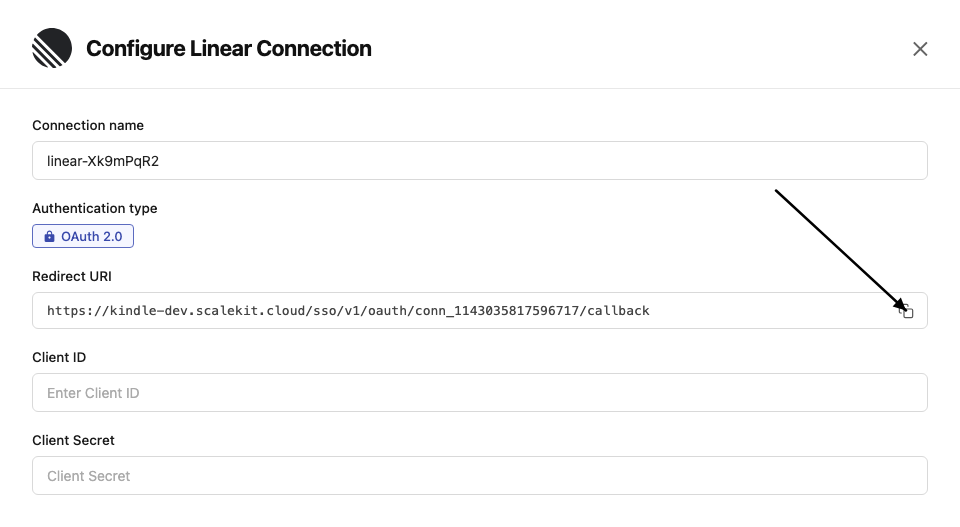
-
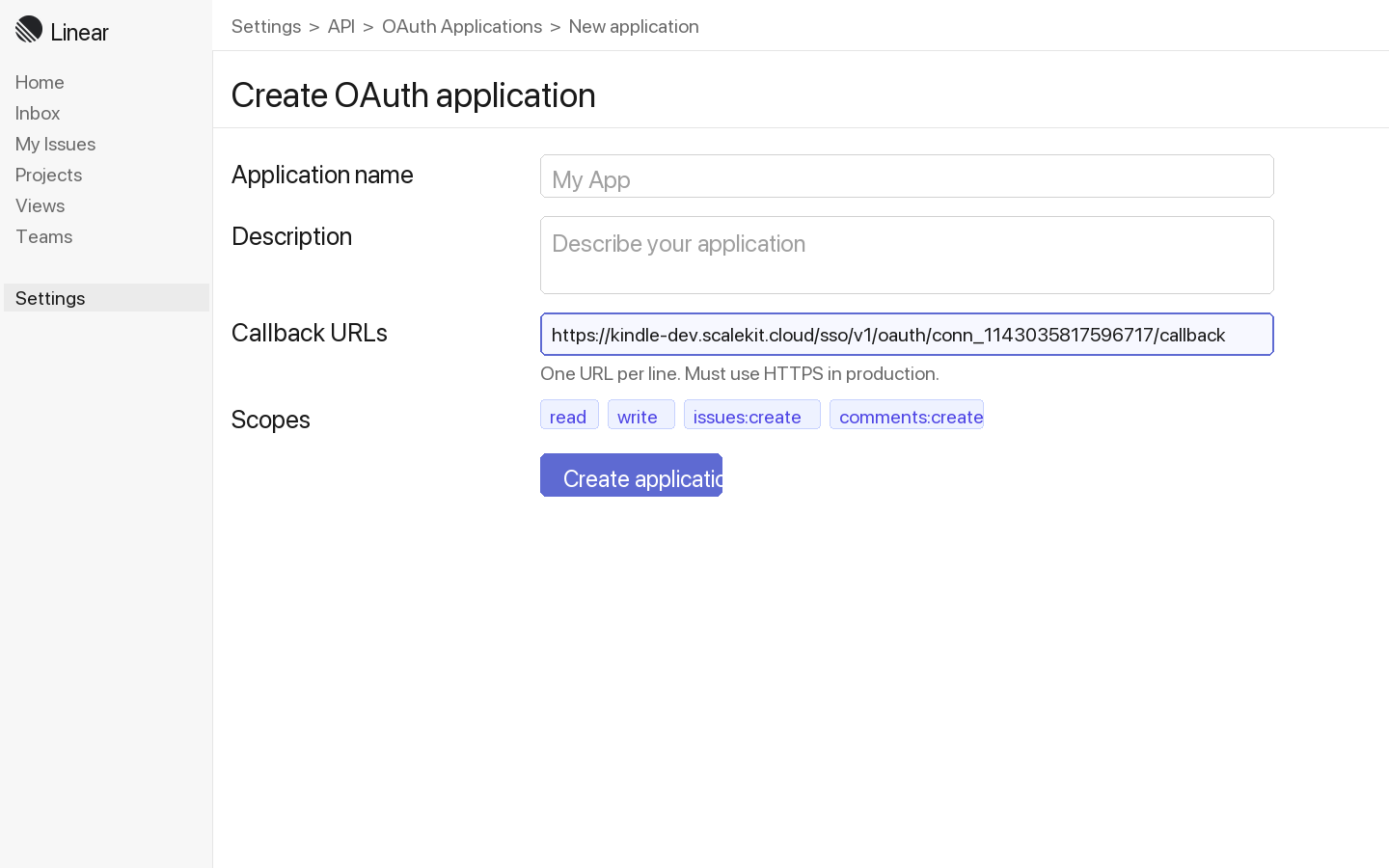
Log in to Linear and go to Settings → API → OAuth applications.
-
Click New application, enter an application name and description, then paste the redirect URI from Scalekit into the Callback URLs field. Click Create application.
-
-
Get client credentials
- In your Linear OAuth application, copy the Client ID and Client Secret.
-
Add credentials in Scalekit
-
In Scalekit dashboard, go to AgentKit > Connections and open the connection you created.
-
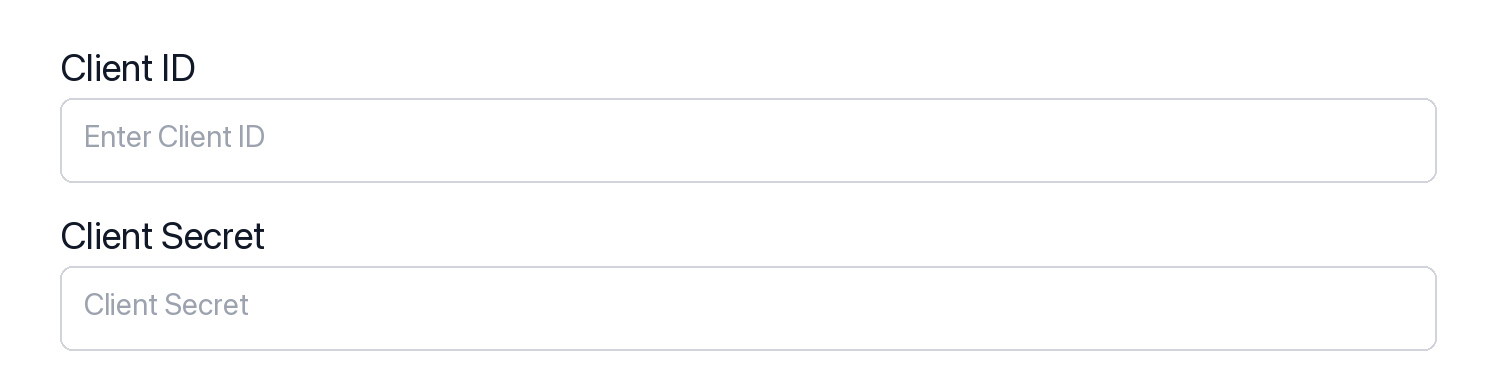
Enter your credentials:
- Client ID (from above)
- Client Secret (from above)
- Permissions (scopes — see Linear OAuth scopes reference)
-
Click Save.
-
-
-
Authorize and make your first call
Section titled “Authorize and make your first call”quickstart.ts import { ScalekitClient } from '@scalekit-sdk/node'import 'dotenv/config'const scalekit = new ScalekitClient(process.env.SCALEKIT_ENV_URL,process.env.SCALEKIT_CLIENT_ID,process.env.SCALEKIT_CLIENT_SECRET,)const actions = scalekit.actionsconst connector = 'linear'const identifier = 'user_123'// Generate an authorization link for the userconst { link } = await actions.getAuthorizationLink({ connectionName: connector, identifier })console.log('Authorize Linear:', link)process.stdout.write('Press Enter after authorizing...')await new Promise(r => process.stdin.once('data', r))// Make your first callconst result = await actions.executeTool({connector,identifier,toolName: 'linear_issues_list',toolInput: {},})console.log(result)quickstart.py import osfrom scalekit.client import ScalekitClientfrom dotenv import load_dotenvload_dotenv()scalekit_client = ScalekitClient(env_url=os.getenv("SCALEKIT_ENV_URL"),client_id=os.getenv("SCALEKIT_CLIENT_ID"),client_secret=os.getenv("SCALEKIT_CLIENT_SECRET"),)actions = scalekit_client.actionsconnection_name = "linear"identifier = "user_123"# Generate an authorization link for the userlink_response = actions.get_authorization_link(connection_name=connection_name,identifier=identifier,)print("Authorize Linear:", link_response.link)input("Press Enter after authorizing...")# Make your first callresult = actions.execute_tool(tool_input={},tool_name="linear_issues_list",connection_name=connection_name,identifier=identifier,)print(result)
What you can do
Section titled “What you can do”Connect this agent connector to let your agent:
- Read issues — fetch issues, projects, cycles, and team details
- Create and update issues — file new issues, update status, set priority, and assign teammates
- Manage projects — create and update project metadata and milestones
- Search — find issues by keyword, assignee, label, or state
Common workflows
Section titled “Common workflows”Proxy API call
// Make a GraphQL request via Scalekit proxyconst result = await actions.request({ connectionName: 'linear', identifier: 'user_123', path: '/graphql', method: 'POST', body: JSON.stringify({ query: '{ viewer { id name email } }' }),});console.log(result);import json
# Make a GraphQL request via Scalekit proxyresult = actions.request( connection_name='linear', identifier='user_123', path="/graphql", method="POST", body=json.dumps({"query": "{ viewer { id name email } }"}))print(result)Execute a tool
const result = await actions.executeTool({ connector: 'linear', identifier: 'user_123', toolName: 'linear_graphql_query', toolInput: { query: '{ viewer { id name email } }', },});console.log(result);result = actions.execute_tool( connection_name='linear', identifier='user_123', tool_name='linear_graphql_query', tool_input={ "query": "{ viewer { id name email } }", },)print(result)Tool list
Section titled “Tool list”Use the exact tool names from the Tool list below when you call execute_tool. If you’re not sure which name to use, list the tools available for the current user first.
linear_attachment_create
#
Create an external link attachment on a Linear issue. 4 params
Create an external link attachment on a Linear issue.
issueId string required ID of the issue to attach the link to title string required Attachment title url string required URL of the attachment subtitle string optional Subtitle or description for the attachment linear_attachment_delete
#
Delete an attachment from a Linear issue. 1 param
Delete an attachment from a Linear issue.
attachmentId string required ID of the attachment to delete linear_attachment_update
#
Update the title or subtitle of an existing attachment on a Linear issue. 3 params
Update the title or subtitle of an existing attachment on a Linear issue.
attachmentId string required ID of the attachment to update title string required New title for the attachment subtitle string optional New subtitle or description linear_comment_create
#
Create a comment on a Linear issue. 2 params
Create a comment on a Linear issue.
body string required Comment text issueId string required ID of the issue to comment on linear_comment_delete
#
Permanently delete a comment from a Linear issue. 1 param
Permanently delete a comment from a Linear issue.
commentId string required ID of the comment to delete linear_comment_get
#
Retrieve a single comment by its ID. 1 param
Retrieve a single comment by its ID.
commentId string required ID of the comment to retrieve linear_comment_update
#
Update the text body of an existing Linear comment. 2 params
Update the text body of an existing Linear comment.
body string required Updated comment text commentId string required ID of the comment to update linear_comments_list
#
List all comments on a specific Linear issue with pagination support. 3 params
List all comments on a specific Linear issue with pagination support.
issueId string required ID of the issue to list comments for after string optional Pagination cursor for fetching the next page first integer optional Number of comments to return linear_cycle_create
#
Create a new cycle (sprint) for a Linear team. Requires a team ID, start date, and end date. 5 params
Create a new cycle (sprint) for a Linear team. Requires a team ID, start date, and end date.
endsAt string required Cycle end date-time in ISO 8601 format startsAt string required Cycle start date-time in ISO 8601 format teamId string required ID of the team to create the cycle in description string optional Optional description of the cycle name string optional Optional custom name for the cycle linear_cycle_get
#
Get a specific Linear cycle by ID, including its issues. 1 param
Get a specific Linear cycle by ID, including its issues.
cycleId string required ID of the cycle to retrieve linear_cycle_issues_list
#
List all issues in a specific Linear cycle with pagination support. 3 params
List all issues in a specific Linear cycle with pagination support.
cycleId string required ID of the cycle to list issues for after string optional Pagination cursor for fetching the next page first integer optional Number of issues to return linear_cycle_update
#
Update an existing cycle (sprint) in Linear. 5 params
Update an existing cycle (sprint) in Linear.
cycleId string required ID of the cycle to update description string optional New description for the cycle endsAt string optional New end date-time in ISO 8601 format name string optional New name for the cycle startsAt string optional New start date-time in ISO 8601 format linear_cycles_list
#
List cycles (sprints) for a Linear team with pagination support. 3 params
List cycles (sprints) for a Linear team with pagination support.
teamId string required Team ID to list cycles for after string optional Pagination cursor for fetching the next page first integer optional Number of cycles to return linear_graphql_query
#
Execute a custom GraphQL query or mutation against the Linear API. Allows running any valid GraphQL operation with variables support for advanced use cases. 2 params
Execute a custom GraphQL query or mutation against the Linear API. Allows running any valid GraphQL operation with variables support for advanced use cases.
query string required The GraphQL query or mutation to execute variables object optional Variables to pass to the GraphQL query linear_issue_archive
#
Archive a Linear issue by ID using the issueArchive mutation. 1 param
Archive a Linear issue by ID using the issueArchive mutation.
issueId string required ID of the issue to archive linear_issue_create
#
Create a new issue in Linear using the issueCreate mutation. Requires a team ID and title at minimum. 9 params
Create a new issue in Linear using the issueCreate mutation. Requires a team ID and title at minimum.
teamId string required ID of the team to create the issue in title string required Title of the issue assigneeId string optional ID of the user to assign the issue to description string optional Description of the issue estimate string optional Story point estimate for the issue labelIds array optional Array of label IDs to apply to the issue priority string optional Priority level of the issue (1-4, where 1 is urgent) projectId string optional ID of the project to associate the issue with stateId string optional ID of the workflow state to set linear_issue_delete
#
Permanently delete a Linear issue by ID using the issueDelete mutation. 1 param
Permanently delete a Linear issue by ID using the issueDelete mutation.
issueId string required ID of the issue to delete linear_issue_get
#
Get a single Linear issue by ID, including its state, assignee, team, labels, and project details. 1 param
Get a single Linear issue by ID, including its state, assignee, team, labels, and project details.
issueId string required ID of the issue to retrieve linear_issue_relation_create
#
Create a relation between two issues. Valid types: blocks, duplicate, related, similar. 3 params
Create a relation between two issues. Valid types: blocks, duplicate, related, similar.
issueId string required ID of the issue relatedIssueId string required ID of the related issue type string required Relation type: blocks, duplicate, related, or similar linear_issue_relation_delete
#
Delete an issue relation by its ID. 1 param
Delete an issue relation by its ID.
relationId string required ID of the issue relation to delete linear_issue_relations_list
#
List all relations for a specific issue (blocks, duplicates, related, similar). 1 param
List all relations for a specific issue (blocks, duplicates, related, similar).
issueId string required ID of the issue to get relations for linear_issue_search
#
Full-text search for issues across the workspace by query string. 3 params
Full-text search for issues across the workspace by query string.
query string required Text to search for across issue titles and descriptions first integer optional Number of results to return (max 250) teamId string optional Restrict search to a specific team ID linear_issue_unarchive
#
Restore an archived issue back to active status. 1 param
Restore an archived issue back to active status.
issueId string required ID of the archived issue to restore linear_issue_update
#
Update an existing issue in Linear. You can update title, description, priority, state, and assignee. 6 params
Update an existing issue in Linear. You can update title, description, priority, state, and assignee.
issueId string required ID of the issue to update assigneeId string optional ID of the user to assign the issue to description string optional New description for the issue priority string optional Priority level of the issue (1-4, where 1 is urgent) stateId string optional ID of the workflow state to set title string optional New title for the issue linear_issues_list
#
List issues in Linear using the issues query with simple filtering and pagination support. 8 params
List issues in Linear using the issues query with simple filtering and pagination support.
after string optional Cursor for pagination (returns issues after this cursor) assignee string optional Filter by assignee email (e.g., 'user@example.com') before string optional Cursor for pagination (returns issues before this cursor) first integer optional Number of issues to return (pagination) labels array optional Filter by label names (array of strings) priority string optional Filter by priority level (1=Urgent, 2=High, 3=Medium, 4=Low) project string optional Filter by project name (e.g., 'Q4 Goals') state string optional Filter by state name (e.g., 'In Progress', 'Done') linear_label_create
#
Create a new issue label in a Linear team. 4 params
Create a new issue label in a Linear team.
name string required Label name teamId string required Team ID to create the label in color string optional Label color as hex code description string optional Label description linear_labels_list
#
List issue labels in the Linear workspace, optionally filtered by team. 2 params
List issue labels in the Linear workspace, optionally filtered by team.
first integer optional Number of labels to return teamId string optional Filter labels by team ID linear_project_create
#
Create a new project in Linear with optional description, state, and date fields. 6 params
Create a new project in Linear with optional description, state, and date fields.
name string required Name of the project teamIds array required Array of team IDs to associate with the project description string optional Description of the project startDate string optional Start date in YYYY-MM-DD format state string optional Project state: planned, started, paused, completed, cancelled targetDate string optional Target date in YYYY-MM-DD format linear_project_get
#
Get a single Linear project by ID, including teams, members, and associated issues. 1 param
Get a single Linear project by ID, including teams, members, and associated issues.
projectId string required ID of the project to retrieve linear_project_milestone_create
#
Create a new milestone for a project. 4 params
Create a new milestone for a project.
name string required Name of the milestone projectId string required ID of the project to add the milestone to description string optional Description of the milestone targetDate string optional Target completion date (YYYY-MM-DD) linear_project_milestone_delete
#
Delete a project milestone by its ID. 1 param
Delete a project milestone by its ID.
milestoneId string required ID of the milestone to delete linear_project_milestone_update
#
Update an existing project milestone. 4 params
Update an existing project milestone.
milestoneId string required ID of the milestone to update description string optional New description name string optional New name for the milestone targetDate string optional New target date (YYYY-MM-DD) linear_project_milestones_list
#
List milestones for a specific project. 2 params
List milestones for a specific project.
projectId string required ID of the project to list milestones for first integer optional Number of milestones to return linear_project_update
#
Update an existing Linear project's name, description, state, or dates. 6 params
Update an existing Linear project's name, description, state, or dates.
projectId string required ID of the project to update description string optional Updated description of the project name string optional Updated name of the project startDate string optional Updated start date in YYYY-MM-DD format state string optional Updated project state: planned, started, paused, completed, cancelled targetDate string optional Updated target date in YYYY-MM-DD format linear_projects_list
#
List all projects in the Linear workspace with pagination support. 2 params
List all projects in the Linear workspace with pagination support.
after string optional Pagination cursor for fetching the next page first integer optional Number of projects to return linear_roadmaps_list
#
List all roadmaps in the Linear workspace with pagination support. 2 params
List all roadmaps in the Linear workspace with pagination support.
after string optional Pagination cursor for fetching the next page first integer optional Number of roadmaps to return linear_team_create
#
Create a new team in the Linear workspace. 5 params
Create a new team in the Linear workspace.
name string required Name of the team color string optional Team color as hex code description string optional Description of the team key string optional Short identifier key for the team (e.g. PLAT) private boolean optional Whether the team is private linear_team_get
#
Get a single Linear team by ID, including its members and workflow states. 1 param
Get a single Linear team by ID, including its members and workflow states.
teamId string required ID of the team to retrieve linear_team_update
#
Update an existing team's name, description, or settings. 4 params
Update an existing team's name, description, or settings.
teamId string required ID of the team to update color string optional New team color as hex code description string optional New description for the team name string optional New name for the team linear_teams_list
#
List all teams in the Linear workspace with their members and pagination support. 2 params
List all teams in the Linear workspace with their members and pagination support.
after string optional Pagination cursor for fetching the next page first integer optional Number of teams to return linear_test_list
#
List issues in Linear using the issues query with simple filtering and pagination support. 8 params
List issues in Linear using the issues query with simple filtering and pagination support.
after string optional Cursor for pagination (returns issues after this cursor) assignee string optional Filter by assignee email (e.g., 'user@example.com') before string optional Cursor for pagination (returns issues before this cursor) first integer optional Number of issues to return (pagination) labels array optional Filter by label names (array of strings) priority string optional Filter by priority level (1=Urgent, 2=High, 3=Medium, 4=Low) project string optional Filter by project name (e.g., 'Q4 Goals') state string optional Filter by state name (e.g., 'In Progress', 'Done') linear_user_get
#
Retrieve a single Linear user by their ID. 1 param
Retrieve a single Linear user by their ID.
userId string required ID of the user to retrieve linear_users_list
#
List all users in the Linear workspace with pagination support. 2 params
List all users in the Linear workspace with pagination support.
after string optional Pagination cursor for fetching the next page first integer optional Number of users to return linear_viewer_get
#
Get the currently authenticated Linear user (viewer), including their teams. 0 params
Get the currently authenticated Linear user (viewer), including their teams.
linear_webhook_create
#
Create a new webhook for Linear events. Specify the URL and the resource types to subscribe to. 6 params
Create a new webhook for Linear events. Specify the URL and the resource types to subscribe to.
resourceTypes array required List of resource types to subscribe to (e.g. Issue, Comment, Project) url string required The URL to receive webhook payloads enabled boolean optional Whether the webhook is active (default: true) label string optional Human-readable label for the webhook secret string optional Secret token to sign the webhook payload teamId string optional Restrict webhook to a specific team ID linear_webhook_delete
#
Delete a webhook by its ID. 1 param
Delete a webhook by its ID.
webhookId string required ID of the webhook to delete linear_webhook_get
#
Retrieve a single webhook by its ID. 1 param
Retrieve a single webhook by its ID.
webhookId string required ID of the webhook linear_webhook_update
#
Update an existing webhook's URL, resource types, label, or enabled status. 6 params
Update an existing webhook's URL, resource types, label, or enabled status.
webhookId string required ID of the webhook to update enabled boolean optional Enable or disable the webhook label string optional New label for the webhook resourceTypes array optional Updated list of resource types to subscribe to secret string optional New secret token for signing payloads url string optional New URL to receive webhook payloads linear_webhooks_list
#
List all webhooks configured for the current workspace. 2 params
List all webhooks configured for the current workspace.
after string optional Pagination cursor first integer optional Number of webhooks to return linear_workflow_state_create
#
Create a new workflow state for a Linear team. Valid types: backlog, unstarted, started, completed, canceled. 6 params
Create a new workflow state for a Linear team. Valid types: backlog, unstarted, started, completed, canceled.
color string required Color of the state as a hex code name string required Name of the workflow state teamId string required ID of the team to create the state in type string required State type: backlog, unstarted, started, completed, or canceled description string optional Optional description of the state position number optional Position of the state in the workflow linear_workflow_state_get
#
Retrieve a single workflow state by its ID. 1 param
Retrieve a single workflow state by its ID.
stateId string required ID of the workflow state linear_workflow_state_update
#
Update an existing workflow state in Linear. 4 params
Update an existing workflow state in Linear.
stateId string required ID of the workflow state to update color string optional New color as hex code description string optional New description for the state name string optional New name for the state linear_workflow_states_list
#
List workflow states in the Linear workspace, optionally filtered by team. 2 params
List workflow states in the Linear workspace, optionally filtered by team.
first integer optional Number of workflow states to return teamId string optional Filter by team ID