


Apollo connector
OAuth 2.0 crmsalesConnect to Apollo.io to search and enrich B2B contacts and accounts, manage CRM contacts, and automate outreach sequences.
Apollo connector
-
Install the SDK
Section titled “Install the SDK”Terminal window npm install @scalekit-sdk/nodeTerminal window pip install scalekit -
Set your credentials
Section titled “Set your credentials”Add your Scalekit credentials to your
.envfile. Find values in app.scalekit.com > Developers > API Credentials..env SCALEKIT_ENVIRONMENT_URL=<your-environment-url>SCALEKIT_CLIENT_ID=<your-client-id>SCALEKIT_CLIENT_SECRET=<your-client-secret> -
Set up the connector
Section titled “Set up the connector”Register your Apollo credentials with Scalekit so it handles the token lifecycle. You do this once per environment.
Dashboard setup steps
Register your Scalekit environment with the Apollo connector so Scalekit handles the authentication flow and token lifecycle for you. The connection name you create will be used to identify and invoke the connection programmatically.
-
Create a connection in Scalekit
-
In Scalekit dashboard, go to AgentKit > Connections > Create Connection. Find Apollo and click Create.
-
Click Use your own credentials and copy the Redirect URI. It looks like:
https://<SCALEKIT_ENVIRONMENT_URL>/sso/v1/oauth/<CONNECTION_ID>/callbackScope Required for contact_readReading contact details contact_writeCreating contacts contact_updateUpdating contacts account_readReading account details account_writeCreating accounts organizations_enrichEnriching accounts with Apollo data person_readEnriching contacts (paid plans only) emailer_campaigns_searchListing email sequences accounts_searchSearching accounts (paid plans only) contacts_searchSearching contacts (paid plans only)
Keep this tab open — you’ll return to it in step 3.
-
-
Register an OAuth application in Apollo
-
Go to Apollo’s OAuth registration page and sign in with your Apollo account.
-
Fill in the registration form:
- Application name — a name to identify your app (e.g.,
My Sales Agent) - Description — brief description of what your app does
- Redirect URIs — paste the redirect URI you copied from Scalekit
- Application name — a name to identify your app (e.g.,
-
Under Scopes, select the permissions your agent needs. Use the table below to decide:
Scope Required for contact_readReading contact details contact_writeCreating contacts contact_updateUpdating contacts account_readReading account details account_writeCreating accounts organizations_enrichEnriching accounts with Apollo data person_readEnriching contacts (paid plans only) emailer_campaigns_searchListing email sequences accounts_searchSearching accounts (paid plans only) contacts_searchSearching contacts (paid plans only) 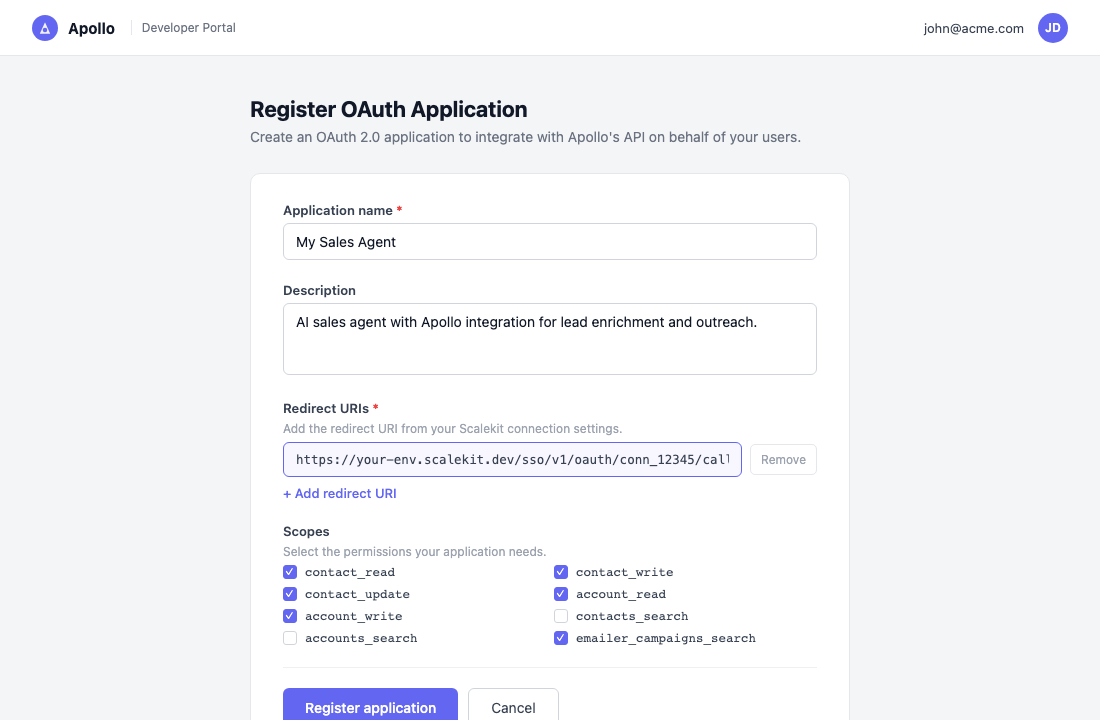
-
Click Register application.
-
-
Copy your client credentials
After registering, Apollo shows the Client ID and Client Secret for your application.
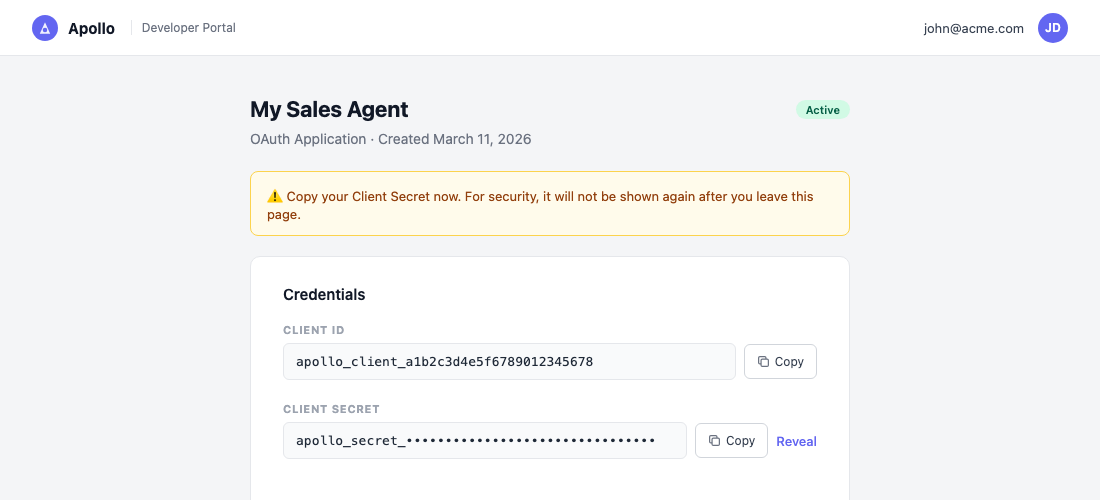
Copy both values now. The Client Secret is shown only once — you cannot retrieve it again after navigating away.
-
Add credentials in Scalekit
-
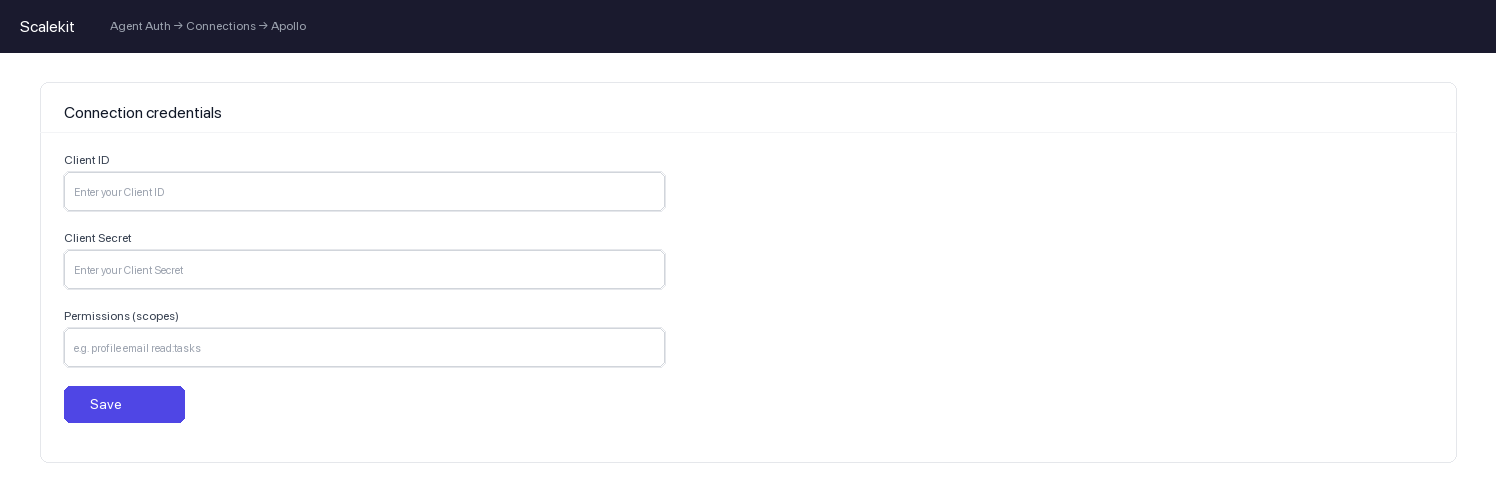
Return to Scalekit dashboard → AgentKit > Connections and open the connection you created in step 1.
-
Enter the following:
- Client ID — from Apollo
- Client Secret — from Apollo
- Permissions — the same scopes you selected in Apollo
-
Click Save.
-
-
-
Authorize and make your first call
Section titled “Authorize and make your first call”quickstart.ts import { ScalekitClient } from '@scalekit-sdk/node'import 'dotenv/config'const scalekit = new ScalekitClient(process.env.SCALEKIT_ENV_URL,process.env.SCALEKIT_CLIENT_ID,process.env.SCALEKIT_CLIENT_SECRET,)const actions = scalekit.actionsconst connector = 'apollo'const identifier = 'user_123'// Generate an authorization link for the userconst { link } = await actions.getAuthorizationLink({ connectionName: connector, identifier })console.log('Authorize Apollo:', link)process.stdout.write('Press Enter after authorizing...')await new Promise(r => process.stdin.once('data', r))// Make your first callconst result = await actions.executeTool({connector,identifier,toolName: 'apollo_list_sequences',toolInput: {},})console.log(result)quickstart.py import osfrom scalekit.client import ScalekitClientfrom dotenv import load_dotenvload_dotenv()scalekit_client = ScalekitClient(env_url=os.getenv("SCALEKIT_ENV_URL"),client_id=os.getenv("SCALEKIT_CLIENT_ID"),client_secret=os.getenv("SCALEKIT_CLIENT_SECRET"),)actions = scalekit_client.actionsconnection_name = "apollo"identifier = "user_123"# Generate an authorization link for the userlink_response = actions.get_authorization_link(connection_name=connection_name,identifier=identifier,)print("Authorize Apollo:", link_response.link)input("Press Enter after authorizing...")# Make your first callresult = actions.execute_tool(tool_input={},tool_name="apollo_list_sequences",connection_name=connection_name,identifier=identifier,)print(result)
What you can do
Section titled “What you can do”Connect this agent connector to let your agent:
- Create account, contact — Create a new account (company) record in your Apollo CRM
- List sequences — List available email sequences (Apollo Sequences / Emailer Campaigns) in your Apollo account
- Update contact — Update properties or CRM stage of an existing Apollo contact record by contact ID
- Get account, contact — Retrieve the full profile of a company account from Apollo by its ID
- Contact enrich — Enrich a contact using Apollo’s people matching engine
- Search contacts, accounts — Search contacts in your Apollo CRM using filters such as job title, company, and sort order
Common workflows
Section titled “Common workflows”Proxy API call
const result = await actions.request({ connectionName: 'apollo', identifier: 'user_123', path: '/api/v1/contacts/search', method: 'POST',});console.log(result.data);result = actions.request( connection_name='apollo', identifier='user_123', path="/api/v1/contacts/search", method="POST",)print(result)Execute a tool
const result = await actions.executeTool({ connector: 'apollo', identifier: 'user_123', toolName: 'apollo_create_account', toolInput: {},});console.log(result);result = actions.execute_tool( connection_name='apollo', identifier='user_123', tool_name='apollo_create_account', tool_input={},)print(result)Tool list
Section titled “Tool list”Use the exact tool names from the Tool list below when you call execute_tool. If you’re not sure which name to use, list the tools available for the current user first.
apollo_create_account
#
Create a new account (company) record in your Apollo CRM. Accounts represent organizations and can be linked to contacts. Check for duplicates before creating to avoid double entries. 5 params
Create a new account (company) record in your Apollo CRM. Accounts represent organizations and can be linked to contacts. Check for duplicates before creating to avoid double entries.
name string required Name of the company/account domain string optional Website domain of the company linkedin_url string optional LinkedIn company page URL phone_number string optional Main phone number of the company raw_address string optional Physical address of the company apollo_create_contact
#
Create a new contact record in your Apollo CRM. The contact will appear in your Apollo contacts list and can be enrolled in sequences. Check for duplicates before creating to avoid double entries. 8 params
Create a new contact record in your Apollo CRM. The contact will appear in your Apollo contacts list and can be enrolled in sequences. Check for duplicates before creating to avoid double entries.
first_name string required First name of the contact last_name string required Last name of the contact account_id string optional Apollo account ID to associate this contact with email string optional Email address of the contact linkedin_url string optional LinkedIn profile URL of the contact organization_name string optional Company name the contact works at phone string optional Phone number of the contact title string optional Job title of the contact apollo_enrich_account
#
Enrich a company/account record with Apollo firmographic data using the company's website domain or name. Returns verified employee count, revenue estimates, industry, tech stack, funding rounds, and social profiles. Consumes Apollo credits per match. 2 params
Enrich a company/account record with Apollo firmographic data using the company's website domain or name. Returns verified employee count, revenue estimates, industry, tech stack, funding rounds, and social profiles. Consumes Apollo credits per match.
domain string optional Website domain of the company to enrich (e.g., acmecorp.com) name string optional Company name to enrich (used if domain is not available) apollo_enrich_contact
#
Enrich a contact using Apollo's people matching engine. Provide an email address or name + company to retrieve a verified contact profile. Revealing personal emails or phone numbers consumes additional Apollo credits per successful match. 7 params
Enrich a contact using Apollo's people matching engine. Provide an email address or name + company to retrieve a verified contact profile. Revealing personal emails or phone numbers consumes additional Apollo credits per successful match.
email string optional Work email address of the contact to enrich first_name string optional First name of the contact to enrich last_name string optional Last name of the contact to enrich linkedin_url string optional LinkedIn profile URL for precise matching organization_name string optional Company name to assist in matching reveal_personal_emails boolean optional Attempt to reveal personal email addresses (consumes extra Apollo credits) reveal_phone_number boolean optional Attempt to reveal direct phone numbers (consumes extra Apollo credits) apollo_get_account
#
Retrieve the full profile of a company account from Apollo by its ID. Returns detailed firmographic data including employee count, revenue estimates, industry, tech stack, funding information, and social profiles. 1 param
Retrieve the full profile of a company account from Apollo by its ID. Returns detailed firmographic data including employee count, revenue estimates, industry, tech stack, funding information, and social profiles.
account_id string required The Apollo account (organization) ID to retrieve apollo_get_contact
#
Retrieve the full profile of a contact from Apollo by their ID. Returns detailed professional information including email, phone, LinkedIn URL, employment history, education, and social profiles. 1 param
Retrieve the full profile of a contact from Apollo by their ID. Returns detailed professional information including email, phone, LinkedIn URL, employment history, education, and social profiles.
contact_id string required The Apollo contact ID to retrieve apollo_list_sequences
#
List available email sequences (Apollo Sequences / Emailer Campaigns) in your Apollo account. Supports filtering by name and pagination. Returns sequence ID, name, status, and step count. 3 params
List available email sequences (Apollo Sequences / Emailer Campaigns) in your Apollo account. Supports filtering by name and pagination. Returns sequence ID, name, status, and step count.
page integer optional Page number for pagination (starts at 1) per_page integer optional Number of sequences to return per page (max 100) search string optional Filter sequences by name (partial match) apollo_search_accounts
#
Search Apollo's company database using firmographic filters such as company name, industry, employee count range, revenue range, and location. Returns matching account records with company details. 7 params
Search Apollo's company database using firmographic filters such as company name, industry, employee count range, revenue range, and location. Returns matching account records with company details.
company_name string optional Filter accounts by company name (partial match supported) employee_ranges string optional Comma-separated employee count ranges (e.g., 1,10,11,50,51,200) industry string optional Filter accounts by industry vertical keywords string optional Keyword search across company name, description, and domain location string optional Filter accounts by headquarters city, state, or country page integer optional Page number for pagination (starts at 1) per_page integer optional Number of accounts to return per page (max 100) apollo_search_contacts
#
Search contacts in your Apollo CRM using filters such as job title, company, and sort order. Returns matching contact records with professional details. Results are paginated. 8 params
Search contacts in your Apollo CRM using filters such as job title, company, and sort order. Returns matching contact records with professional details. Results are paginated.
company_name string optional Filter contacts by company name industry string optional Filter contacts by their company's industry (e.g., Software, Healthcare) keywords string optional Full-text keyword search across contact name, title, company, and bio location string optional Filter contacts by city, state, or country page integer optional Page number for pagination (starts at 1) per_page integer optional Number of contacts to return per page (max 100) seniority string optional Filter by seniority level (e.g., c_suite, vp, director, manager, senior, entry) title string optional Filter contacts by job title keywords (e.g., VP of Sales) apollo_update_contact
#
Update properties or CRM stage of an existing Apollo contact record by contact ID. Only the provided fields will be updated; omitted fields remain unchanged. 9 params
Update properties or CRM stage of an existing Apollo contact record by contact ID. Only the provided fields will be updated; omitted fields remain unchanged.
contact_id string required The Apollo contact ID to update contact_stage_id string optional Apollo CRM stage ID to move the contact to email string optional Updated email address for the contact first_name string optional Updated first name last_name string optional Updated last name linkedin_url string optional Updated LinkedIn profile URL organization_name string optional Updated company name phone string optional Updated phone number title string optional Updated job title