


Airtable connector
OAuth 2.0 project_managementdataanalyticsConnect to Airtable. Manage databases, tables, records, and collaborate on structured data
Airtable connector
-
Install the SDK
Section titled “Install the SDK”Terminal window npm install @scalekit-sdk/nodeTerminal window pip install scalekit -
Set your credentials
Section titled “Set your credentials”Add your Scalekit credentials to your
.envfile. Find values in app.scalekit.com > Developers > API Credentials..env SCALEKIT_ENVIRONMENT_URL=<your-environment-url>SCALEKIT_CLIENT_ID=<your-client-id>SCALEKIT_CLIENT_SECRET=<your-client-secret> -
Set up the connector
Section titled “Set up the connector”Register your Airtable credentials with Scalekit so it handles the token lifecycle. You do this once per environment.
Dashboard setup steps
Register your Scalekit environment with the Airtable connector so Scalekit handles the authentication flow and token lifecycle for you. The connection name you create will be used to identify and invoke the connection programmatically. Then complete the configuration in your application as follows:
-
Create the Airtable connection in Scalekit
-
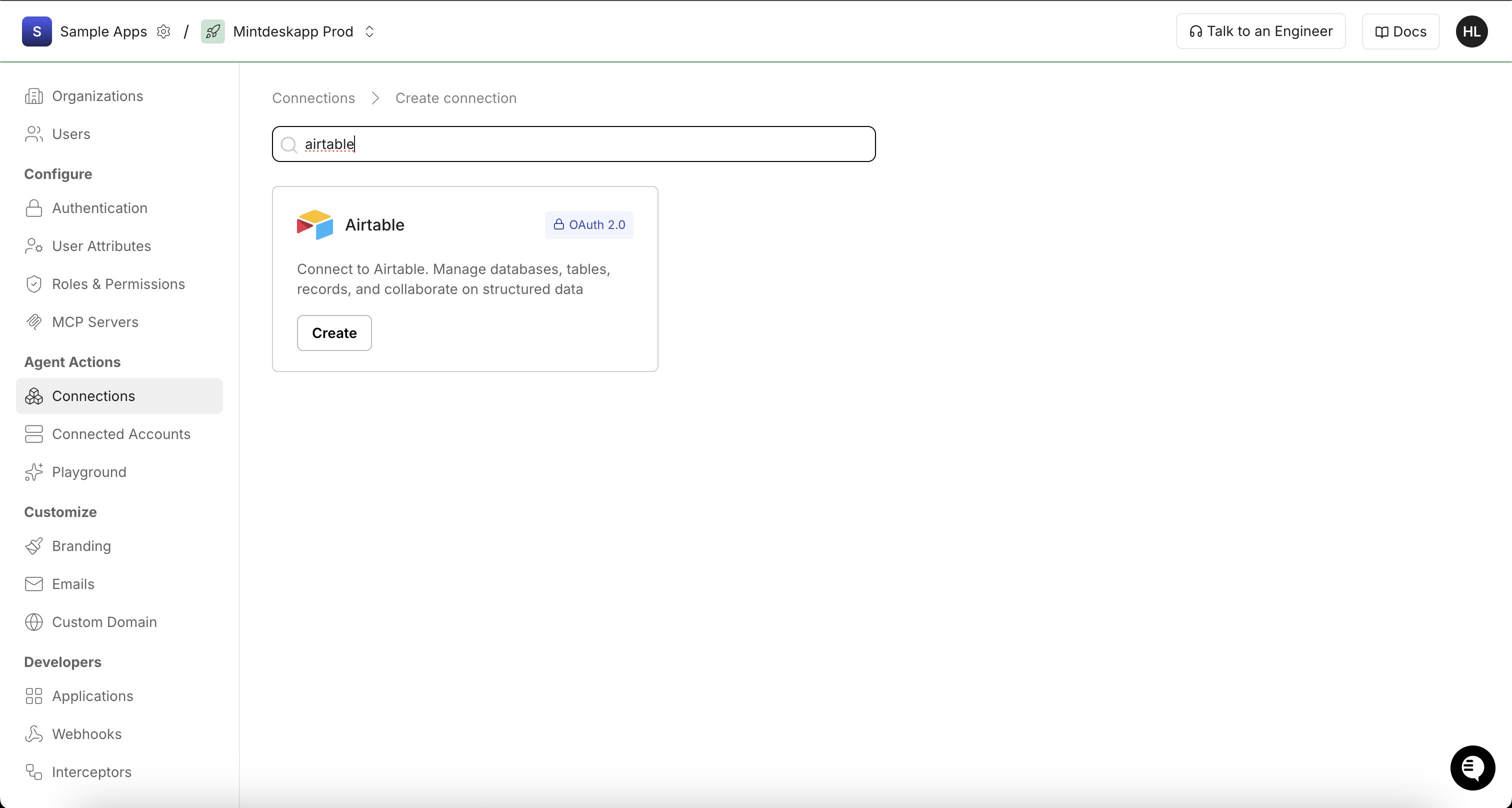
In Scalekit dashboard, go to AgentKit > Connections > Create Connection. Search for Airtable and click Create.
-
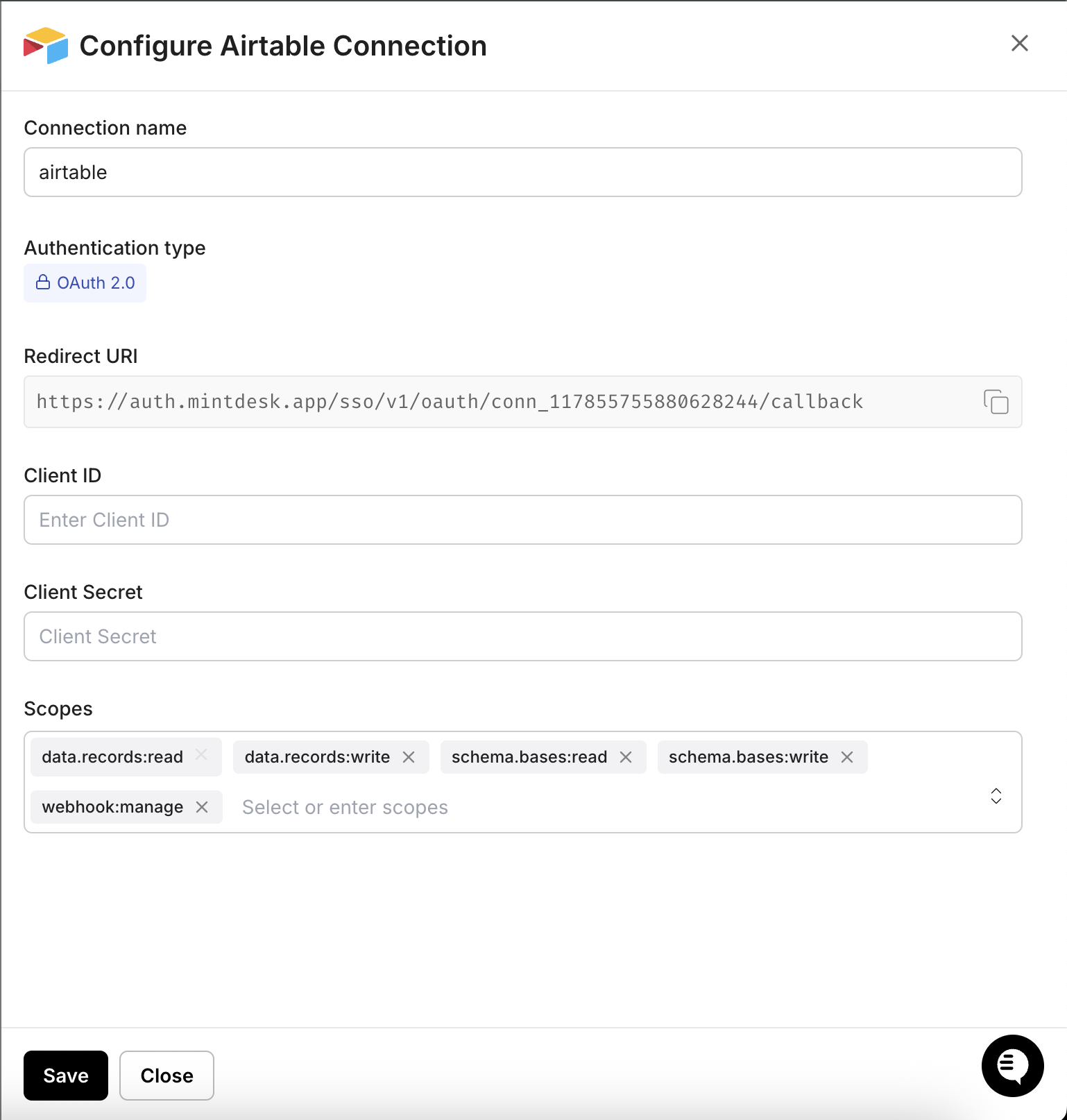
In the Configure Airtable Connection dialog, copy the Redirect URI. You will need this when registering your OAuth integration in Airtable.
-
-
Register an OAuth integration in Airtable
-
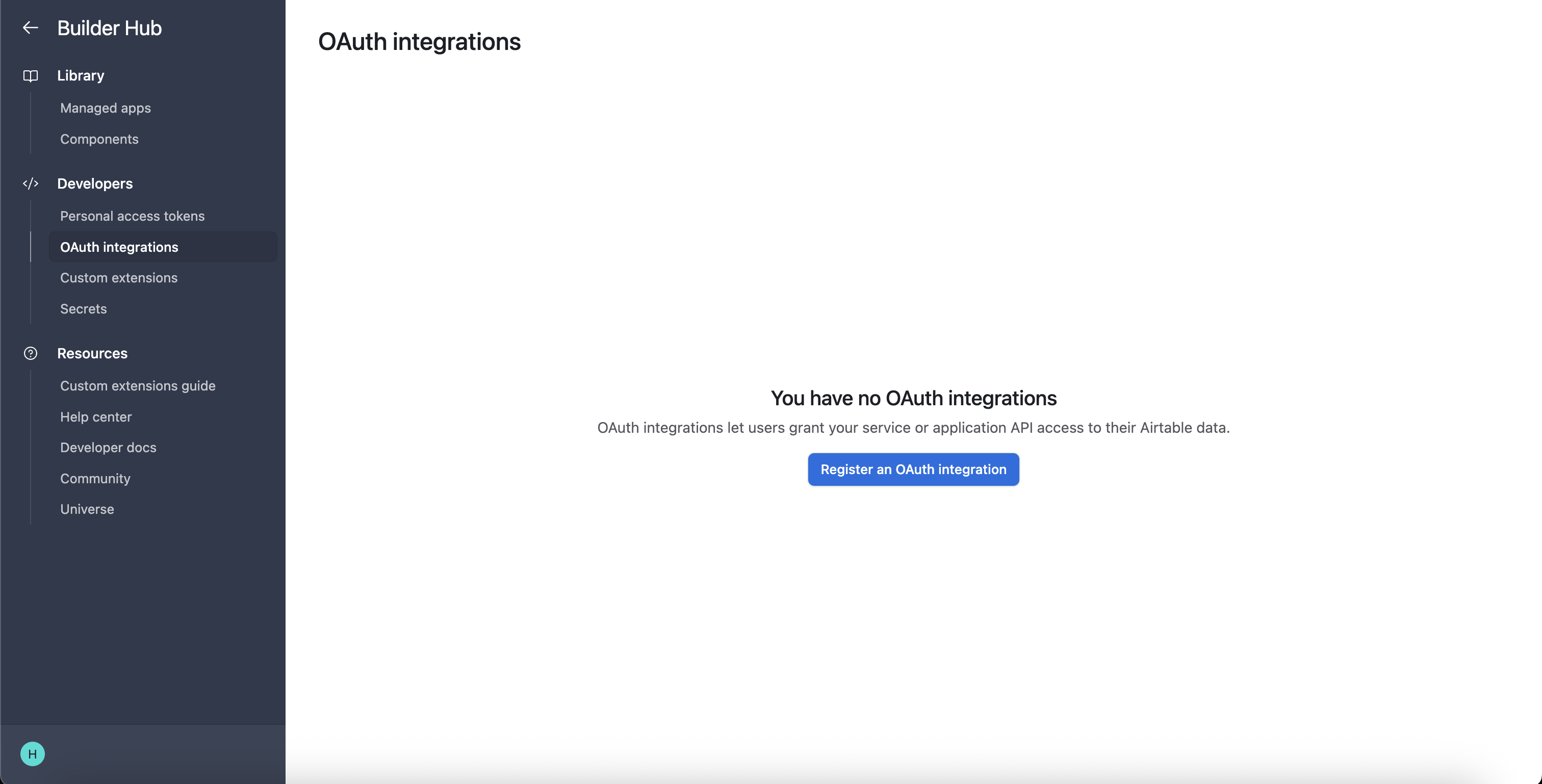
Go to the Airtable Builder Hub and navigate to OAuth integrations. Click Register an OAuth integration.
-
Fill in your integration details (name, description, and other required fields).
-
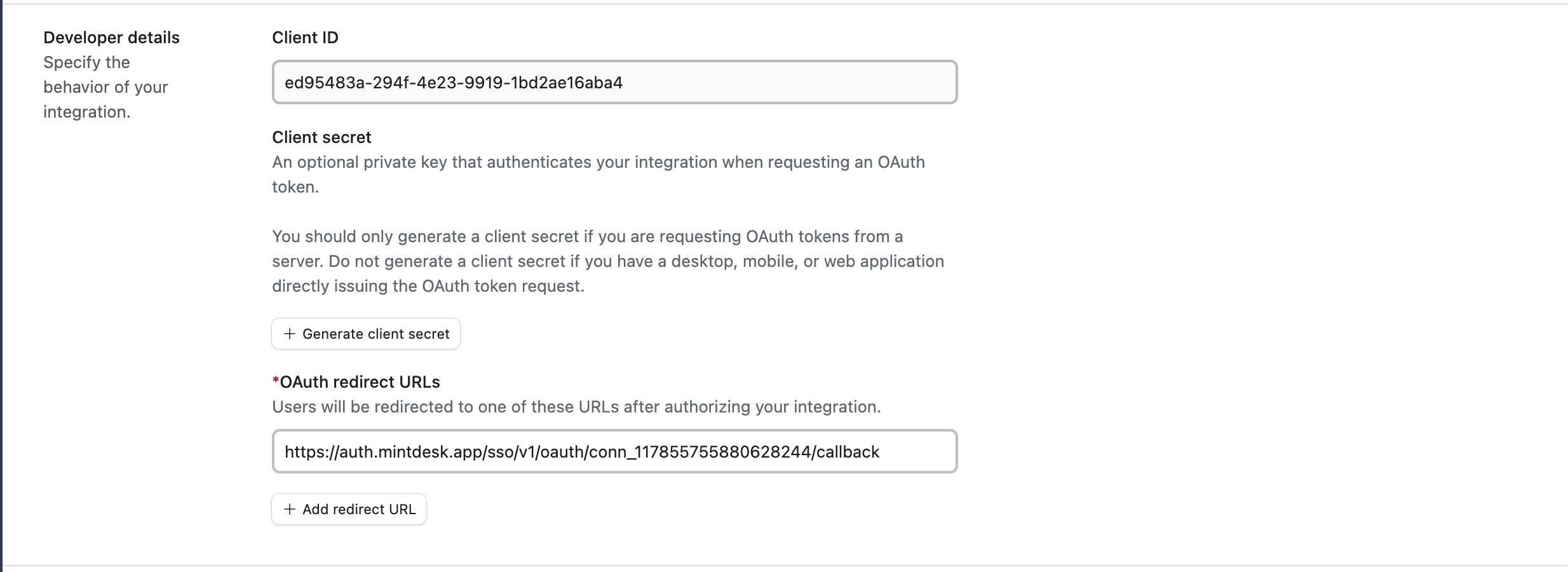
Under OAuth redirect URLs, paste the redirect URI you copied from the Scalekit dashboard.
-
-
Get your client credentials
-
On your OAuth integration page in the Airtable Builder Hub, find the Developer details section.
-
Copy the Client ID.
-
Click Generate client secret and copy the secret value immediately.
-
-
Add credentials in Scalekit
-
In Scalekit dashboard, go to AgentKit > Connections and open the Airtable connection you created.
-
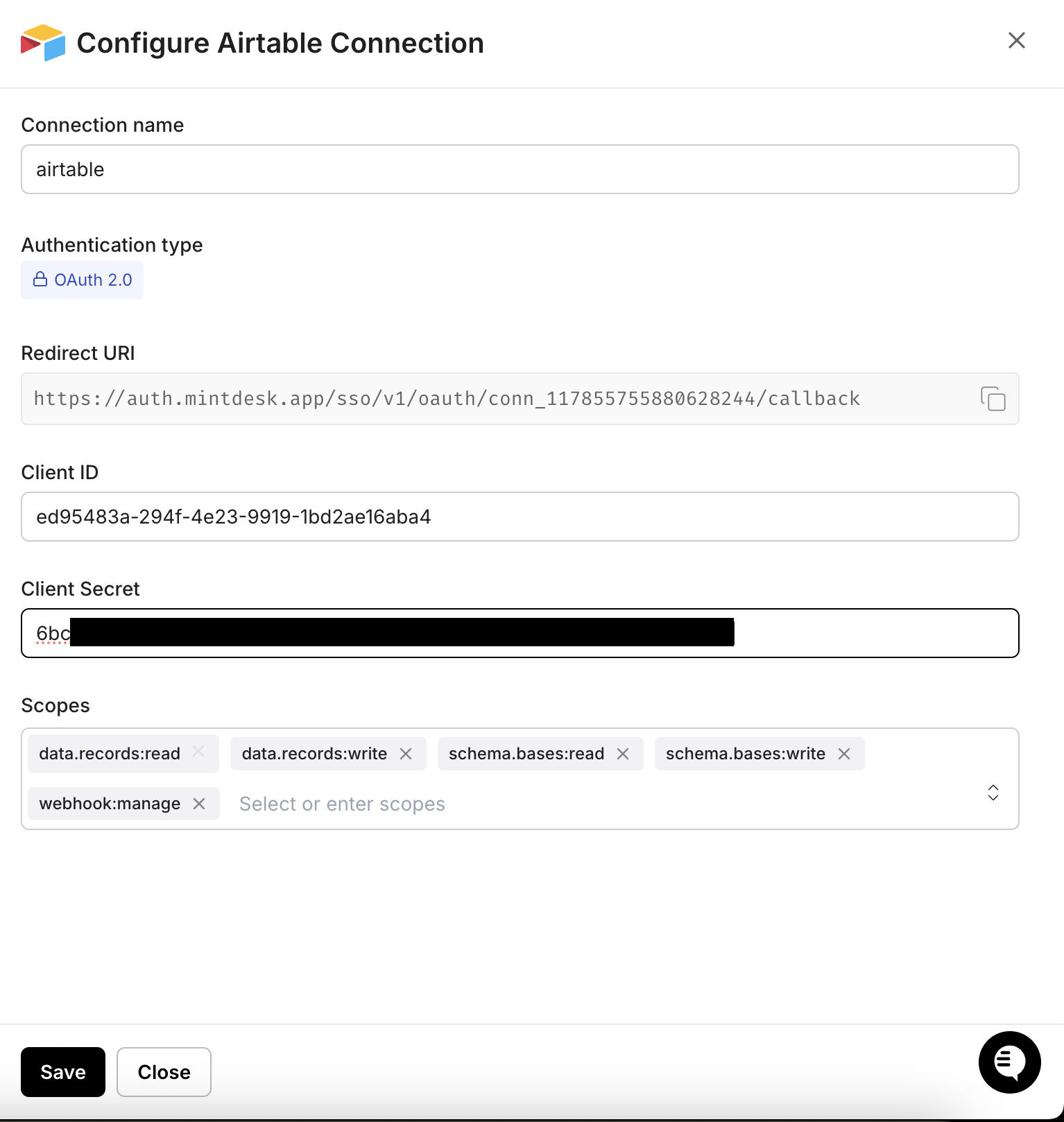
Enter your credentials:
- Client ID — from the Airtable developer details
- Client Secret — the generated secret from Airtable
- Scopes — select the permissions your app needs (for example,
data.records:read,data.records:write,schema.bases:read,schema.bases:write,webhook.manage). See Airtable OAuth scopes reference for the full list.
-
Click Save.
-
-
-
Authorize and make your first call
Section titled “Authorize and make your first call”quickstart.ts import { ScalekitClient } from '@scalekit-sdk/node'import 'dotenv/config'const scalekit = new ScalekitClient(process.env.SCALEKIT_ENV_URL,process.env.SCALEKIT_CLIENT_ID,process.env.SCALEKIT_CLIENT_SECRET,)const actions = scalekit.actionsconst connector = 'airtable'const identifier = 'user_123'// Generate an authorization link for the userconst { link } = await actions.getAuthorizationLink({ connectionName: connector, identifier })console.log('Authorize Airtable:', link)process.stdout.write('Press Enter after authorizing...')await new Promise(r => process.stdin.once('data', r))// Make your first API call through the proxyconst result = await actions.request({connectionName: connector,identifier,path: '/v0/meta/whoami',method: 'GET',})console.log(result)quickstart.py import osfrom scalekit.client import ScalekitClientfrom dotenv import load_dotenvload_dotenv()scalekit_client = ScalekitClient(env_url=os.getenv("SCALEKIT_ENV_URL"),client_id=os.getenv("SCALEKIT_CLIENT_ID"),client_secret=os.getenv("SCALEKIT_CLIENT_SECRET"),)actions = scalekit_client.actionsconnection_name = "airtable"identifier = "user_123"# Generate an authorization link for the userlink_response = actions.get_authorization_link(connection_name=connection_name,identifier=identifier,)print("Authorize Airtable:", link_response.link)input("Press Enter after authorizing...")# Make your first API call through the proxyresult = actions.request(connection_name=connection_name,identifier=identifier,path="/v0/meta/whoami",method="GET",)print(result)
Common workflows
Section titled “Common workflows”Proxy API call
const result = await actions.request({ connectionName: 'airtable', identifier: 'user_123', path: '/v0/meta/whoami', method: 'GET',});console.log(result);result = actions.request( connection_name='airtable', identifier='user_123', path="/v0/meta/whoami", method="GET",)print(result)Execute a tool
const result = await actions.executeTool({ connector: 'airtable', identifier: 'user_123', toolName: 'airtable_list', toolInput: {},});console.log(result);result = actions.execute_tool( connection_name='airtable', identifier='user_123', tool_name='airtable_list', tool_input={},)print(result)