


Supadata connector
API Key dataanalyticsConnect with Supadata to extract transcripts, metadata, and structured content from YouTube, social media, and the web using AI.
Supadata connector
-
Install the SDK
Section titled “Install the SDK”Terminal window npm install @scalekit-sdk/nodeTerminal window pip install scalekit -
Set your credentials
Section titled “Set your credentials”Add your Scalekit credentials to your
.envfile. Find values in app.scalekit.com > Developers > API Credentials..env SCALEKIT_ENVIRONMENT_URL=<your-environment-url>SCALEKIT_CLIENT_ID=<your-client-id>SCALEKIT_CLIENT_SECRET=<your-client-secret> -
Set up the connector
Section titled “Set up the connector”Register your Supadata credentials with Scalekit so it can authenticate requests on your behalf. You do this once per environment.
Dashboard setup steps
Register your Scalekit environment with the Supadata connector so Scalekit can proxy API requests and inject your API key automatically. Unlike OAuth connectors, Supadata uses API key authentication — there is no redirect URI or OAuth flow.
-
Get a Supadata API key
Your Supadata API key is generated automatically when you create an account.
- Go to dash.supadata.ai and sign up or sign in. No credit card is required for the free tier.
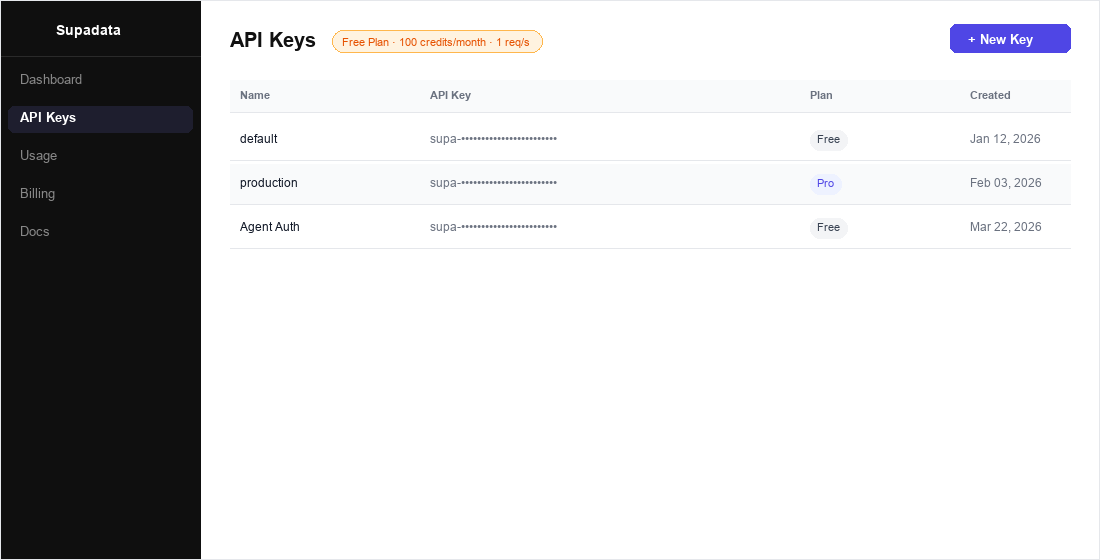
- After signing in, click API Keys in the left sidebar.
- Your auto-generated key is listed in the table. Click the key row to reveal or copy it.
- To create a new dedicated key for this integration, click + New Key, give it a name (e.g.,
Agent Auth), and click Create.
-
Create a connection in Scalekit
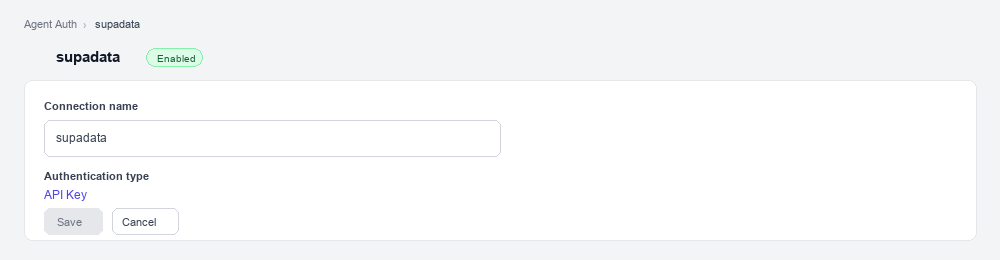
- In Scalekit dashboard, go to AgentKit > Connections > Create Connection. Find Supadata and click Create.
- Note the Connection name — you will use this as
connection_namein your code (e.g.,supadata). - Click Save.
-
Add a connected account
Connected accounts link a specific user identifier in your system to a Supadata API key. Add them via the dashboard for testing, or via the Scalekit API in production.
Via dashboard (for testing)
-
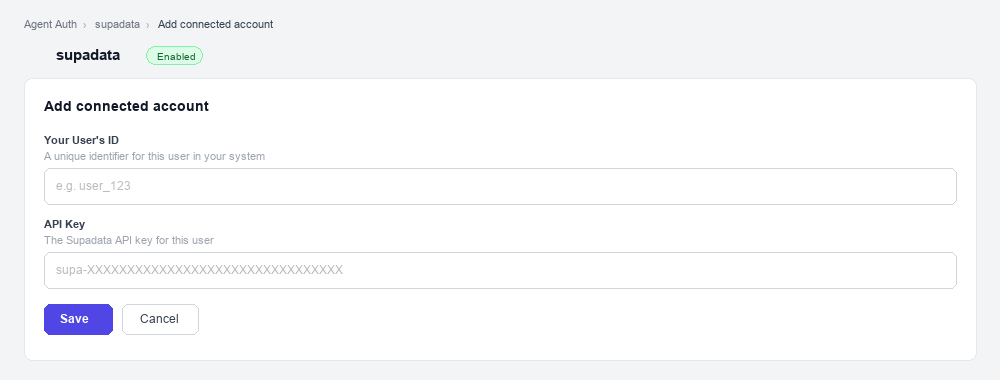
Open the connection you created and click the Connected Accounts tab → Add account.
-
Fill in:
- Your User’s ID — a unique identifier for this user in your system (e.g.,
user_123) - API Key — the Supadata API key you copied in step 1
- Your User’s ID — a unique identifier for this user in your system (e.g.,
-
Click Save.
Via API (for production)
// Never hard-code API keys — read from secure storage or user inputconst supadataApiKey = getUserSupadataKey(); // retrieve from your secure storeawait scalekit.actions.upsertConnectedAccount({connectionName: 'supadata',identifier: 'user_123', // your user's unique IDcredentials: { api_key: supadataApiKey },});# Never hard-code API keys — read from secure storage or user inputsupadata_api_key = get_user_supadata_key() # retrieve from your secure storescalekit_client.actions.upsert_connected_account(connection_name="supadata",identifier="user_123",credentials={"api_key": supadata_api_key}) -
-
-
Make your first call
Section titled “Make your first call”quickstart.ts import { ScalekitClient } from '@scalekit-sdk/node'import 'dotenv/config'const scalekit = new ScalekitClient(process.env.SCALEKIT_ENV_URL,process.env.SCALEKIT_CLIENT_ID,process.env.SCALEKIT_CLIENT_SECRET,)const actions = scalekit.actionsconst connector = 'supadata'const identifier = 'user_123'// Make your first callconst result = await actions.executeTool({connector,identifier,toolName: 'supadata_metadata_get',toolInput: { url: 'https://example.com/url' },})console.log(result)quickstart.py import osfrom scalekit.client import ScalekitClientfrom dotenv import load_dotenvload_dotenv()scalekit_client = ScalekitClient(env_url=os.getenv("SCALEKIT_ENV_URL"),client_id=os.getenv("SCALEKIT_CLIENT_ID"),client_secret=os.getenv("SCALEKIT_CLIENT_SECRET"),)actions = scalekit_client.actionsconnection_name = "supadata"identifier = "user_123"# Make your first callresult = actions.execute_tool(tool_input={"url":"https://example.com/url"},tool_name="supadata_metadata_get",connection_name=connection_name,identifier=identifier,)print(result)
What you can do
Section titled “What you can do”Connect this agent connector to let your agent:
- Get metadata, youtube playlist, youtube channel — Retrieve unified metadata for a video or media URL including title, description, author info, engagement stats, media details, and creation date
- Scrape web — Scrape a web page and return its content as clean Markdown
- Search youtube — Search YouTube for videos, channels, or playlists
- Map web — Discover and return all URLs found on a website
- Translate youtube transcript — Retrieve and translate a YouTube video transcript into a target language
Common workflows
Section titled “Common workflows”Proxy API call
// Get a YouTube transcript — no API key needed hereconst result = await actions.request({ connectionName: 'supadata', identifier: 'user_123', path: '/v1/youtube/transcript', method: 'GET', queryParams: { videoId: 'dQw4w9WgXcQ', text: 'true' },});console.log(result);# Get a YouTube transcript — no API key needed hereresult = actions.request( connection_name='supadata', identifier='user_123', path="/v1/youtube/transcript", method="GET", params={"videoId": "dQw4w9WgXcQ", "text": True})print(result)Execute a tool
const result = await actions.executeTool({ connector: 'supadata', identifier: 'user_123', toolName: 'supadata_metadata_get', toolInput: {},});console.log(result);result = actions.execute_tool( tool_input={}, tool_name='supadata_metadata_get', connection_name='supadata', identifier='user_123',)print(result)Tool list
Section titled “Tool list”Use the exact tool names from the Tool list below when you call execute_tool. If you’re not sure which name to use, list the tools available for the current user first.
supadata_metadata_get
#
Retrieve unified metadata for a video or media URL including title, description, author info, engagement stats, media details, and creation date. Supports YouTube, TikTok, Instagram, X (Twitter), Facebook, and more. 1 param
Retrieve unified metadata for a video or media URL including title, description, author info, engagement stats, media details, and creation date. Supports YouTube, TikTok, Instagram, X (Twitter), Facebook, and more.
url string required URL of the video or media to retrieve metadata for. supadata_transcript_get
#
Extract transcripts from YouTube, TikTok, Instagram, X (Twitter), Facebook, or direct file URLs. Supports native captions, auto-generated captions, or AI-generated transcripts. Returns timestamped segments with speaker labels. 5 params
Extract transcripts from YouTube, TikTok, Instagram, X (Twitter), Facebook, or direct file URLs. Supports native captions, auto-generated captions, or AI-generated transcripts. Returns timestamped segments with speaker labels.
url string required URL of the video or media file to transcribe. Supports YouTube, TikTok, Instagram, X, Facebook, or direct video/audio file URLs. chunkSize integer optional Maximum number of characters per transcript segment chunk. lang string optional ISO 639-1 language code for the transcript (e.g., en, fr, de). Defaults to the video's original language. mode string optional Transcript generation mode: native (use existing captions, 1 credit), auto (native with AI fallback), or generate (AI-generated, 2 credits/minute). text boolean optional Return plain text instead of timestamped segments. Defaults to false. supadata_web_map
#
Discover and return all URLs found on a website. Useful for site structure analysis, link auditing, and building crawl lists. Costs 1 credit per request. 1 param
Discover and return all URLs found on a website. Useful for site structure analysis, link auditing, and building crawl lists. Costs 1 credit per request.
url string required Base URL of the website to map. supadata_web_scrape
#
Scrape a web page and return its content as clean Markdown. Ideal for extracting readable content from any URL while stripping away navigation and ads. 3 params
Scrape a web page and return its content as clean Markdown. Ideal for extracting readable content from any URL while stripping away navigation and ads.
url string required URL of the web page to scrape. lang string optional ISO 639-1 language code to request content in a specific language (e.g., en, fr, de). noLinks boolean optional Strip all hyperlinks from the Markdown output. Defaults to false. supadata_youtube_channel_get
#
Retrieve metadata for a YouTube channel including name, description, subscriber count, video count, and thumbnails. 1 param
Retrieve metadata for a YouTube channel including name, description, subscriber count, video count, and thumbnails.
channelId string required YouTube channel ID, handle (@username), or full channel URL. supadata_youtube_playlist_get
#
Retrieve metadata and video list for a YouTube playlist including title, description, video count, and individual video details. 1 param
Retrieve metadata and video list for a YouTube playlist including title, description, video count, and individual video details.
playlistId string required YouTube playlist ID or full playlist URL. supadata_youtube_search
#
Search YouTube for videos, channels, or playlists. Returns results with titles, IDs, descriptions, thumbnails, and metadata. 4 params
Search YouTube for videos, channels, or playlists. Returns results with titles, IDs, descriptions, thumbnails, and metadata.
query string required Search query string to find videos, channels, or playlists on YouTube. lang string optional ISO 639-1 language code to filter results by language (e.g., en, fr). limit integer optional Maximum number of results to return. type string optional Type of results to return: video, channel, or playlist. supadata_youtube_transcript_get
#
Retrieve the transcript for a YouTube video by video ID or URL. Returns timestamped segments with text content. 3 params
Retrieve the transcript for a YouTube video by video ID or URL. Returns timestamped segments with text content.
videoId string required YouTube video ID or full YouTube URL to retrieve the transcript for. lang string optional ISO 639-1 language code for the transcript (e.g., en, fr, de). text boolean optional Return plain text instead of timestamped segments. Defaults to false. supadata_youtube_transcript_translate
#
Retrieve and translate a YouTube video transcript into a target language. Returns translated timestamped segments. 3 params
Retrieve and translate a YouTube video transcript into a target language. Returns translated timestamped segments.
lang string required ISO 639-1 language code to translate the transcript into (e.g., en, fr, es). videoId string required YouTube video ID or full YouTube URL to translate the transcript for. text boolean optional Return plain text instead of timestamped segments. Defaults to false. supadata_youtube_video_get
#
Retrieve detailed metadata for a YouTube video including title, description, view count, like count, duration, tags, thumbnails, and channel info. 1 param
Retrieve detailed metadata for a YouTube video including title, description, view count, like count, duration, tags, thumbnails, and channel info.
videoId string required YouTube video ID or full YouTube URL.